GLUCOFIX
®
TECH - 51415 - 02/20
UK
11
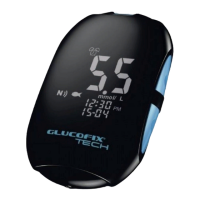
2. SYSTEM OVERVIEW
MEMORY ICON: Indicates that you are using the memory (§5).
CLOCK/ALARM ICON: “Clock” appears while setting the time (§6.1); “alarm” appears while
setting the acoustic reminder(s), and will be displayed if any alarm is
on (§6.2).
HYPO/HYPER ICONS: Appear while setting the hypoglycaemic and hyperglycaemic
thresholds and if your test results are below or above these values
(§6.4).
DROP ICON: Blinks to indicate that the meter is ready for blood or control solution
testing (§4.2, 4.3).
MAIN DISPLAY AREA: Displays test results, stored test values, result averages and
messages.
UNIT OF MEASUREMENT: Shows the unit of measurement of your blood glucose meter (mg/dL
or mmol/L, not changeable).
TIME: Shows time (HH:MM 12H am/pm or 24H format).
AVERAGE: Shows the period related to the displayed average (1, 7, 14, 30, 60 or
90 days – §5.2).
DATE: Shows the date (DD-MM format).
MARKERS ICONS: Displayed while marking a test result (§4.4) or reviewing a marked
result.


 To Next Page