GLUCOFIX
®
TECH - 51415 - 02/20
UK
36
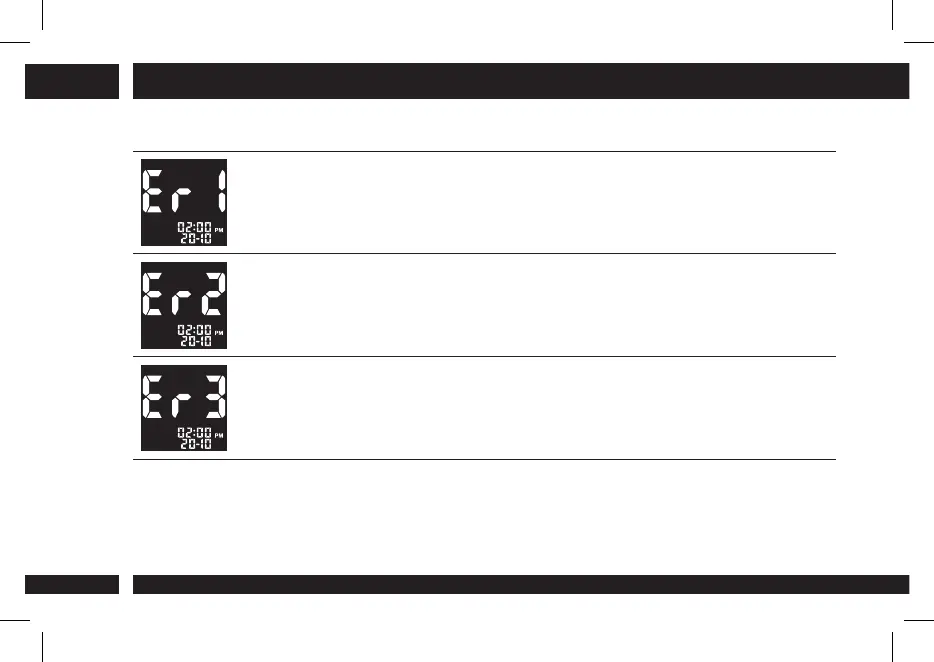
8.2 Error messages
System Hardware Error. Remove and reinsert the batteries to restart the
meter, and repeat the test with a new strip. If the problem persists, please
contact the A. Menarini Diagnostics customer service.
The test strip is damaged or has already been used or the blood sample
was applied before the drop icon started to blink on the display. Remove
the old test strip and repeat the test with a new one. Wait until the drop icon
starts to blink before you begin.
Blood sample error. The blood sample did not ll the sample area of the strip
during the measurement because the sample was not applied correctly or
the volume was insucient. Repeat the test with a new strip after correctly
puncturing your nger (§4.1).
8. TROUBLESHOOTING


 To Next Page