GLUCOFIX
®
TECH - 51415 - 02/20
UK
23
4.4 Marking Test Results
After a blood (not control) glucose test is performed with a valid result, you can mark the result as
follows:
a. Start from point c of the glucose testing procedure (result displayed on the screen, §4.2).
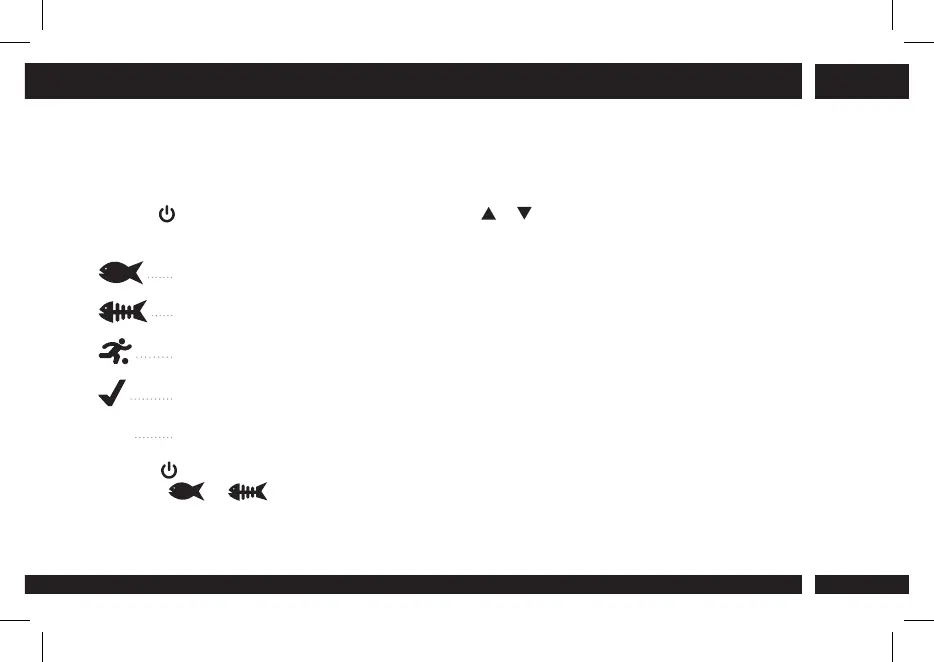
Press until the markers icons start blinking. Press or to scroll through the icons (backwards
or forwards) according to the following sequence:
Before meal marker.
After meal marker.
Exercise marker.
Check marker (General Purpose marker).
Void (Once conrmed it deselects any previously selected marker).
b. Press to conrm the marker you selected. You can select more markers (but only one when
setting or ) by repeating steps a & b.
c. Return to point d of the glucose testing procedure (§4.2).
4. MEASURING YOUR BLOOD GLUCOSE LEVELS



 To Next Page