2-17
Chapter 2: Motherboard information
2.7.2 Internal connectors
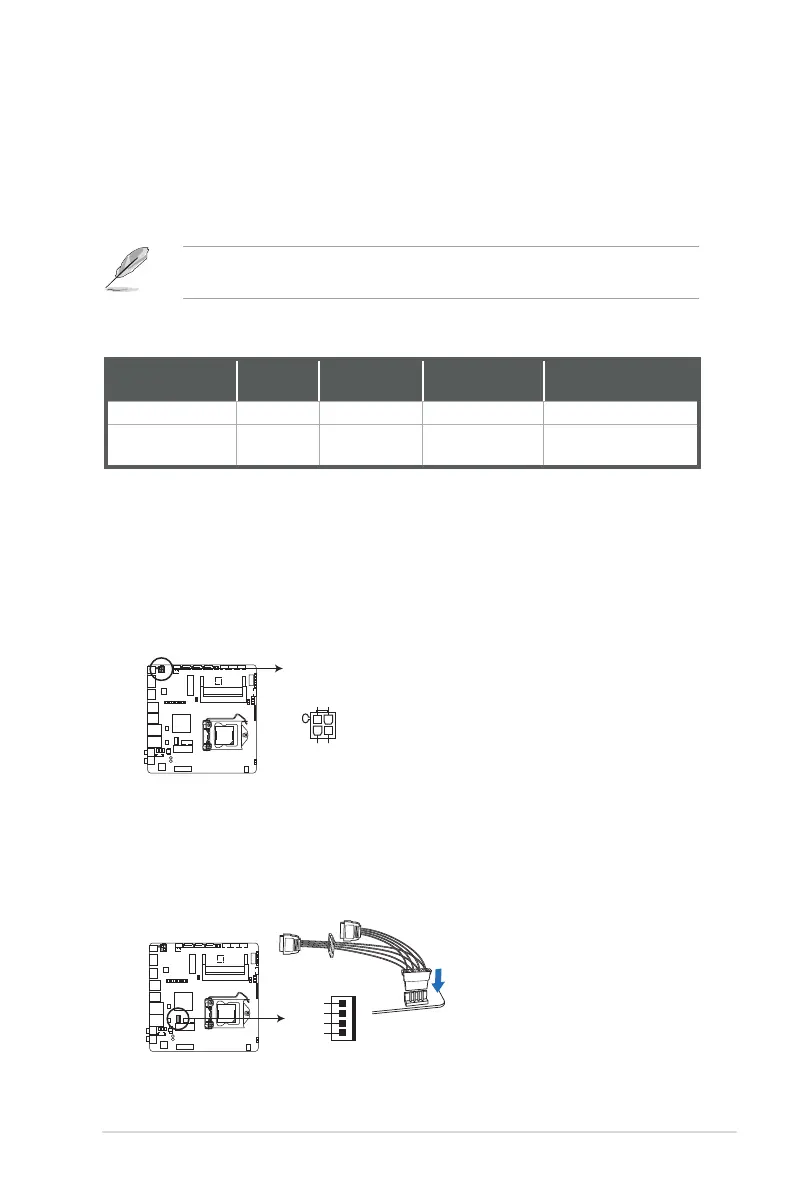
1. DC power connector (4-pin DC_PWR2)
ThisconnectorisfortheDCpowerplug.Thepowersupplyplugisdesigned
totthisconnectorinonlyoneorientation.Findtheproperorientationand
pushdownrmlyuntiltheconnectorcompletelyt.
2. SATA power connector (4-pin SATA_PWR)
ThisconnectorisfortheSATApowercable.Thepowercableplugis
designedtotthisconnectorinonlyoneorientation.Findtheproper
orientationandpushdownrmlyuntiltheconnectorcompletelyt.
EMB-H81B DC-In 4P Power connector
PIN 1
DC_PWR2
DC_IN
DC_IN
GND
GND
EMB-H81B SATA POWER connector
+5V
GND
GND
+12V
PIN1
SATA_PWR
7. Line Out port (green).Thisportconnectstoaheadphoneoraspeaker.Ina
4-channel,6-channeland8-channelcongurations,thefunctionofthisport
becomes Front Speaker Out.
8. Microphone port (pink). This port connects a microphone.
NOTE: Refertotheaudiocongurationtableforthefunctionoftheaudioports
inthe2,4,6,or8-channelconguration.
Audio2,4,6,or8-channelconguration
Port
Headset
2-channel
4-channel 6-channel 8-channel
Pink(Rearpanel) MicIn MicIn Bass/Center Bass/Center
Green(Rearpanel) Line Out
Front
Speaker Out
Front Speaker
Out
Front Speaker Out



 To Next Page