EMB-H81B
2-16
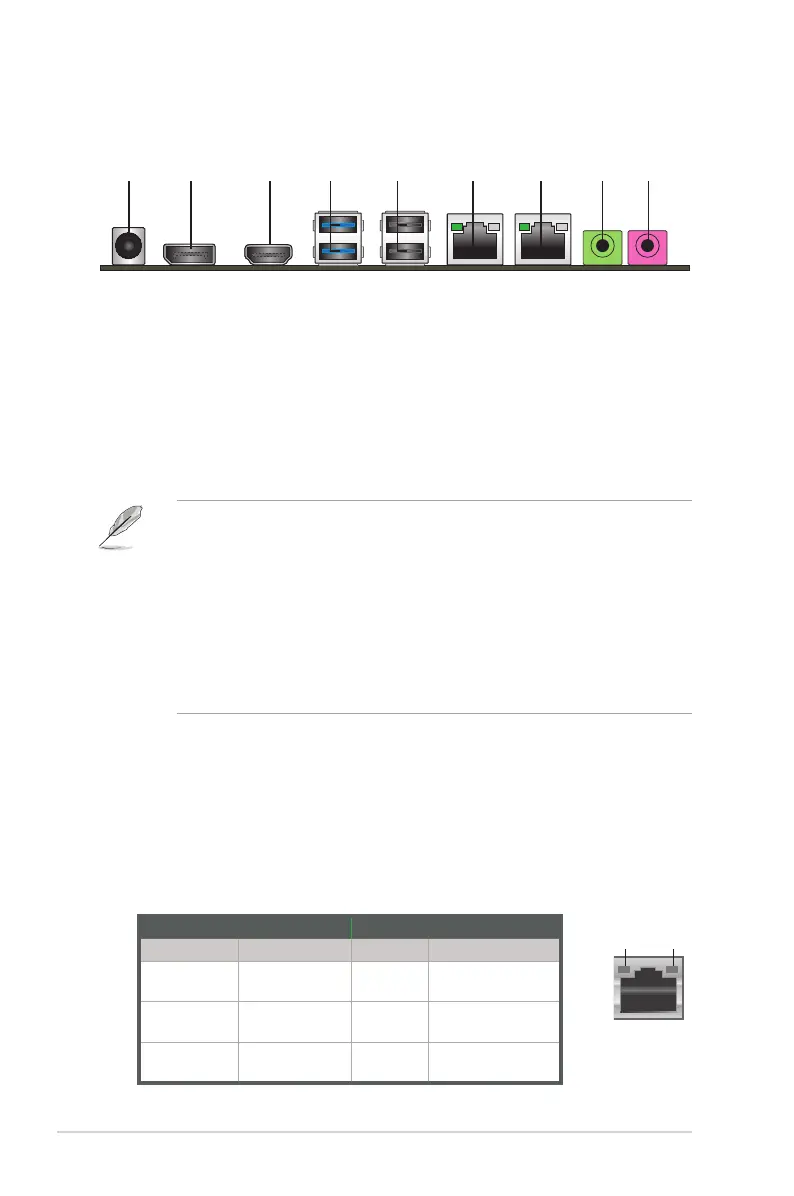
1. DC-In power jack.ThisjackconnectstoaDCpoweradapter.
2. DisplayPort. This port connects a DisplayPort monitor or a home-theater
system.
3. HDMI port. ThisportisforaHigh-DenitionMultimediaInterface(HDMI),
andisHDCPcompliantallowingplaybackofHDDVD,Blu-ray,andother
protected content.
4. USB 3.0 ports.These9-pinUniversalSerialBus(USB)portsconnectto
USB3.0/2.0devices.
NOTES:
• DONOTconnectakeyboard/mousetoanyUSB3.0portwheninstalling
Windows
®
operating system.
• DuetoUSB3.0controllerlimitation,USB3.0devicescanonlybeused
underWindows
®
OSenvironmentandaftertheUSB3.0driverinstallation.
• USB3.0devicescanonlybeusedasdatastorageonly.
• WestronglyrecommendthatyouconnectUSB3.0devicestoUSB3.0
portsforfasterandbetterperformanceforyourUSB3.0devices.
5. USB 2.0 ports.These4-pinUniversalSerialBus(USB)portsareavailable
forconnectingUSB2.0/1.1devices.
6. LAN (RJ-45) ports.TheseportsallowGigabitconnectiontoaLocalArea
Network(LAN)throughanetworkhub.RefertothetablebelowfortheLAN
port LED indications.
2.7 Connectors
2.7.1 Rear panel connectors
842 3 6 71 95
LAN port
Speed
LED
Activity Link
LED
ACT/LINK LED SPEED LED
Status Description Status Description
OFF No link OFF 10Mbps
connection
GREEN Linked ORANGE 100Mbps
connection
BLINKING Dataactivity GREEN 1Gbps
connection
LAN port LED indications



 To Next Page