3-8
EMB-H81B
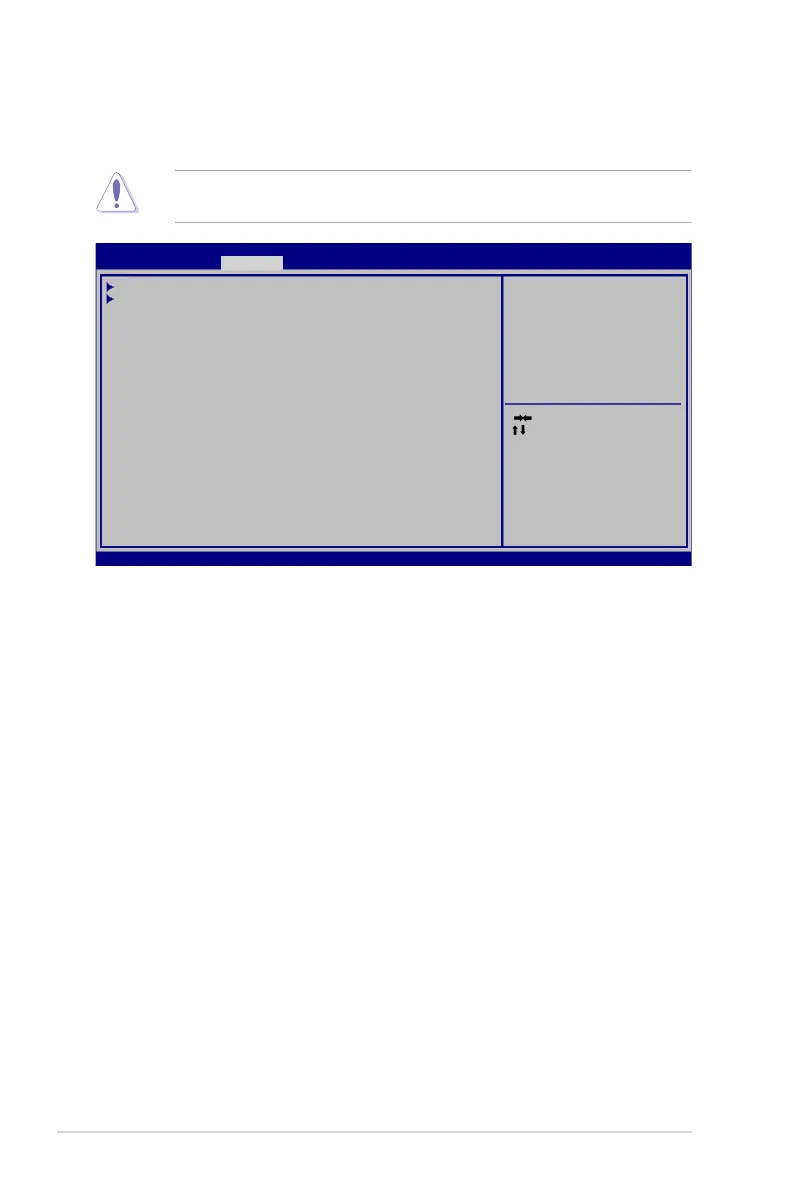
3.4 Chipset menu
The Chipset menu items allow you to change the settings for the chipset.
Be cautious when changing the settings of the Advanced menu items. Incorrect
eld values can cause the system to malfunction.
Select Screen
Select Item
Enter: Select
+/- Change Opt.
F1 General Help
F2 Previous Values
F3 Optimized Defaults
F4 Save & Exit
ESC Exit
Version 2.16.1240 Copyright (C) 2013, American Megatrends, Inc.
System Agent (SA)
Parameters.
SystemAgent(SA)Conguration
PCH-IOConguration
Aptio Setup Utility - Copyright (C)2013 American Megatrends, Inc.
Main Advanced Chipset Boot Security Save & Exit
3.4.1 System Agent (SA) Configuration
Allows you to change the System Agent (SA) parameters.
VT-d [Enabled]
Allows you to enable or disable VT-d function on MCH. Conguration options:
[Enabled] [Disabled]
Graphics Configuration
Internal Graphics [Auto]
Congures IGD enabled based on setup options.
Conguration options: [Auto] [Disabled] [Enabled]
DVMT Pre-Allocated [32M]
Allows you to select the amount of system memory allocated to DVMT 5.0
used by the Internal Graphics Device.
Conguration options: [32M] [64M][96M] [128M] ~ [416M] [448M] [480M]
[512M] [1024M]
DVMT Total Gfx Mem [256M]
Allows you to select the total amount of system memory allocated to DVMT
5.0 used by the Internal Graphics Device.
Conguration options: [128M][256M] [MAX]


 To Next Page