13
5, 25, 50 or 100 Sample Size
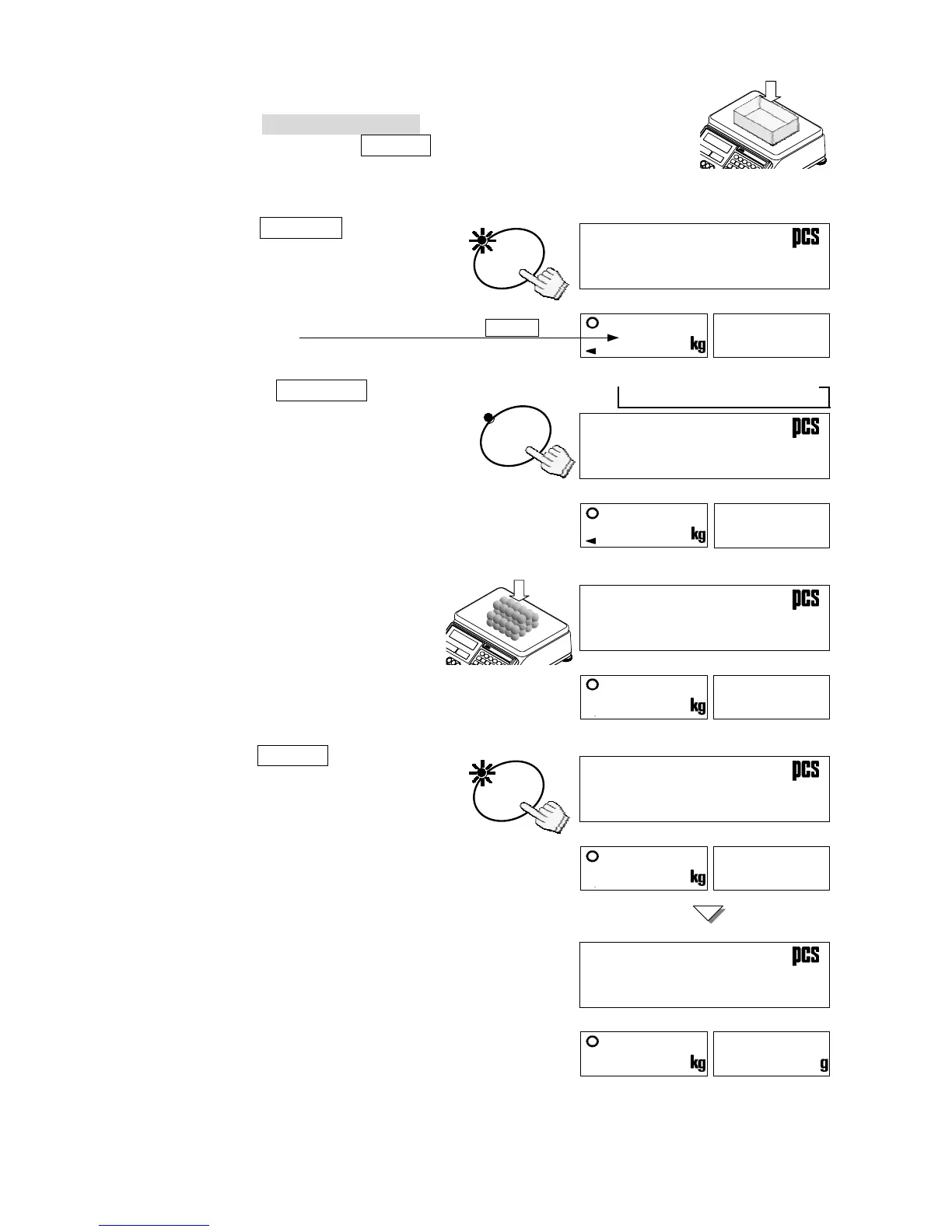
1. The three UNIT WEIGHT BY LED’s should be blinking at this
point, if not, press the RESET key to clear any unit weight. If
you are going to use a tare container, place it on the weighing
pan.
2. Press the SAMPLE key. Any tare
container will be automatically tared.
The display will show “add” “10 pcs”.
3. Press the
SAMPLE key to go
through the count size: of 5, 25, 50
or 100 pieces.
The larger the sample size, the more
accurate the unit weight registered.
(Example of selecting a sample size
of 50)
4. Place the selected number of
sample pieces on the weighing
pan (or in the tare container).
The weight of the pieces will be
displayed.
5. Press the
ENTER key.
The display will show “-------” for
a moment while calculating the unit
weight. After a moment the display
will show the count, total weight and
unit weight.
If the “add ##” appears on the unit weight
display, then the sample size is not large
enough for accurate counting – add the
additional number of sample pieces.
6. You may now begin counting operations
for pieces of the same weight.
SAMPL



 To Next Page