16
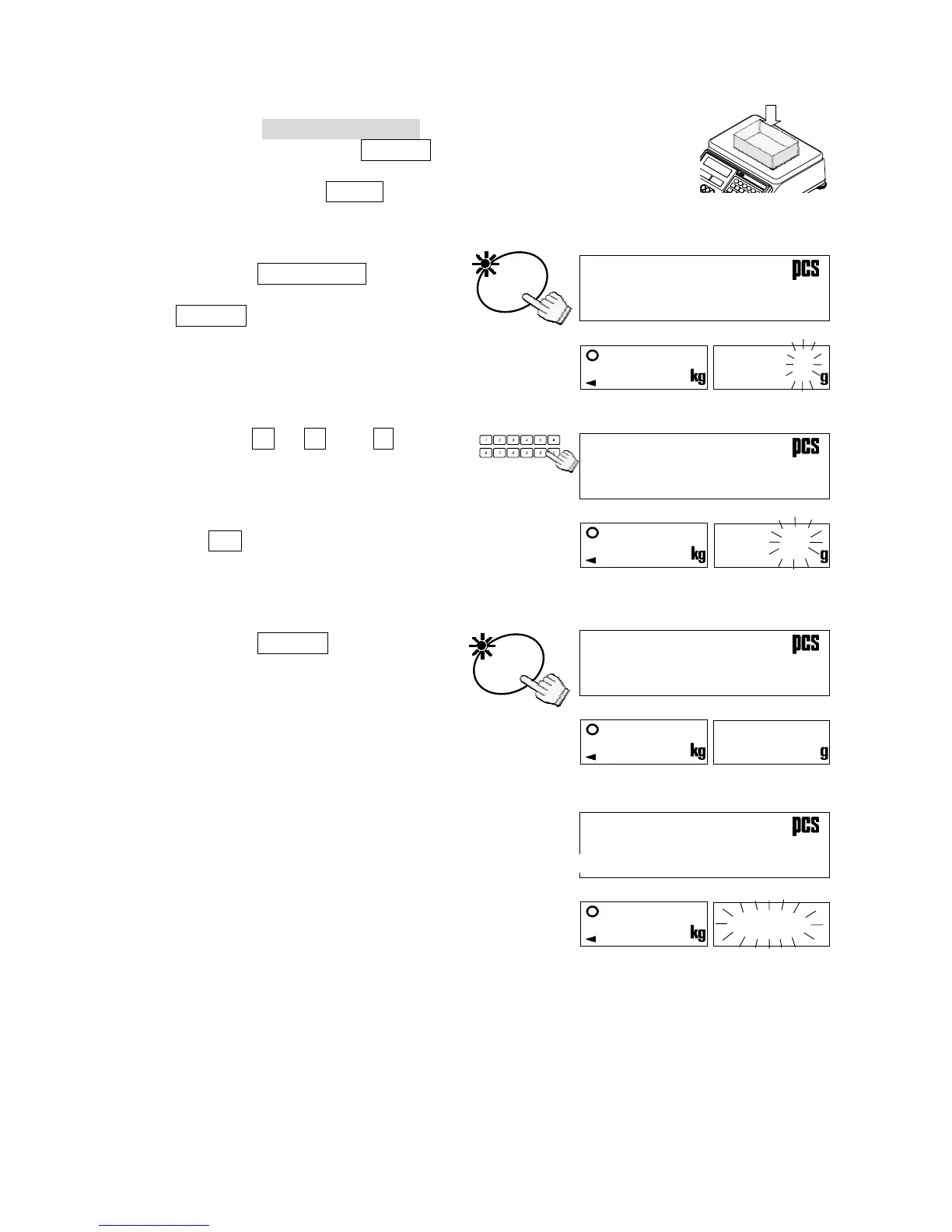
3-4. Unit Weight By KEYBOARD
1. The three UNIT WEIGHT BY LED’s should be blinking at this
point, if not, press the RESET key to clear any unit weight. If
you are going to use a tare container, place it on the weighing
pan and press the TARE key. Be sure to set the weight display
is “0”.
2. Press the KEYBOARD key.
The unit weight display and the
ENTER key LED will blink.
3. Use the
0 Æ 9 and . 10-key
pad
to display the unit weight.
If you hit the wrong key, press
the C key to clear and start again.
(Example of a unit weight 32g)
4. Press the ENTER key.
The unit weight 32g will have been
entered.
If the unit weight entered is too light, “lo
ut” (low unit weight) will be displayed,
and you will be returned to step 3.
5. You may now begin counting
operations for pieces of the same
weight.
KEY



 To Next Page