21
5-2. Clearing A Stored Unit Weight
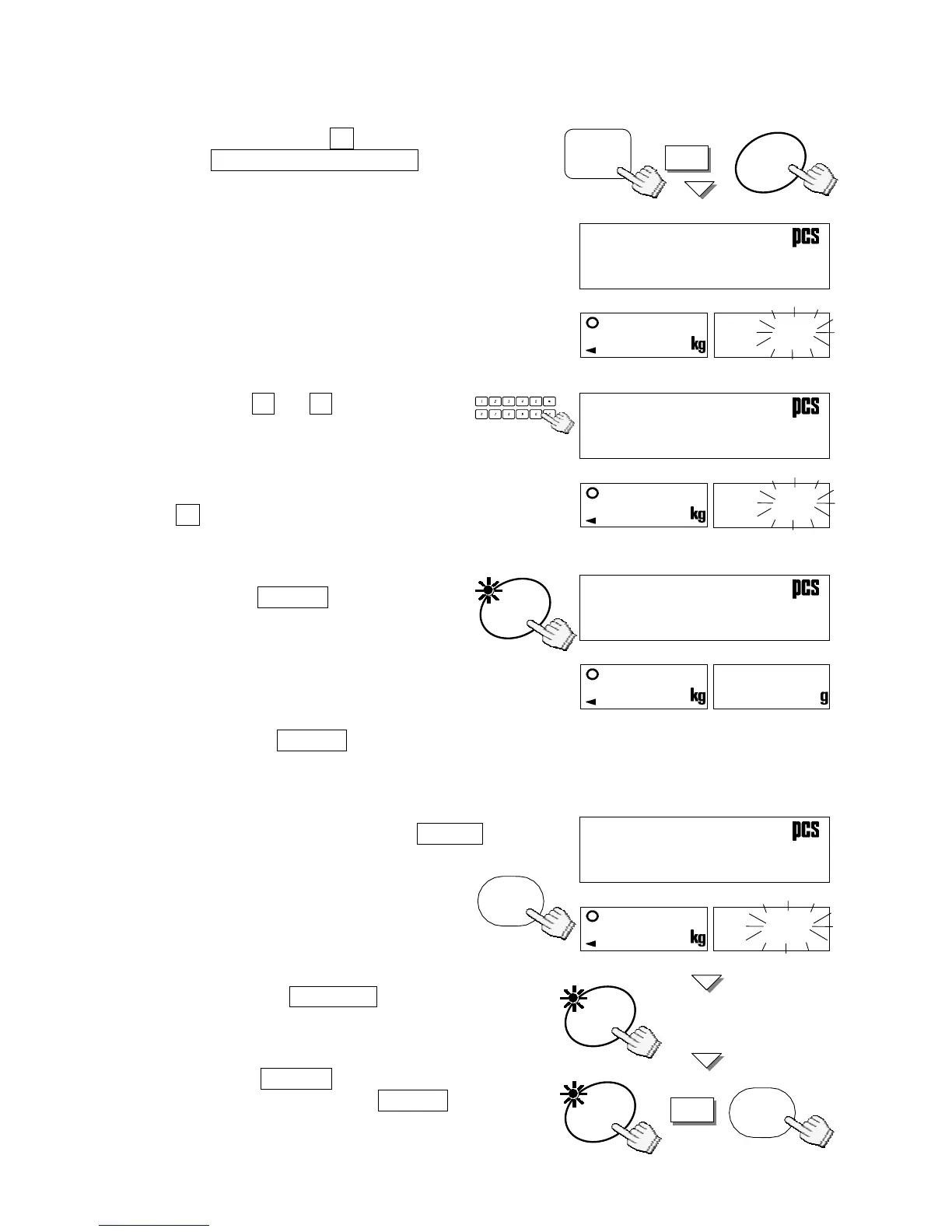
1. Press and hold the C key, then press
the STORE UNIT WEIGHT key –
release both.
2. “Clear” will appear and “id-00” will
appear withÑ00Òblinking.
3. Use the 0 Æ 9 10-key pad to
display the ID number to clear.
(Example of ID number “12”)
If you hit the wrong key, press the
C key to clear and start again.
4. Press the ENTER key.
The ID memory specified at step 3
will be cleared and the display
returns to normal.
If there is no such ID number to clear, the
scale will beep. Return to step 2 to try again,
or press the RESET key to exit.
Clearing All ID Memories at Once
1. In the Step 2 above, press the TOTAL key.
“idall” will appear with ÑallÒblinking.
2. Press the ENTER key, then
ÑallÒblinking will stop.
3. Press the ENTER key again to clear all
ID memories. Press the RESET key to
exit without clearing ID memories.
The display will return to normal.
STOR



 To Next Page