26
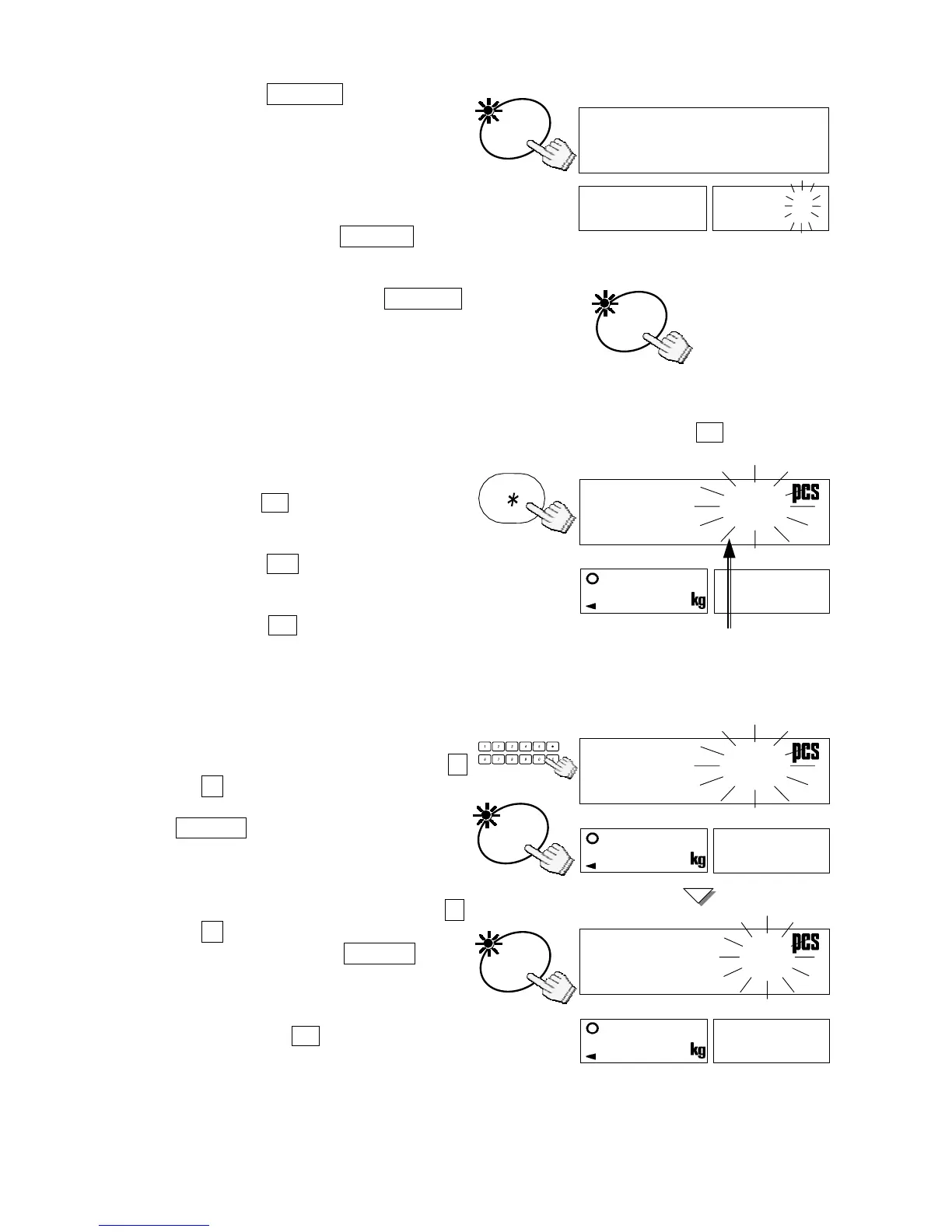
5. Press the ENTER key to save
the setting and move to next F-
Function, f-05-02.
6. Continue to enter f-05 comparator
settings – refer to “9-2. F-Functions” for a
listing. If there are no changes to a F-
Function, press the ENTER key to
move to the next.
7. When finished: press the ON/OFF key to exit.
Then, press it to turn the display back ON.
Comparator functions and limits will now operate
as set.
Viewing Comparator Limits
The comparator limits you are using will be shown by pressing the ½ key.
Set f-09-01="0" to use this mode.
1. Press the ½ key, then the upper
limit will be shown.
2. Press the ½ key again, then the
lower limit will be shown.
3. Press the ½ key. The display will
return to normal.
Changing Comparator Limits Instead of Setting the F-Function
Set f-09-01="0" to use this mode.
1. To change the upper limit, use the 0
Æ 9 10-key pad to display a new
limit in step 1 above, and press the
ENTER key. Then the new limit is
stored and the lower limit will be
shown.
2. To change the lower limit, use the 0
Æ 9 10-key pad to display a new
limit, and press the ENTER key.
Then the display will return to
normal with the new limit.
Pressing the ½ key to go to next
step, the input data is not stored.
These limits are held in memory even
if power to the scale is switched off.
8f-05-02
8
8Clear
8
8
aidal00



 To Next Page