51
Example of the function setting procedure
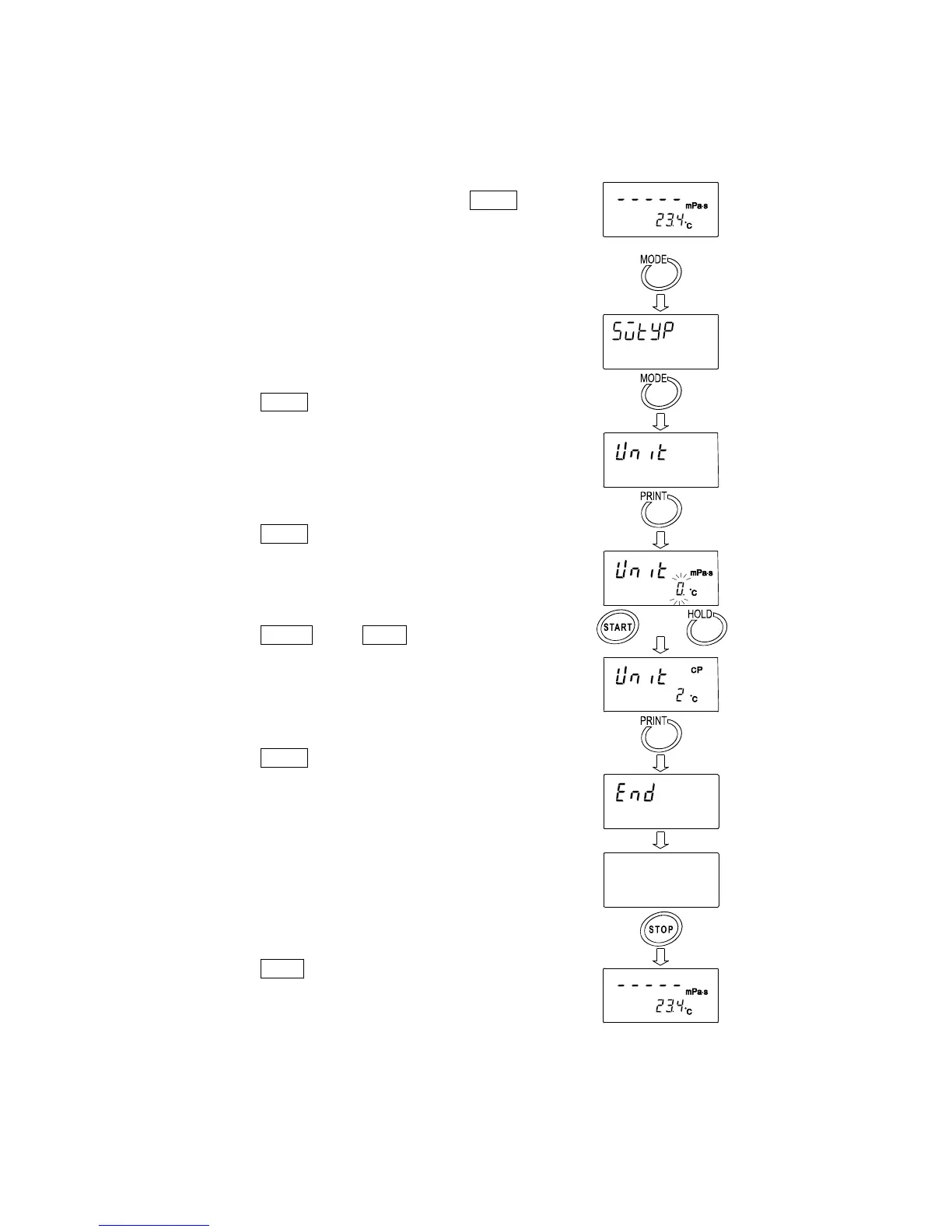
To change the setting of "Unit upon power-on (Unit)" to the viscosity: cP (Centipoise) and the
temperature: °C (Celsius).
1 In the standby mode, press and hold the MODE
key to enter the function setting mode. " 5vtyp "
appears.
2 Press the MODE key to select " Unit ".
3 Press the PRINT key to confirm the item.
(The decimal point illuminates when the setting
currently saved is displayed.)
4 Press the START key or HOLD key to select the
unit to be used.
(In this example, " 2 " is selected. Viscosity: cP,
Temperature: °C)
5 Press the PRINT key to save the setting.
After " end ", the next item is displayed.
6 Press the STOP key to return to the standby
mode.
(Standby mode)
Press and hold
or
Next item of
function setting
(Standby mode)


 To Next Page