17
8. SETTING THE CLOCK
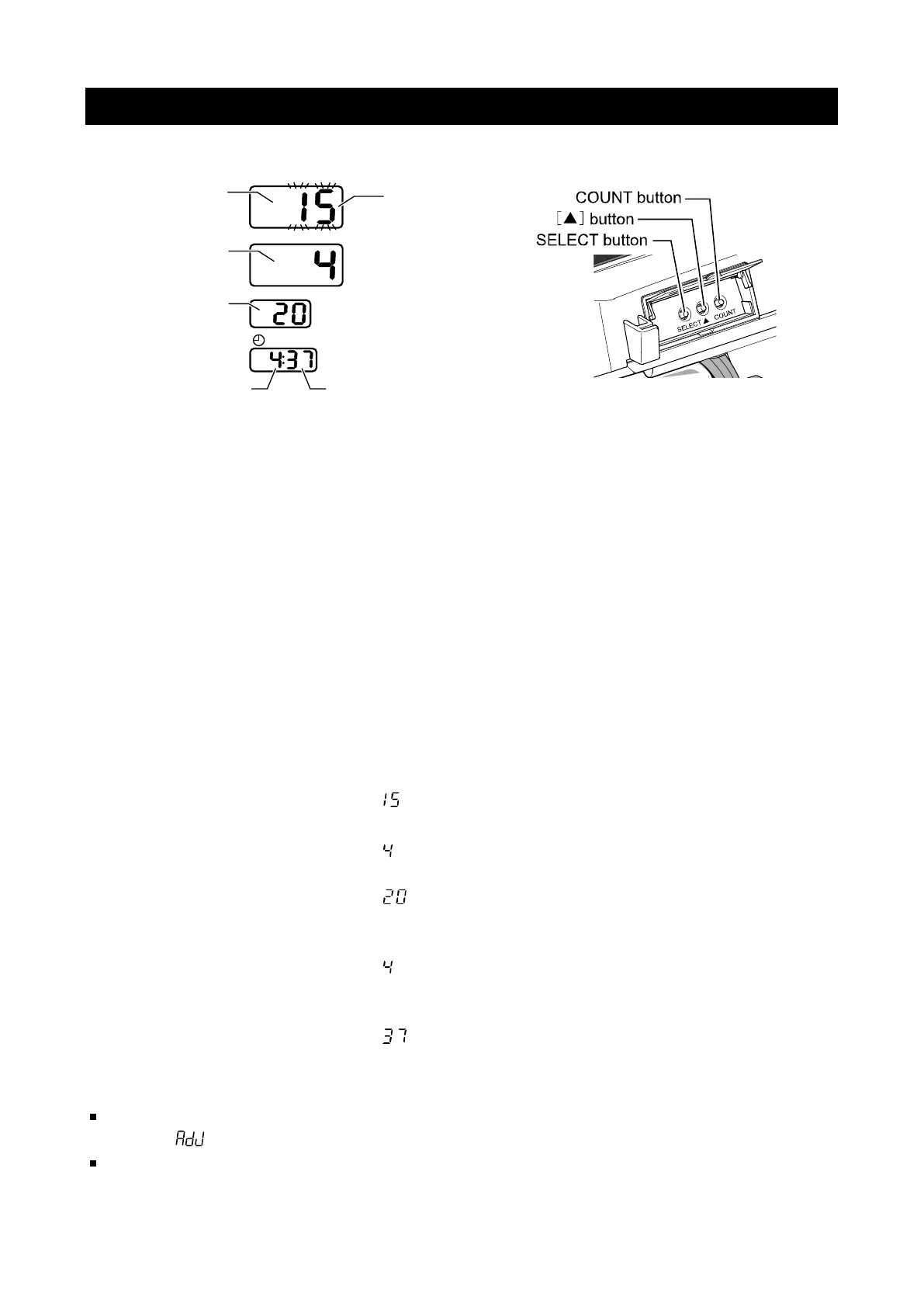
To set the date and time, use clock setting mode. Clock setting mode has the following
display.
Setting the date and time:
Use the following buttons.
SELECT button: 1. While the monitor is in standby mode, hold the SELECT button for 1
second to enter clock setting mode. The year value will start flashing.
2. Press the SELECT button to select the date or time value to be set.
Each time the SELECT button is pressed, the flashing value changes
from year, month, day, hour, minute, and then back to year. The
selected item flashes and can be changed.
▲ button: Change the selected (flashing) values.
START/STOP button: Once the desired date and time is selected, press the START/STOP
button to save the changes and return to standby mode.
COUNT button: If the COUNT button is pressed while configuring settings, changes
are not saved and the monitor returns to standby mode.
Example: Setting the clock to 4:37 PM, April 20, 2015
1. Hold the SELECT button for 1 second. The systolic display section starts flashing.
2. Press the ▲ button to display . (2015)
3. Press the SELECT button. The diastolic display section starts flashing.
4. Press the ▲ button to display . (April)
5. Press the SELECT button. The pulse display section starts flashing.
6. Press the ▲ button to display . (20th)
7. Press the SELECT button to select the hour on the clock display. The hour setting
starts flashing.
8. Press the ▲ button to display . (4 PM)
9. Press the SELECT button to select the minute on the clock display. The minute setting
starts flashing.
10. Press the ▲ button to display . (37 minutes)
11. Press the START/STOP button to return to standby mode.
Notes
If no operation is performed for about 10 seconds, the specified settings are set.
After is displayed for 2 seconds, the monitor returns to the standby mode.
Dates up to December 31, 2050 are supported.
SYS
mmHg
DIA
mmHg
PUL
/min
.
Year
Month
Day
Hour Hour
Selected item
flashes


 To Next Page