22
10. CHANGING FUNCTIONS
The multi-functional monitor can be configured for various applications by changing
function settings. To change function settings, use the buttons located on the rear
panel of the monitor while the monitor is in standby mode.
10.1. Procedure to Change Function Settings
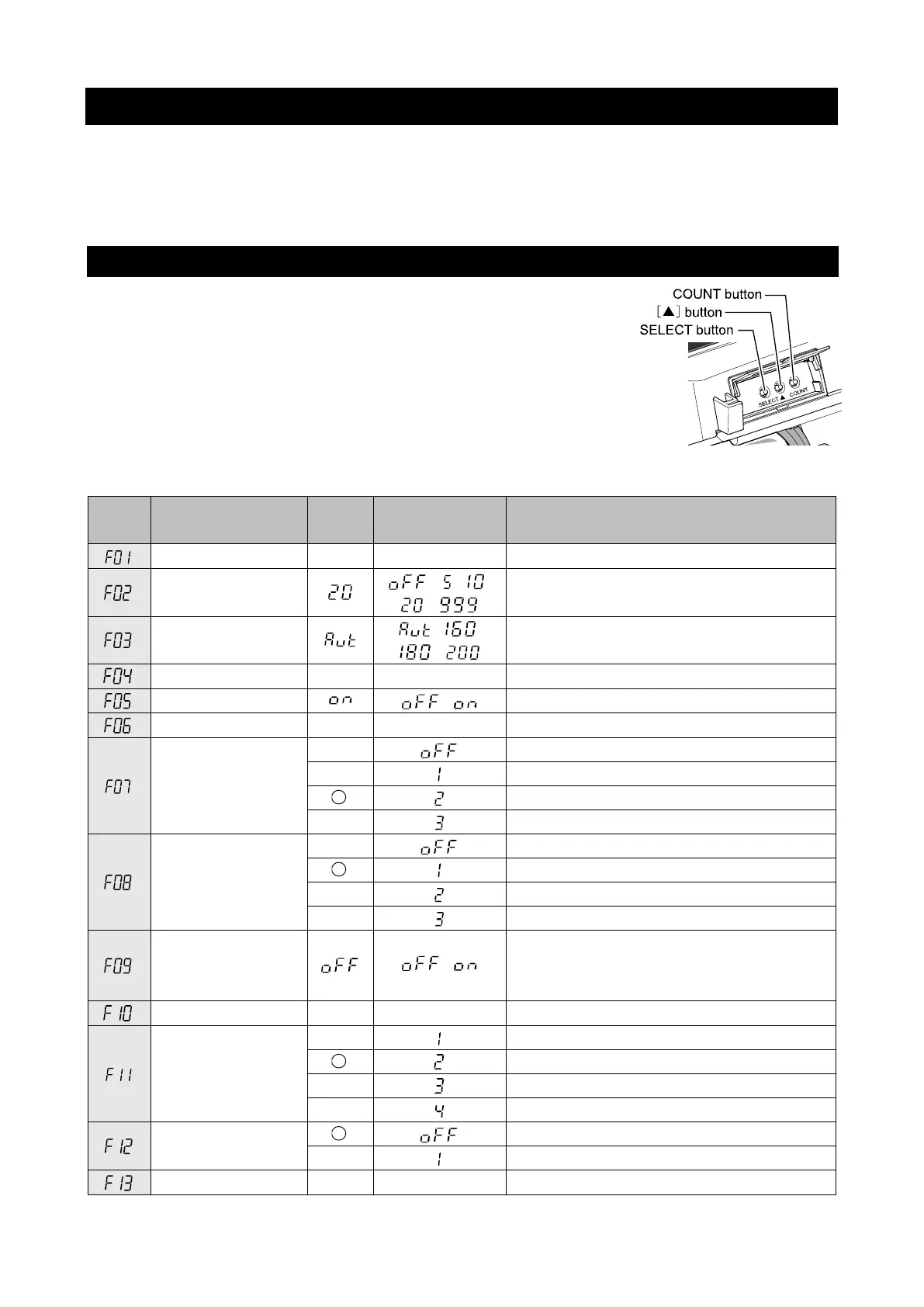
1. In power off mode, hold both the ▲ and SELECT buttons
down and switch the power on.
F01 is displayed in the systolic display section and the
monitor enters the function changing mode.
2. Each time the SELECT button is pressed, the setting item
changes to F02, F03...
3. Each item can be changed using the ▲ button.
4. After completing the settings, switch the power off and then on again.
Details Default
Diastolic
display section
Function
―
Display time
Measurement result display time
(seconds)
Applied pressure
, ,
Applied pressure setting (mmHg)
―
―
Print quality/
light or dark
Light printing (high speed)
Dark high-quality printing (low speed)
ID and name
printing
pressure (MAP)
,
Mean arterial blood pressure (MAP)
printing on/off
―
Measurement
value printing
Graph printing
Pulse fluctuation graph printing
―



 To Next Page