ENGLISH 5
Using The Monitor
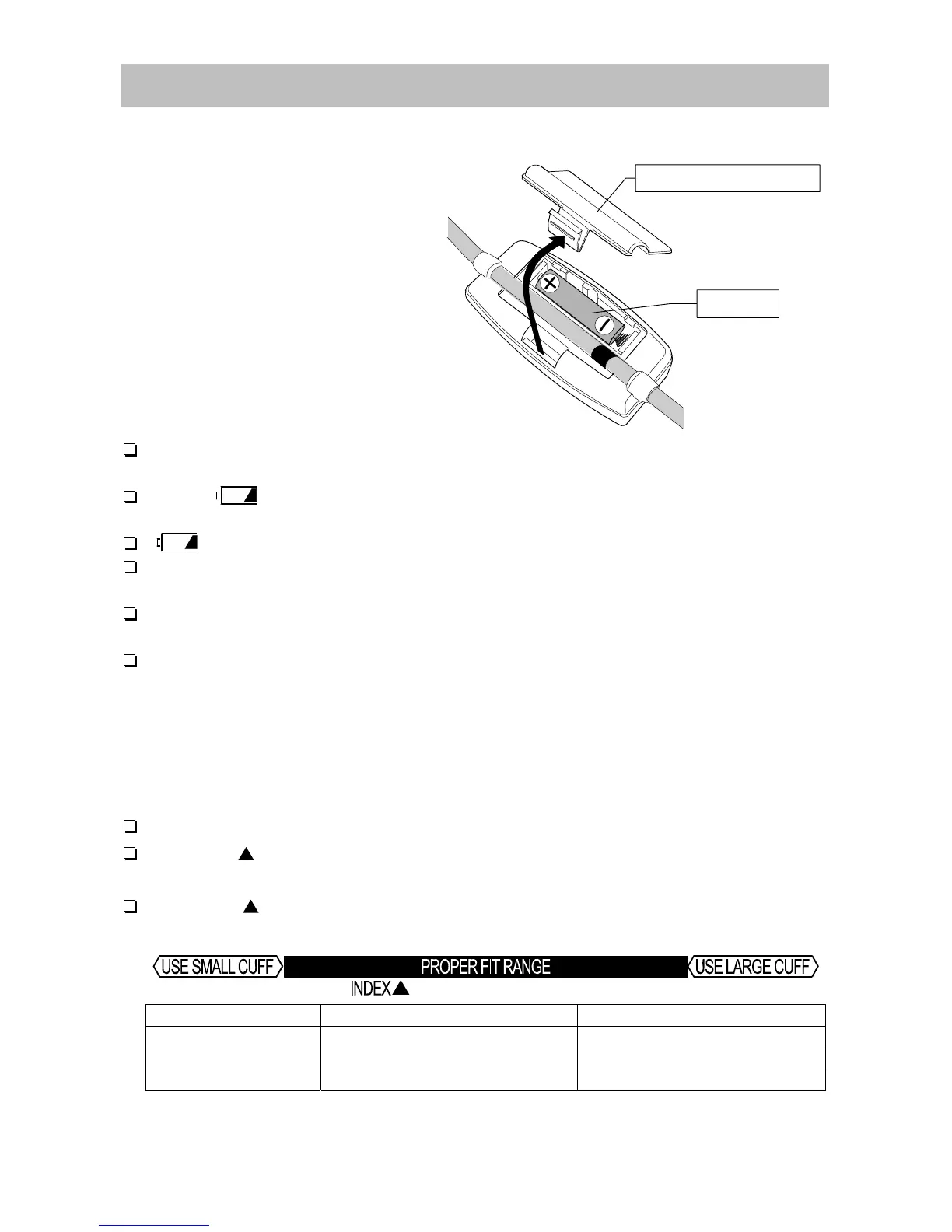
Installing / Changing The Battery
1. Remove the battery cover.
2. Insert a new battery into the
battery compartment as shown,
taking care that the polarities (+)
and (-) are correct.
Use only R6P, LR6, AA or
equivalent battery.
3. Close the battery cover.
CAUTION
Insert the battery as shown in the battery compartment. If not, the device
will not work.
When
(LOW BATTERY mark)
blinks in the display, replace with a new
battery.
(LOW BATTERY mark)
does not appear when the battery is drained.
Battery life varies with the ambient temperature and may be shorter at
low temperatures.
Remove the battery if the device is not to be used for a long time.
The battery may leak and cause a malfunction.
Use the specified battery only. The battery provided with the device is for
testing monitor performance and may have a limited life.
Selecting The Correct Cuff
Using the correct cuff size is important for an accurate reading. If the cuff is not
the proper size, the reading may yield an incorrect blood pressure value.
The arm size is printed on each cuff.
The index and proper fit range, on the cuff, tell you if you are attaching the
correct cuff. (Refer to "Attaching The Arm Cuff" on the next page)
If the index points outside of the range, contact your local dealer to purchase a
replacement cuff.
Arm Size Recommended Cuff Size Order No.
32 cm to 42 cm Large cuff
UA-CUFBLALB
22 cm to 32 cm Medium cuff
UA-CUFCAULB, UA-CUFDAULB
-
Small cuff
-
Arm size: The circumference at the biceps.
Note: This UA-704 monitor is NOT designed for using a small cuff.
Battery cover
Battery


 To Next Page