4
Identifying the Parts
Main Unit
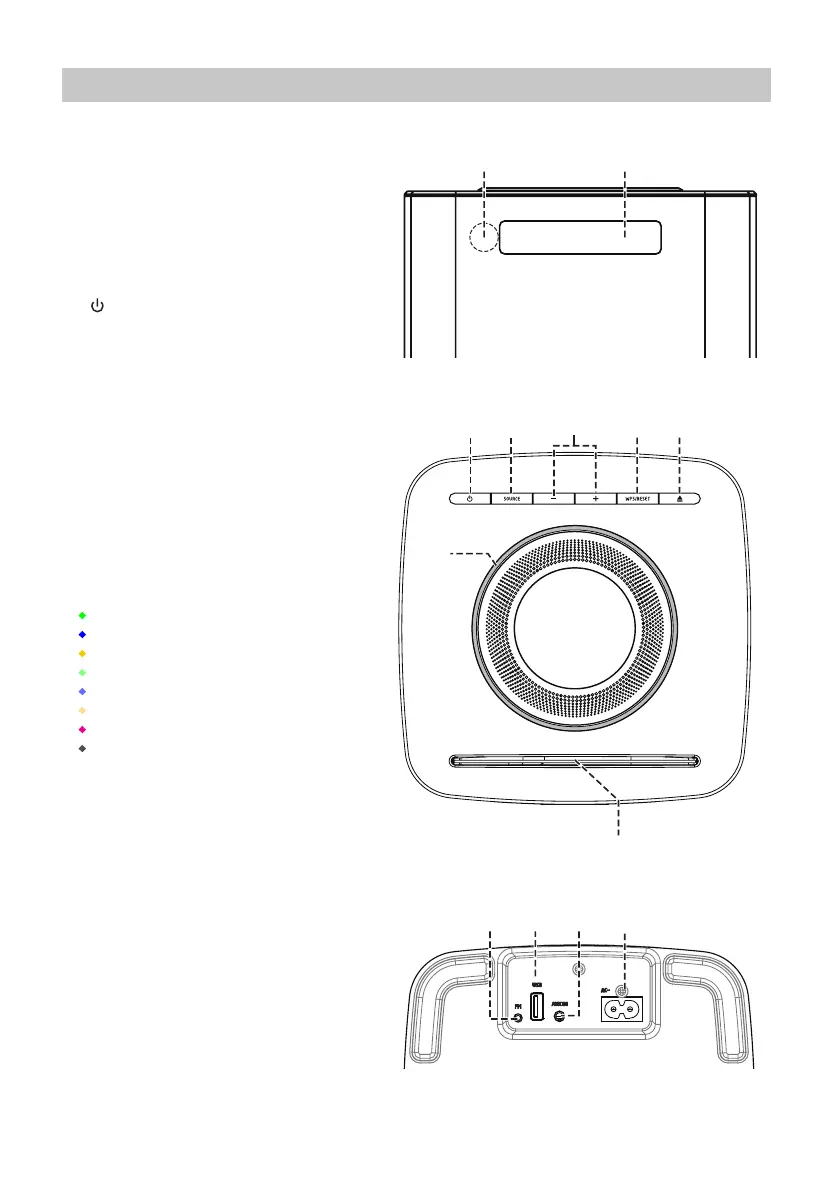
Front View
1 Remote Control Sensor
Receive the signal from the remote control.
2 Display
Top View
3 button
Switch the unit between ON and Standby
mode.
4 SOURCE button
Select the play function.
5 VOLUME - / + buttons
Increase/decrease the volume level.
6 WPS / RESET button
Activate Network Mode Setup.
Press and hold to Network System Reset.
7
K
button
Open and close the disc compartment.
8 Status Indicators
• Green indicator : AUX mode
• Blue indicator : BT mode
• Yellow indicator : A&S connect
• Light green indicator : Spotify connect
• Light blue indicator : WiFi Mulit Room
• Light yellow indicator : CD mode
• Purple indicator : USB mode
• White indicator : FM mode
9 Disc Compartment
Place the CD/MP3 disc.
Bottom View
10 FM Antenna Socket
Connect to a FM Antenna.
11
USB Socket
Insert the USB device.
12 AUX IN Socket
Connect to an external audio device.
13 AC~ Socket
Connect a power cord.


 To Next Page