6
Preparations
Prepare the Remote Control
The provided Remote Control allows the unit to be
operated from a distance.
Even if the Remote Control is operated within the
eective range (6m), remote control operation may
be impossible if there are any obstacles between
the unit and the remote control.
If the Remote Control is operated near other products
which generate infrared rays, or if other remote
control devices using infra-red rays are used near the
unit, it may operate incorrectly. Conversely, the other
products may operate incorrectly.
Replace the Remote Control Battery
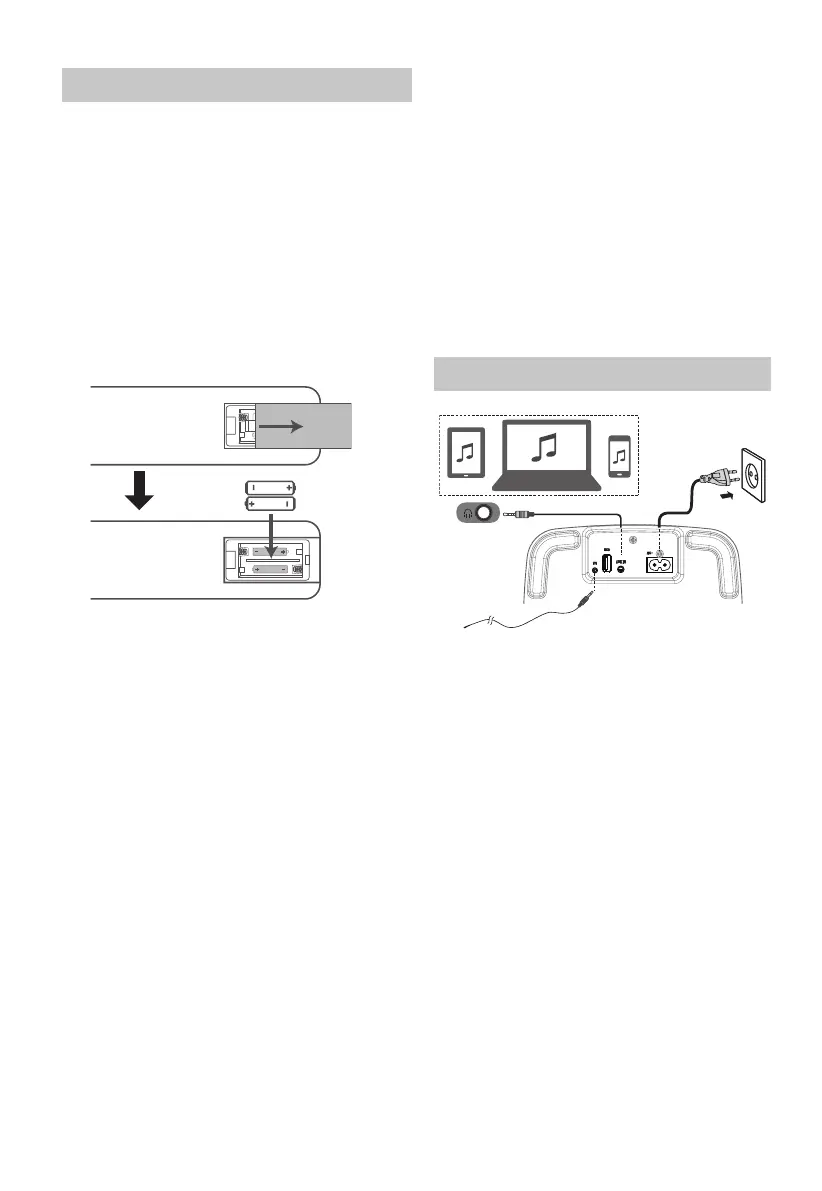
1 Press and slide the back cover to open the
battery compartment of the remote control.
2 Insert two AAA size batteries (not included).
Make sure the (+) and (–) ends of the batteries
match the (+) and (–) ends indicated in the
battery compartment.
3 Close the battery compartment cover.
Precautions Concerning Batteries
• Be sure to insert the batteries with correct
positive “
” and negative “
” polarities.
• Use batteries of the same type. Never use
dierent types of batteries together.
• Either rechargeable or non-rechargeable
batteries can be used. Refer to the precautions
on their labels.
• Be aware of your ngernails when removing
the battery cover and the battery.
• Do not drop the remote control.
• Do not allow anything to impact the remote control.
• Do not spill water or any liquid on the remote
control.
• Do not place the remote control on a wet object.
• Do not place the remote control under direct
sunlight or near sources of excessive heat.
• Remove the battery from the remote control
when not in use for a long period of time, as
corrosion or battery leakage may occur and
result in physical injury, and/or property
damage, and/or re.
• Do not use any batteries other than those
specied.
• Do not mix new batteries with old ones.
• Never recharge a battery unless it is
conrmed to be a rechargeable type.
Connections
AC
B
headphone
AUX IN Socket
Use a 3.5mm to 3.5mm audio cable (included)
to connect the TV’s or external audio device
headphone socket to the AUX IN socket on
the unit.
FM Antenna Socket
Connect one end of the aerial (included)
to the FM socket at the rear of the unit.
Then position the aerial to obtain optimum
reception.
Connect Power
Risk of product damage!
- Ensure that the power supply voltage
corresponds to the voltage printed on the
back or the underside of the unit.
• Connect the power to the AC~ socket on the
unit and a wall outlet.
Note:
- Ensure all connections are connected before
connecting to the mains power socket.


 To Next Page