5
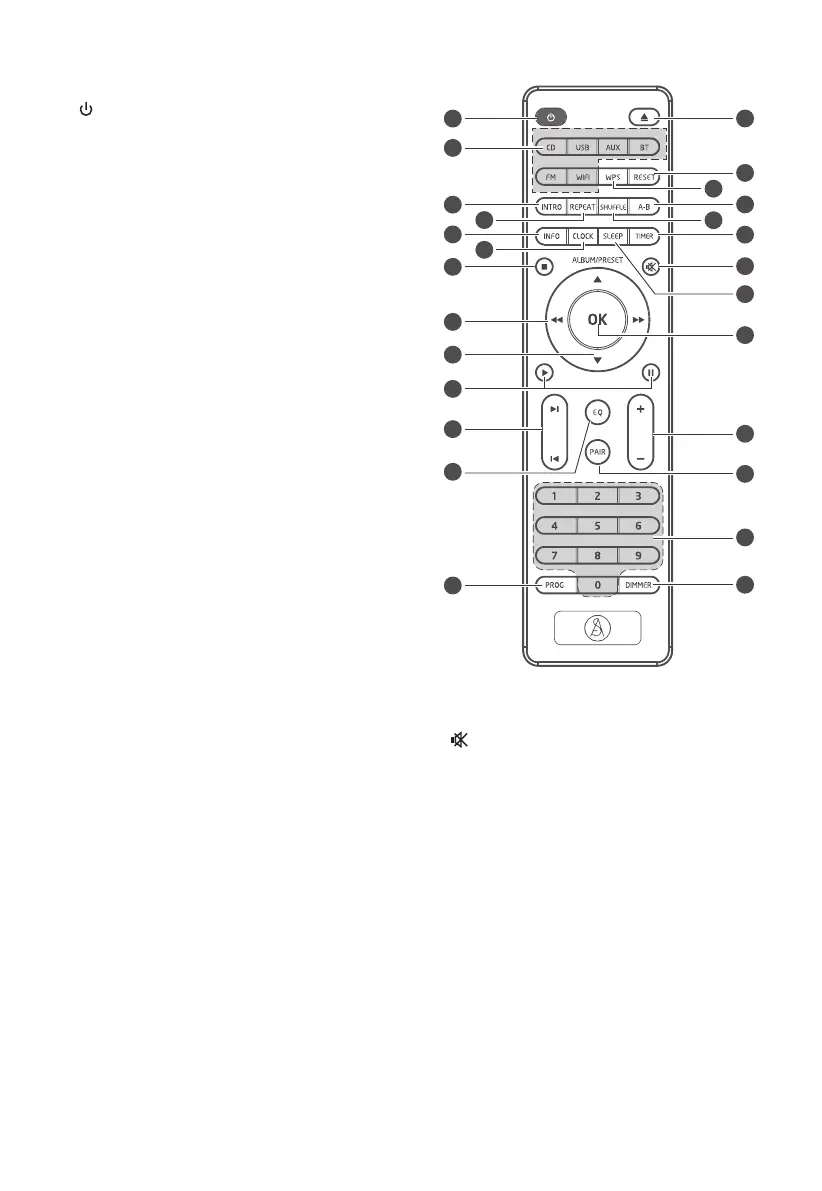
Remote Control
1
Switch the unit between ON and Standby
mode.
2 SOURCE buttons
Select the play function.
3 INTRO
In CD/USB mode, every soundtrack will be
played for 10 Sec.
4 REPEAT
Press to Network System Reset.
5 INFO
Displays playback information.
6 CLOCK
In standby mode, press and hold to activate
clock setup.
Display current clock .
7
L
Stop play.
8
D
,
C
Search backward/forward within a track/disc.
Tune to a radio station.
9 ALBUM/PRESET
,
Select a next/previous preset station.
10
B
,
F
Play/pause/resume playback.
11 I
/
I
Skip to previous/next title, chapter or track.
In CD/USB/BT mode, skip to previous/next
track.
12 EQ
Select the preset equaliser.
13 PROG
In CD/USB mode, programme sound tracks.
In FM mode, presets radio stations.
14
K
Open or close disc compartment.
15 RESET
Press to System Reset.
16 WPS
Activate Network Mode Setup.
17 AB
Repeat a specic section within a track/
chapter.
18 SHUFFLE
Select shue play mode.
19 TIMER
In standby mode, press and hold to set the
alarm timer.
20
Mute or resume the sound.
21 SLEEP
Set the sleep timer.
22 OK
Conrm a selection.
23 VOL+/VOL-
Increase/decrease the volume level.
24 PAIR
Activate the pairing function in Bluetooth
mode and disconnect the existing paired
Bluetooth device.
25 Numeric keypad (0~9)
In CD/USB mode, select a track number for
playback.
In FM mode, choose the preset radio station.
26 DIMMER
Adjust display brightness.
10
11
13
12
9
8
14
15
17
16
18
19
20
21
22
23
25
24
26
1
2
3
4
5
6
7


 To Next Page