TROUBLESHOOTING
14 BACnet
®
General Controller Technical Guide
LED Diagnostics & Troubleshooting
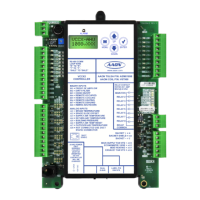
BGC LEDs
TheBGCisequippedwithLEDsthatcanbeusedtoverifyoperation
andperformtroubleshooting.ThereareLEDsforcommunication,
operation modes, and diagnostic codes. The BGC Controller has 25
LEDs—9usedforoperation&status,8usedforrelays,and8used
for binary inputs. See Figure 5, page 15 forthe LED locations.
TheLEDsassociated with theseinputsandoutputs allow youto
seewhatisactivewithoutusingavoltmeter.TheLEDsandtheir
uses are as follows:
Operation LEDs - Factory Troubleshooting
POWER-ThisgreenLEDwilllightuptoindicatethat24VAC
power has been applied to the controller.
APP HB-ThisgreenLEDwilllightupandblinkcontinuouslyto
indicate the application software is working properly.
OS HB-ThisgreenLEDwilllightupandblinkcontinuouslyto
indicate the operating system is working properly.
WDOG-ThisgreenLEDwilllightupandstaylittoindicatethe
operating system is working properly.
Diagnostic LEDs
STATUS 1-ThisredLEDisadiagnosticblinkcodeLED.Ifthe
softwareisrunning,thisLEDshouldblinkatarateof1blinkevery
10 seconds.
STATUS 2-ThisredLEDisadiagnosticblinkcodeLED.Under
normaloperation,itshouldnotbeblinking.IftheLEDisblinking
non-stopalongwithStatus2LED,thecontrollerisresettingfac-
tory defaults.
Communication LEDs
EBUS-ThisyellowLEDwillblinktosignalE-BUScommunica-
tions.
BACNET -ThisyellowLEDwilllightupandblinkcontinuously
to indicate BACnet communications.
Relay LEDs
RLY1 - RLY8-ThesegreenLEDswilllightupwhentherelaysare
enabled and will stay lit as long as they are active.
Binary Input LEDs
BIN1 - BIN8 -ThesegreenLEDswilllightupwheneachcontact
is closed.
POWER LED Operation
WhentheBGCisrstpoweredup,thePOWERLEDshouldlight
up and stay on continuously. If it does not light up, check to be sure
that you have 24 VAC connected to the controller, that the wiring
connections are tight, and that they are wired for the correct polar-
ity. The 24 VAC power must be connected so that all ground wires
remaincommon.Ifaftermakingallthesechecks,thePOWERLED
does not light up, please contact AAON Controls Technical Support
for assistance.



 To Next Page