OVERVIEW
4
BACnet
®
General Controller Technical Guide
Overview
The BACnet
®
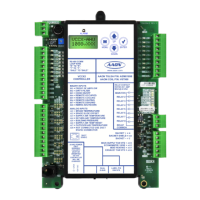
General Controller (BGC) is an Input/Output module
that has BACnet
®
MS/TP communication capability. The BGC has
no internal logic, but allows a BACnet
®
front end to read its inputs
and to command its outputs. The BGC has (8) analog inputs, (8)
wet contact binary inputs, (8) relay outputs and (4) analog outputs.
Features
The BGC Controller:
• Operates as a stand-alone controller connecting to a
BACnet
®
Bus
• Contains a 2 x 8 LCD character display and 4 buttons
that allow for status display and BACnet
®
conguration
settings
NOTE: The BGC contains no user-serviceable parts.
ContactqualiedtechnicalpersonnelifyourBGC
is not operating correctly.
General Information
Power Supply
The BGC requires an 18-30 VAC power connection with a minimum
rating of 15 VA.
WARNING: Observe polarity! All boards must be wired
GND-to-GND and 24 VAC-to-VAC. Failure
to observe polarity could result in damage to
the board.
Environmental Requirements
The BGC needs to be installed in an environment that can maintain
a temperature range between -30°F and 150°F and not exceed 95%
RH levels (non-condensing).
Mounting
The BGC is housed in a plastic enclosure. It is designed to be
mounted by using the 3 mounting holes in the enclosure base. It is
important to mount the module in a location that is free from extreme
high or low temperatures, moisture, dust, and dirt. Be careful not to
damage the electronic components when mounting the module. See
Figure 1, page 5 for Controller dimensions (in inches).



 To Next Page