Chapter 3 - Handling of Control Panel CDP 31x
IV A 3 - 14 DCS 500B / DCP 500B Operating Instructions
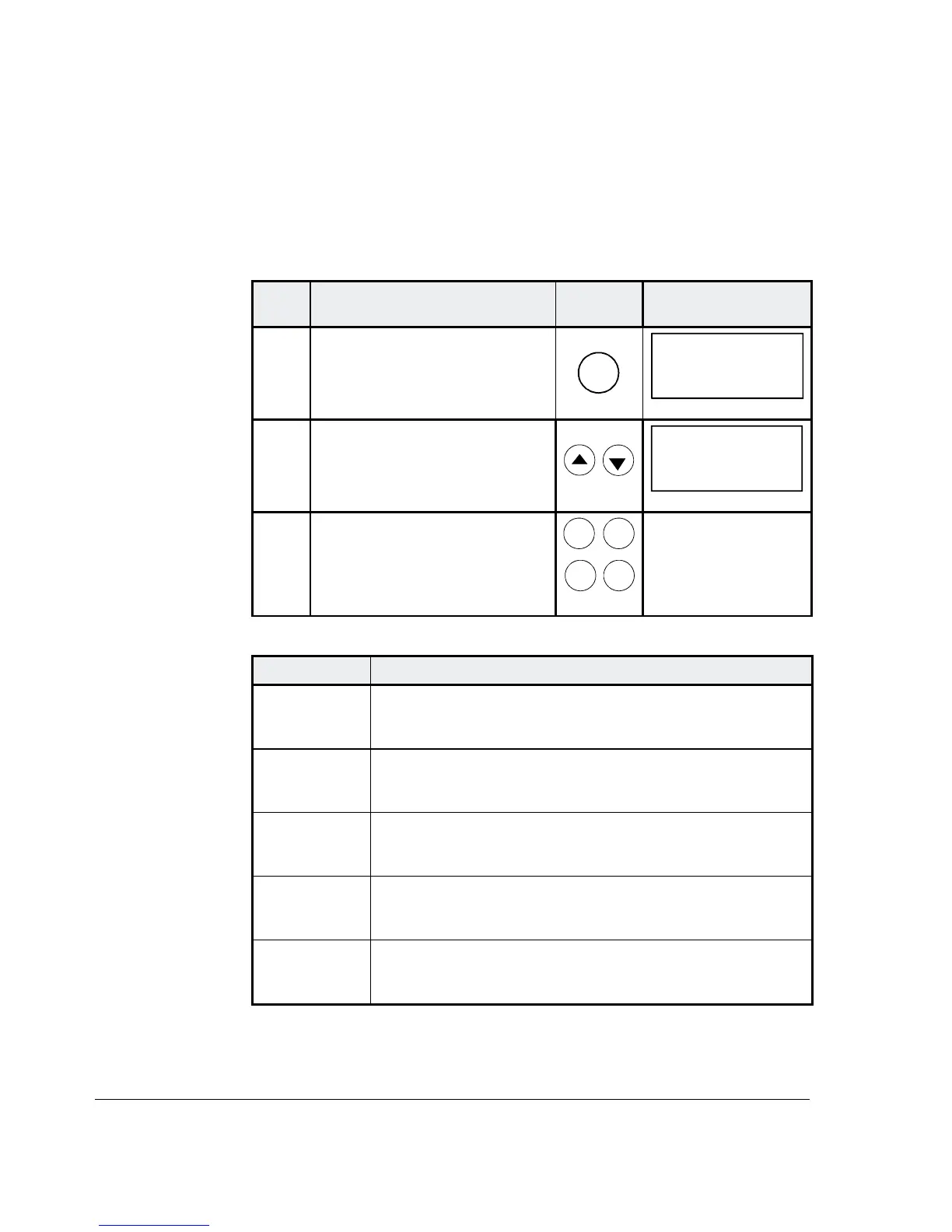
3.13 Drive Mode
Display of the ID-number for the Drive and for the Control Panel
CDP 31x as well as display of the status (Status Display)
Step Function Press key Display after key is
pressed
1.
To enter the Drive Mode
DRIVE
DCS500
ID-NUMBER 0
TOTAL 1 DRIVES
2.
To select the Status Display
(see table below).
0 31P
Ü
3.
To cancel the Drive Mode.
The selected Keypad Mode is
entered.
ACT
PAR
FUNC
DRIVE
Symbol Status Display
á
Stopped, main contactor ON (closed)
Ü
Stopped, main contactor OFF (open)
Ö
Running, main contactor ON (closed)
P
Control Panel CDP 31x
F
Alarm or fault signalling effective in the drive




 To Next Page