Chapter 3 - Handling of Control Panel CDP 31x
IV A 3 - 12 DCS 500B / DCP 500B Operating Instructions
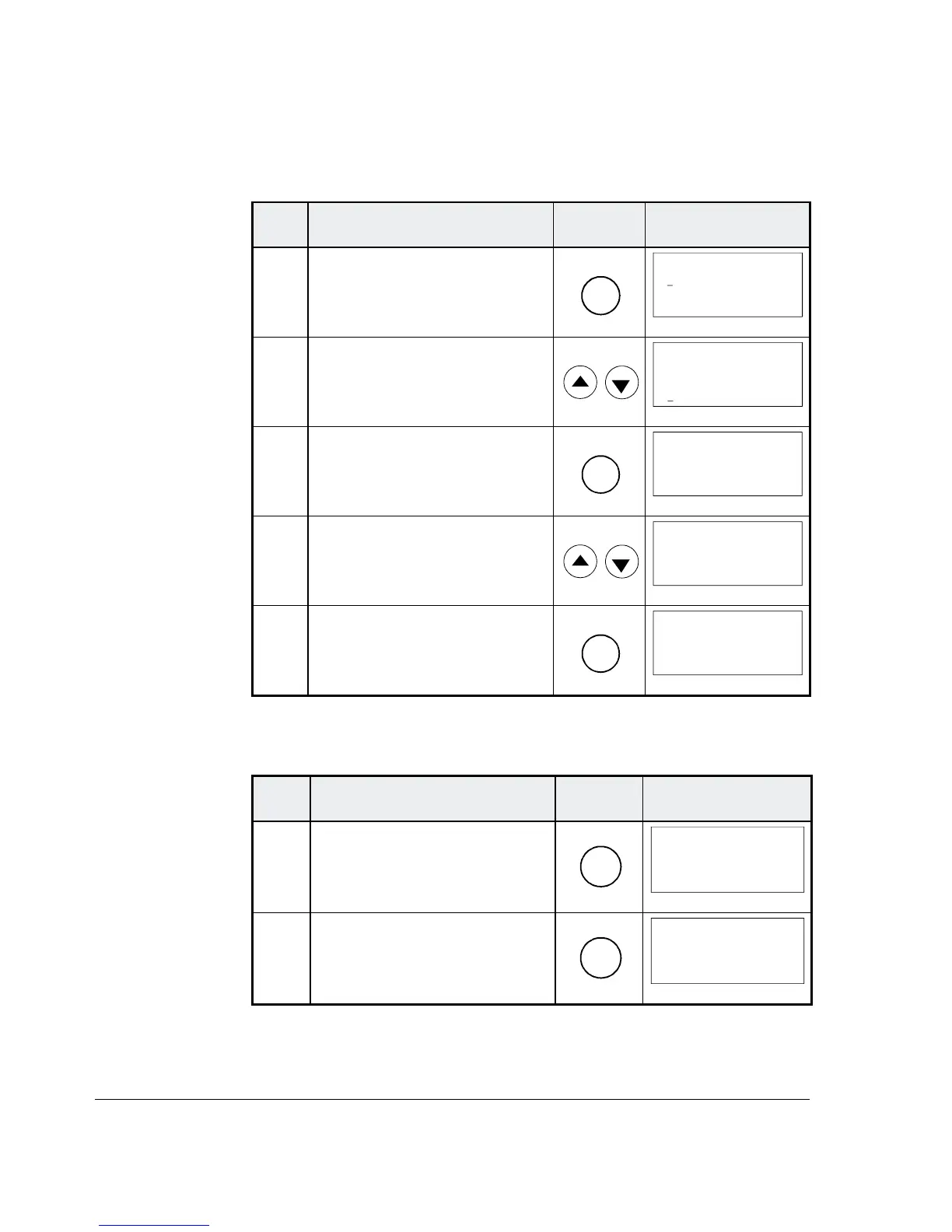
3.10 Setting of the Display Contrast
Step Function Press key Display after key is
pressed
1.
To enter the Function Mode.
FUNC
0 L 0.0 rpm 00
UPLOAD <= <=
DOWNLOAD => =>
CONTRAST 7
2. To select a function.
0 L 0.0 rpm 00
UPLOAD <= <=
DOWNLOAD => =>
CONTRAST 7
3. To enter contrast setting func-
tion.
ENTER
0 L 0.0 rpm 00
CONTRAST [7]
4. To set the contrast.
(1...7)
0 L 0.0 rpm 00
CONTRAST [4]
5. To accept the selected value.
ENTER
0 L 0.0 rpm 00
CONTRAST 4
3.11 Full Name of output pins
Step Function Press key Display after key is
pressed
1. To display the full name of the
three actual signals press key
and hold
ACT
0 L 0.0 rpm 00
SPEED ACT FILT
CONV CURR ACT
U ARM ACT
_
2.
To return to the Actual Signal
Display Mode release key.
ACT
0 L 0.0 rpm 00
SPEED AC 0.0 rpm
CONV CUR 0 A
U ARM AC 0 V
_




 To Next Page