EasyManua.ls Logo

ABB 520ADD02 - User Manual

ABB 520ADD02
6 pages
Print Icon
To Next Page IconTo Next Page
Loading...
RTU520 product line
I/O adapter 520ADD02
Connections and settings
Application, characteristics and technical data have to be taken
from the hardware data sheet:
520ADD02 data sheet 1KGT 150 871
Operation
The I/O adapter 520ADD02 is used to connect more than 16
RTU520I/O modules to an I/O bus with RS485 or fiber optic
connection in RTU520 or RTU540.
The adapter is also used to extend the WRB I/O bus for decen-
tralized I/O applications up to 2 km distance and if distances of
more than 30 cm between the I/O adapters are required.
In addition the I/O adapter 520ADD02 is used as a stand-alone
moduleto connect RTU560 I/O modules (e. g. 23BE40, 23BE50,
23BA40) to an RTU540.
Processing Functions
The I/O adapter is connected to the WRB I/O bus (wired OR
bus) and generates the addresses for the connected I/O mod-
ules within the I/O assembly automatically.The I/O adapter is al-
ways the last adapter unit within the virtual I/O rack 1.
The adapter converts the WRB I/O bus to the SPB I/O bus (serial
peripheral bus) with electrical RS485 or fiber optical connection.
The module is available in two versions (rubrics):
R0001: RS485
R0002: RS485 and glass fiber optical, 840 nm
Settings
The jumper S1 is used to change the start address of the first I/
O module connected to the 520ADD02. In position 2-3 an offset
is calculated to the start address. So it is possible to add up to 8
I/O modules to the previous I/O assembly (see Fig. 8 and Fig. 9).
In RTUtil500 configuration the parameter "8/8 addressing mode"
has to be selected.
If max. 4 I/O modules are connected to the previous I/O assem-
bly the jumper S1 is in position 1-2 (see Fig. 10). Thus no off-
set is added. This configuration is only possible with RTU540. In
the RTUtil500 configuration the parameter "4/4/4/4 addressing
mode" has to be selected at the I/O assembly.
Parameter name Default Parameter location
Addressing mode 8/8 I/O assembly
8/8: upto 8 I/O modules per I/O assembly, maximum 2 I/O assemblies per
virtual I/O rack
4/4/4/4: upto 4 I/O modules per I/O assembly, maximum 4 I/O assemblies
per virtual I/O rack (not used with RTU520)
Signaling
The module has two green LEDs for signaling the activity on the
I/O bus.
Connections
The RTU520 I/O modules are connected to the WRB I/O bus via
connector X1. The previous adapter or a communication module
is connected at X2 via the WRB I/O bus. (see Fig. 2 and Fig. 4)
The RS485 SPB I/O bus is available on connector X3. In parallel
the fiber optical output can be used (see notice below).
RS485 SPB I/O bus connector X3
X3-1 X3-2 X3-3
TB TA Shield
The usage of the adapter 520ADD02 within an RTU520 DIN rail
configuration is shown in Fig. 11.
The usage of the adapter 520ADD02 within an RTU540 DIN rail
configuration is shown in Fig. 12 and Fig. 13.
ADVICE
To prevent damage on the connected modules de-energize
the system before plugging or unplugging the I/O bus con-
nectors.
Question and Answer IconNeed help?

Do you have a question about the ABB 520ADD02 and is the answer not in the manual?

Overview

The 520ADD02 is an I/O adapter designed for use with RTU520 and RTU540 systems, facilitating the connection of I/O modules. It serves as a crucial component for expanding the I/O capabilities of these systems, supporting various configurations and communication protocols.

Function Description

The I/O adapter 520ADD02 is used to connect more than 16 RTU520 I/O modules to an I/O bus with RS485 or fiber optic connection in RTU520 or RTU540. This adapter extends the WRB I/O bus for decentralized I/O applications up to 2 km distance and allows for more than 30 cm between the I/O adapters. In addition, the I/O adapter 520ADD02 can be used as a stand-alone module to connect RTU560 I/O modules (e.g., 23BE40, 23BE50, 23BA40) to an RTU540.

The I/O adapter is connected to the WRB I/O bus (wired OR bus) and generates the addresses for the connected I/O modules within the I/O assembly automatically. The I/O adapter is always the last adapter unit within the virtual I/O rack 1. It converts the WRB I/O bus to the SPB I/O bus (serial peripheral bus) with electrical RS485 or fiber optical connection.

The module is available in two versions (rubrics):

  • R0001: RS485
  • R0002: RS485 and glass fiber optical, 840 nm

The 520ADD02 supports various addressing modes, including 8/8, 8/0, 4/4/4/4, and 4/4/4/0, depending on the I/O assembly configuration. The addressing mode 8/8 allows for 8 I/O modules per I/O assembly, maximum 2 I/O assemblies per virtual I/O rack. The 8/0 mode supports 8 I/O modules per I/O assembly, maximum 2 I/O assemblies per virtual I/O rack (not used with RTU520). The 4/4/4/4 mode supports 4 I/O modules per I/O assembly, maximum 4 I/O assemblies per virtual I/O rack. The 4/4/4/0 mode supports 4 I/O modules per I/O assembly, maximum 4 I/O assemblies per virtual I/O rack (not used with RTU520).

Important Technical Specifications

The 520ADD02 has two green LEDs for signaling the activity on the I/O bus.

The RTU520 I/O modules are connected to the WRB I/O bus via connector X1. The previous adapter or a communication module is connected at X2 via the WRB I/O bus. The RS485 SPB I/O bus is available on connector X3. In parallel, the fiber optical output can be used (see notice below).

The RS485 SPB I/O bus connector X3 has the following pin assignments:

  • X3-1: TB
  • X3-2: TA
  • X3-3: Shield

The usage of the adapter 520ADD02 within an RTU520 DIN rail configuration is shown in Figure 11. The usage of the adapter 520ADD02 within an RTU540 DIN rail configuration is shown in Figure 12 and Figure 13.

The 520ADD02 is designed to prevent damage on the connected modules. It de-energizes the system before plugging or unplugging the I/O bus connectors.

Usage Features

The jumper S1 is used to change the start address of the first I/O Module connected to the 520ADD02. In position 2–3 an offset is calculated to the start address. So it is possible to add up to 8 I/O modules to the previous I/O assembly. In the RTU500 configuration, the parameter "4/4/4/4 addressing mode" has to be selected.

The 520ADD02 is designed for DIN rail mounting. To mount the module:

  1. Insert the upper edge into the DIN rail and push downwards.
  2. Push the lower edge towards the DIN rail and snap in the module.

To remove the module:

  1. Lift one module connector into the other starting from right to left.
  2. Mount end stops at the left and right side.

The 520ADD02 can be used in various configurations with RTU520 and RTU540 systems.

  • RTU520 with 8 I/O module configuration: The 520ADD02 is used to connect 8 I/O modules to the WRB I/O bus.
  • RTU540 with 8 I/O module configuration: Similar to RTU520, the 520ADD02 connects 8 I/O modules to the WRB I/O bus in an RTU540 system.
  • RTU520 with extension I/O: The 520ADD02 facilitates the extension of I/O capabilities in RTU520 systems by connecting additional I/O assemblies.
  • RTU540 with extension I/O: The 520ADD02 supports the extension of I/O capabilities in RTU540 systems, allowing for multiple I/O assemblies.
  • RTU540 with 23BA40/23BE40: The 520ADD02 can be used to connect 23BA40 and 23BE40 modules to an RTU540 system, further expanding its functionality.

Maintenance Features

To prevent unintended disconnection of the I/O bus connectors, end stops (e.g., SAM3, 1SNA190001R0000) shall be used at both ends of the I/O assembly.

Do not change the physical SPB I/O bus medium (electrical, fiber optical) more than once within one RTU I/O bus configuration. Otherwise, communication failures due to signal delay effects can occur.
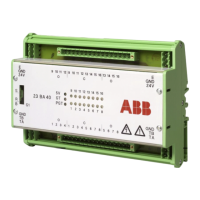
ABB 520ADD02 Specifications

General IconGeneral
BrandABB
Model520ADD02
CategoryAdapter
LanguageEnglish

Related product manuals