EasyManua.ls Logo

ABB F Series - User Manual

ABB F Series
30 pages
Print Icon
To Next Page IconTo Next Page
Loading...
OPTIONS FOR ABB DRIVES AND CONVERTERS
FEA-03 F-series extension adapter
User's manual
Question and Answer IconNeed help?

Do you have a question about the ABB F Series and is the answer not in the manual?

Summary

Safety Instructions

Use of Warnings and Notes

Explains the meaning of warning symbols and notes used in the manual to highlight hazards.

General Safety Instructions

Provides essential safety precautions for all personnel working on the drive, motor cable, or motor.

Introduction to the Manual

Applicability

Specifies that this manual applies to the FEA-03 F-series extension adapter.

Compatibility

Lists compatible option modules (FIO-01, FIO-11, etc.) for the FEA-03 adapter.

Target Audience

Identifies intended readers as personnel involved in installation, commissioning, use, and service.

Purpose of the Manual

Outlines that the manual provides installation and usage information for the FEA-03 adapter.

Before You Start

Advises on prerequisites, including drive installation and availability of drive manuals.

Terms and Abbreviations

Defines technical terms and abbreviations used throughout the manual.

Related Documents

Lists other relevant manuals and guides for option modules and drives.

Hardware Description

Overview

Describes the FEA-03 as an adapter for I/O and encoder modules outside the drive unit.

Layout

Shows the arrangement of connectors, LEDs, and other components on the FEA-03 adapter.

Optical Component Types

Details the types of fiber-optic cables (POF, HCS) supported by the adapter's link.

Mechanical Installation

Examining the Delivery

Lists the contents included in the FEA-03 package.

Installing the Extension Adapter

Provides instructions on mounting the adapter using DIN rail latches and grounding.

Installing the Adapter Vertically on a DIN Rail

Step-by-step guide for mounting the adapter vertically on a DIN rail.

Installing the Adapter Horizontally on a DIN Rail

Step-by-step guide for mounting the adapter horizontally on a DIN rail.

Installing an Option Module on the Adapter

Details the procedure for physically installing an option module into the adapter.

Removing an Option Module from the Adapter

Explains the process for safely removing an option module from the adapter.

Electrical Installation

Connecting the Adapter to the Drive Control Unit

Describes how to connect the FEA-03 adapter to the drive via a DDCS communication module.

Start-up

Defining Node IDs for Option Modules

Explains how to assign unique node IDs to option modules using mechanical switches.

Setting the Drive Parameters

Guides on configuring drive parameters related to option module locations.

Diagnostics

General

Refers to the drive firmware manual for fault and warning message details.

Diagnostic LEDs

Describes the function and color of diagnostic LEDs on the extension adapter.

Technical Data

Housing

Specifies the material and finish of the adapter's housing.

Mounting

Details the mounting method, primarily on a 35 x 7.5 DIN rail.

Power Supply Connection

Provides voltage and current consumption details for the power supply.

Connectors

Lists specifications for fiber-optic and power supply connectors.

LED

Refers to the diagnostics section for LED information.

Ambient Conditions

States that ambient conditions are governed by the drive's hardware manual.

Degree of Protection

Specifies the Ingress Protection (IP) rating of the adapter.

Standards

Lists the safety and EMC standards the adapter complies with.

Dimensions

Provides physical dimensions of the adapter in mm and inches.

Further Information

Product and Service Inquiries

Instructs users on how to address inquiries to ABB representatives.

Product Training

Directs users to ABB's website for information on product training.

Providing Feedback on ABB Manuals

Invites users to submit comments and feedback on ABB manuals.

Document Library on the Internet

Guides users to find ABB product documents in PDF format online.

Overview

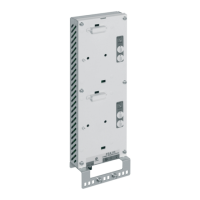
The FEA-03 F-series extension adapter is a device designed to expand the I/O capabilities of ABB drives. It allows for the installation of I/O extension modules and encoder interface modules externally to the main drive unit, thereby increasing the number of F-series option modules that can be connected to the drive's control unit. One or two option modules can be installed on a single FEA-03 adapter. The adapter communicates with the drive via a fiber-optic link using the DDCS protocol.

Function Description:

The primary function of the FEA-03 F-series extension adapter is to provide additional slots for F-series option modules, which include various I/O extension modules (such as FIO-01, FIO-11, FAIO-01, FDIO-01) and encoder interface modules (FEN-01, FEN-11, FEN-21, FEN-31). This allows for greater flexibility and expandability in drive systems where more I/O or specific encoder interfaces are required than what the main drive unit can natively support. The adapter acts as an intermediary, connecting these external modules to the drive's control unit through a robust fiber-optic communication link, ensuring reliable data exchange using the DDCS protocol. This modular approach simplifies system design and maintenance by centralizing additional I/O and encoder interfaces.
Important Technical Specifications:

  • Compatibility: The FEA-03 F-series extension adapter is compatible with FIO-01, FIO-11, FAIO-01, FDIO-01, FEN-01, FEN-11, FEN-21, and FEN-31 option modules. Drive compatibility should be checked against ordering information or the specific drive's hardware manual.
  • Communication: Utilizes a 10 MBd fiber-optic link for connection to the drive's control unit, requiring the drive to also have a 10 MBd DDCS fiber-optic connection.
  • Optical Cable Types: Supports Plastic Optical Fibre (POF) cables with a maximum length of 30 m (98 ft) and Hard Clad Silica (HCS®) cables with a maximum length of 200 m (656 ft). HCS cables are recommended for longer connection distances due to their lower attenuation. It is crucial that the optical components (transmitter and receiver) on a fiber-optic link are of the same type.
  • Power Supply: Requires a 24 V DC ±10% power supply. Current consumption details are specified in the user manual of the I/O extension module.
  • Connectors: Features Avago Versatile Link (10 MBd) for fiber-optic connections and a detachable screw terminal block (Phoenix Contact MSTBA 2.5/2-G-5.08) for power supply.
  • Housing: Constructed from painted and zinc-plated sheet steel, providing durability and protection.
  • Mounting: Designed for installation onto a 35 x 7.5 mm DIN rail, either vertically or horizontally, using spring-loaded latches.
  • Degree of Protection: Rated IP20, indicating protection against solid objects larger than 12.5 mm but no protection against liquids.
  • Standards Compliance: Complies with safety standard IEC 61800-5-1 and EMC standard IEC 61800-3.
  • Dimensions: Approximately 90 mm (3.54 in) wide, 292 mm (11.48 in) high, and 41 mm (1.61 in) deep.
  • Ambient Conditions: Operates under the same ambient conditions specified for the drive in its hardware manual.

Usage Features:

  • Modular Expansion: The FEA-03 allows for flexible expansion of drive systems by accommodating one or two F-series option modules, enabling users to tailor the drive's I/O and interface capabilities to specific application needs.
  • Ring Topology Support: Multiple FEA-03 extension adapters can be connected in a ring topology using fiber-optic cables, facilitating complex and distributed control architectures.
  • Node ID Definition: Each option module connected to the FEA-03 requires a unique two-digit decimal node ID (ranging from 04 to 99, with 00-03 reserved). These IDs are set using mechanical switches (A and B for Slot 1, C and D for Slot 2) on the adapter, where switches A and C define the first digit and B and D define the second digit.
  • Drive Parameter Configuration: After physical installation and node ID assignment, the drive control program must be configured to recognize and utilize the connected FEA-03 and its modules. This involves setting specific parameters in the drive's firmware, such as "Extension adapter com port" (e.g., parameter 60.41 in ACS880 primary control program) and module location parameters (e.g., 14.02 Module 1 location, 91.12 Module 1 location).
  • Fiber-Optic Link Configuration: When using an FDCO module for communication, a current selector switch on the FEA-03 must be set according to the fiber-optic cable length and type (POF or HCS) to ensure proper signal transmission. For RDCO modules, channel parameter values are set in the drive control program.
  • Easy Installation: The adapter features spring-loaded latches for straightforward vertical or horizontal DIN rail mounting. A support bracket is provided for vertical installations to enhance stability.
  • EMC Compliance: Proper grounding of the DIN rail or using a separate grounding conductor (minimum 6 mm² cross-sectional area) is essential for personnel safety and to reduce electromagnetic emission and interference, contributing to EMC compliance. Fastening the option module screw is also critical for grounding and EMC.

Maintenance Features:

  • Diagnostic LEDs: The FEA-03 includes diagnostic LEDs to assist in troubleshooting:
    • PWR OK (Green): Indicates that power applied to the extension adapter is satisfactory.
    • SLOT 1 STATUS (Green): Lights up when the initialization of the option module connected to Slot 1 is complete and OK.
    • SLOT 2 STATUS (Green): Lights up when the initialization of the option module connected to Slot 2 is complete and OK. These LEDs provide quick visual feedback on the operational status of the adapter and its installed modules, aiding in rapid fault identification.
  • Module Installation/Removal: Option modules can be easily installed or removed by manipulating a cover, a lock, and a fastening screw. This design facilitates quick module replacement or reconfiguration without extensive disassembly.
  • Documentation: The user manual provides detailed instructions for mechanical and electrical installation, start-up procedures, and diagnostics, serving as a comprehensive guide for maintenance personnel. Additional information and product documents are available in PDF format on the ABB website.
  • Technical Support: Users can address product inquiries to their local ABB representative, quoting the type designation and serial number, for support and service. Feedback on manuals is also welcomed, contributing to continuous improvement of documentation.

ABB F Series Specifications

General IconGeneral
BrandABB
ModelF Series
CategoryAdapter
LanguageEnglish

Related product manuals