Chapter 2 – Overview of the ACS 501
ACS 501 Installation & Start-up Manual 2-5
Control Panel Operation
Control Panel Display
The Control Panel, located on top of the Control Interface Card, has a 2x20
character alphanumeric LCD and a keypad.
The operation information, parameters and fault indications are displayed in
nine languages: English, German, Italian, Spanish, Dutch, French, Danish,
Finnish, and Swedish. The language selection is made in Start-up Data,
Parameter A (Language).
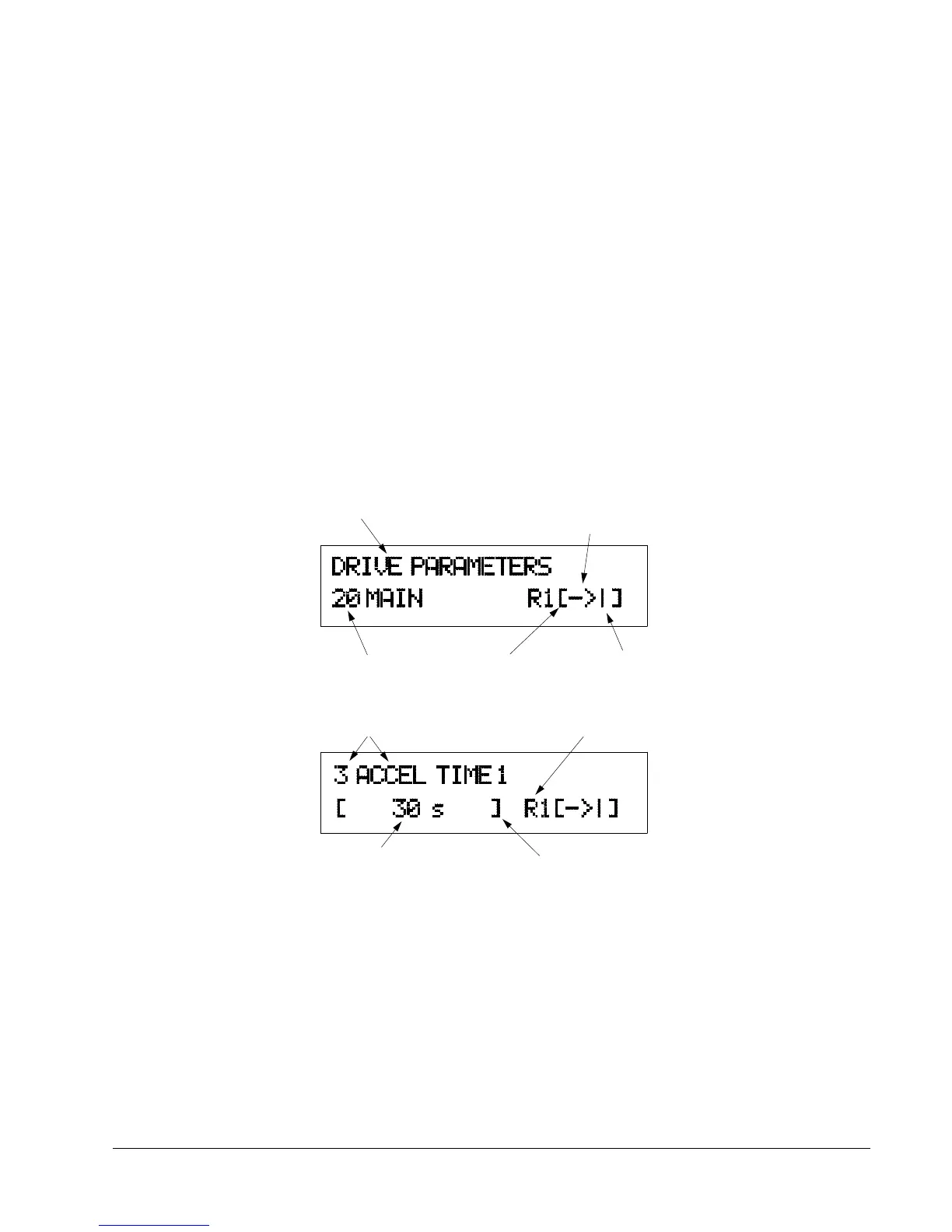
Figure 2-3 shows control panel display indications.
Figure 2-3 Control Panel Displays
Main Name
Rotation Direction
→ = Forward
← = Reverse
Main Number
Control Location
[ ] = Keypad Control
No Brackets = External
Run Status
I = Run
O = Stop
Parameter Number
and Name
Active Reference
R1 = Ref 1
Parameter Value
Mode Indication
[ ] = Setting Mode
No Brackets = Display Mode



 To Next Page