Chapter 2 – Overview of the ACS 501
ACS 501 Installation & Start-up Manual 2-7
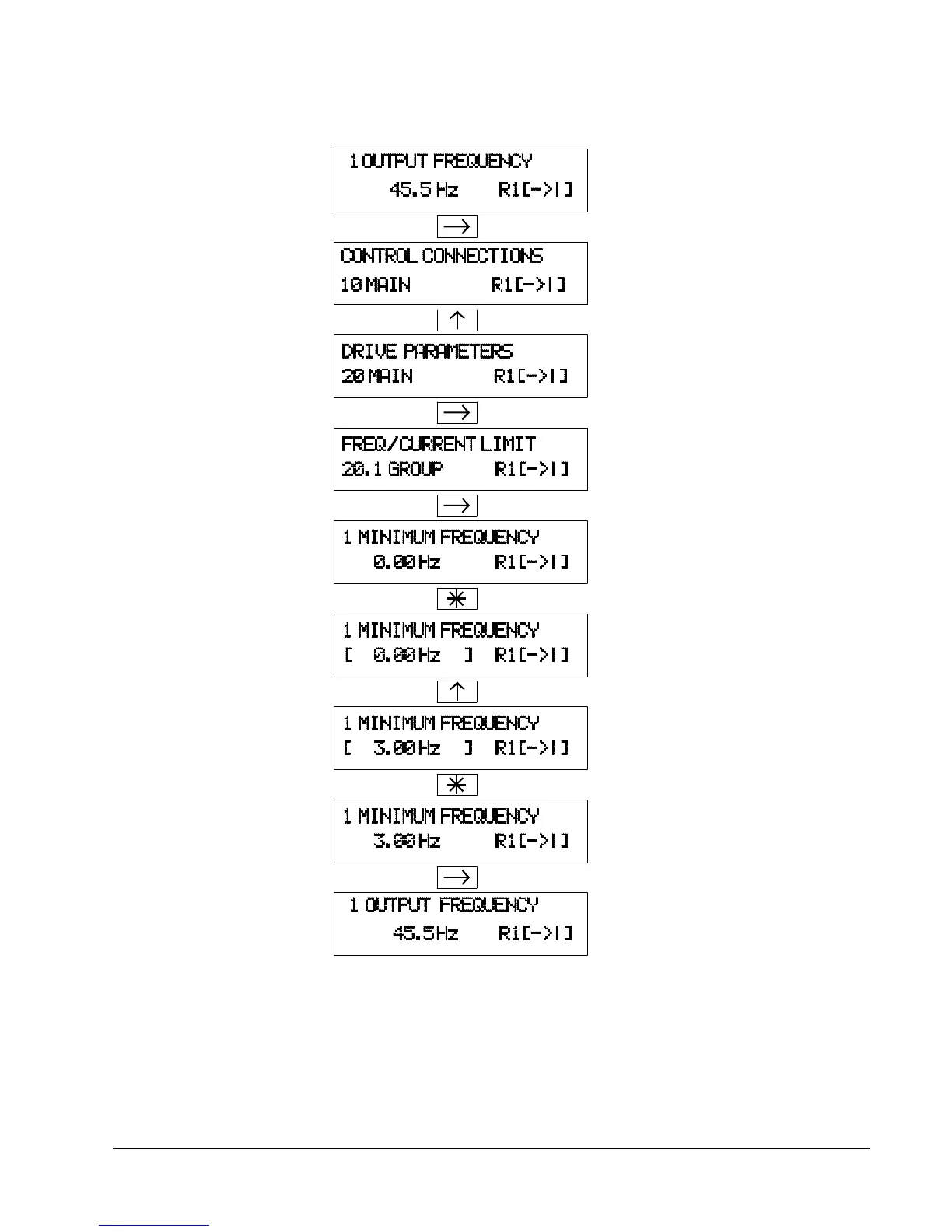
Figure 2-4 Parameter Settings
Indent to Main level.
Select the required Main.
Indent to Group level. Select the required
Indent to Parameter level. Select the required
Parameter by [Up Arrow] and [Down Arrow]
key.
Change to Setting mode. Brackets indicate that
the parameter value now can be changed.
Set the parameter value. If you want to cancel the
change and return to Display mode, press [Right
Arrow] or [Left Arrow], otherwise
Save the selected value to parameter memory.
Brackets disappear indicating that the parameter
value is stored in memory.
Return to Operating Data Parameter 1 (Output
Frequency).
Group by [Up Arrow] and [Down Arrow] keys.



 To Next Page