29
Language
Language
Language
Language
30
Language
Language
LanguageLanguage
Managing Your Results
Meter memory stores up to 450 events – control solution, blood glucose, and blood β-Ketone results,
and other meter information. The most recent events appear rst.
Viewing Test Results in Memory
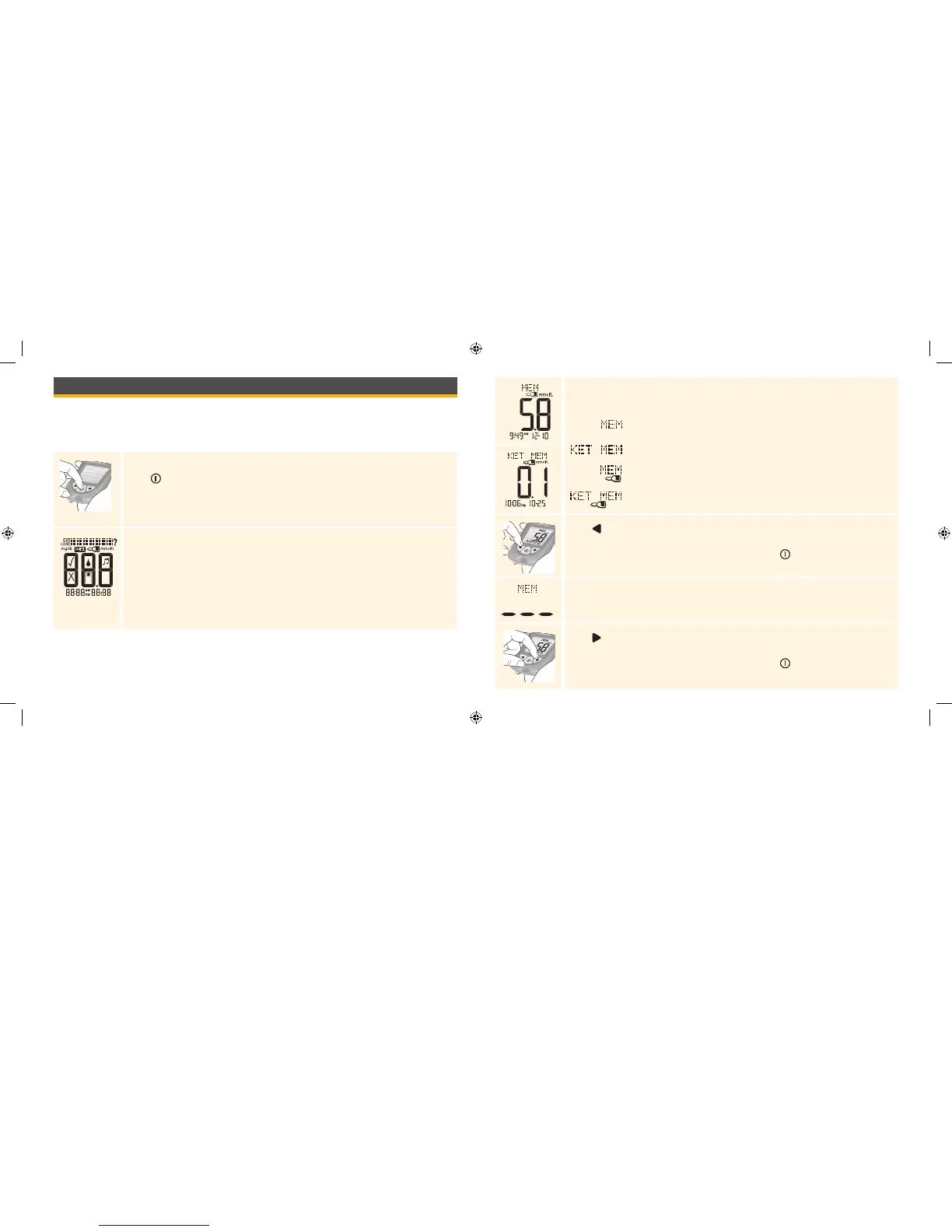
Start with the meter o (no test strip inserted).
Press to turn the meter on.
This display always appears when the meter is turned on.
Do not use the meter if the display check screen does not exactly match the
example. Contact Customer Service.
See “Testing Your Blood Glucose” section for more information.
Your most recent result, with time and date (if set) it was obtained, appears next.
The following symbols indicate the type of result:
= Blood glucose result
= Blood β-Ketone result
= Glucose control solution result
= Ketone control solution result
Press to review the previous result. Repeat this for each result you wish
to review.
Note: To exit meter memory at any time, press and hold .
Appear on the display when there are no previous results to view.
Press to return to a previously reviewed result. Repeat this for each result you
wish to review.
Note: To exit meter memory at any time, press and hold .
ART20287_Rev-A-Man.indd 29-30 11/17/10 3:01 PM















 To Next Page