5
Language
Language
Language
Language
6
Language
Language
LanguageLanguage
Time
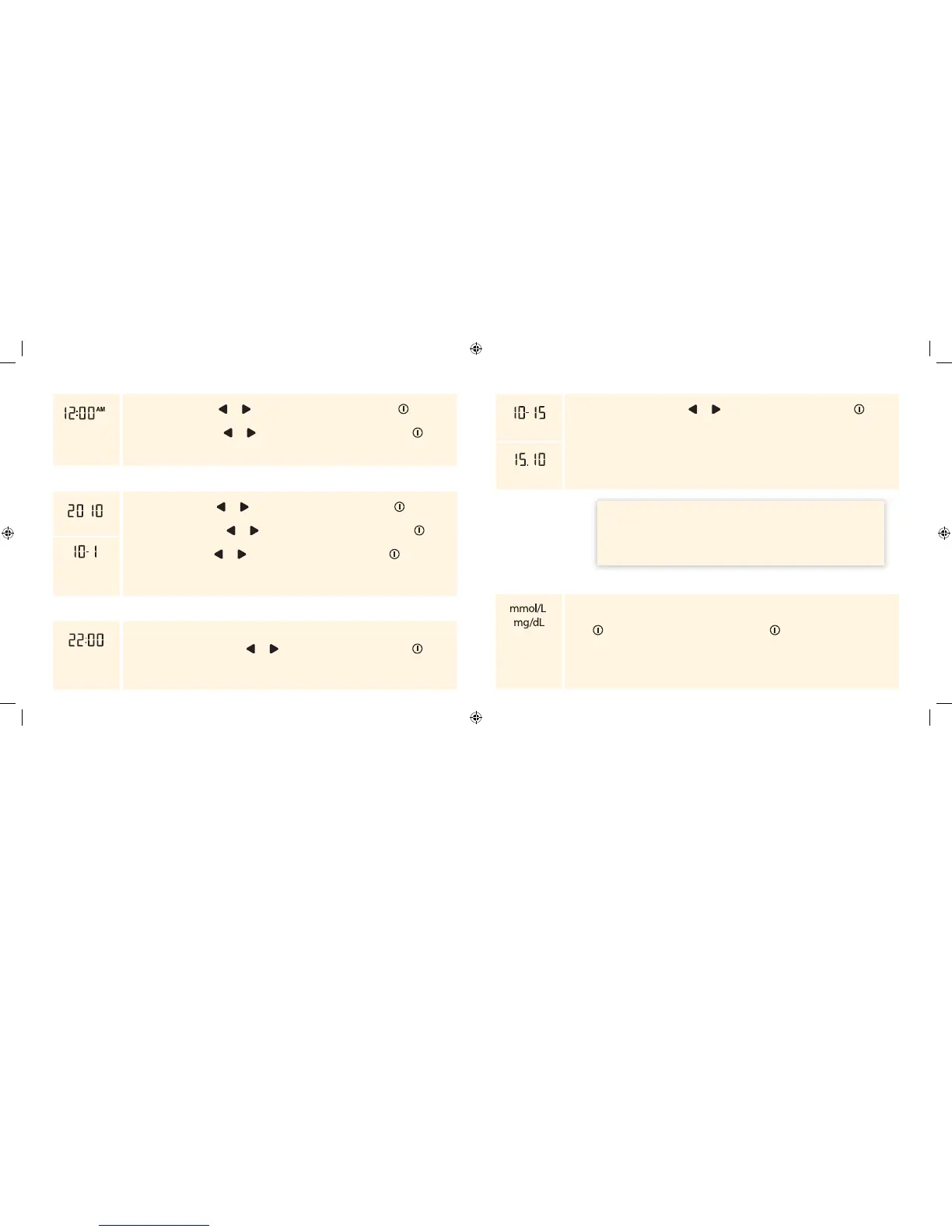
The hour ashes. Press or until the correct hour appears. Press to save
the hour and to move to set minutes.
The minutes ash. Press or until the correct minutes appear. Press to
save the minutes and to move to set date.
Date
Year
The year ashes. Press or until the correct year appears. Press to save the
year and to move to set month.
The month ashes. Press or until the correct month appears. Press to
save the month and to move to set day.
The day ashes. Press or until the correct day appears. Press to save the
day and to move to set time format.
Month – Day
Time Format
24 Hour Format
Note: If using the 12-hour time format, AM and PM appear.
The time format ashes. Press or to change the time format. Press to
save the time format and to move to set date format.
Date Format
Month – Day
The date format ashes. Press or to change the date format. Press to
save the date format and to move to the measurement units.
Day.Month
Measurement Units
The unit of measurement set by the factory appears. You cannot change this
setting. Contact Customer Service for more information.
Press to return to set beeper, or press and hold to turn o the meter.
IMPORTANT: Please check that the correct time and date is set before
you use the meter for the rst time. This will help you keep records of
when you monitor and will help you and your healthcare professional
make informed decisions about your care. You must set the time and
date to review averages.
ART20287_Rev-A-Man.indd 5-6 11/17/10 3:01 PM















 To Next Page