6
3. UPS Functional Descriptions
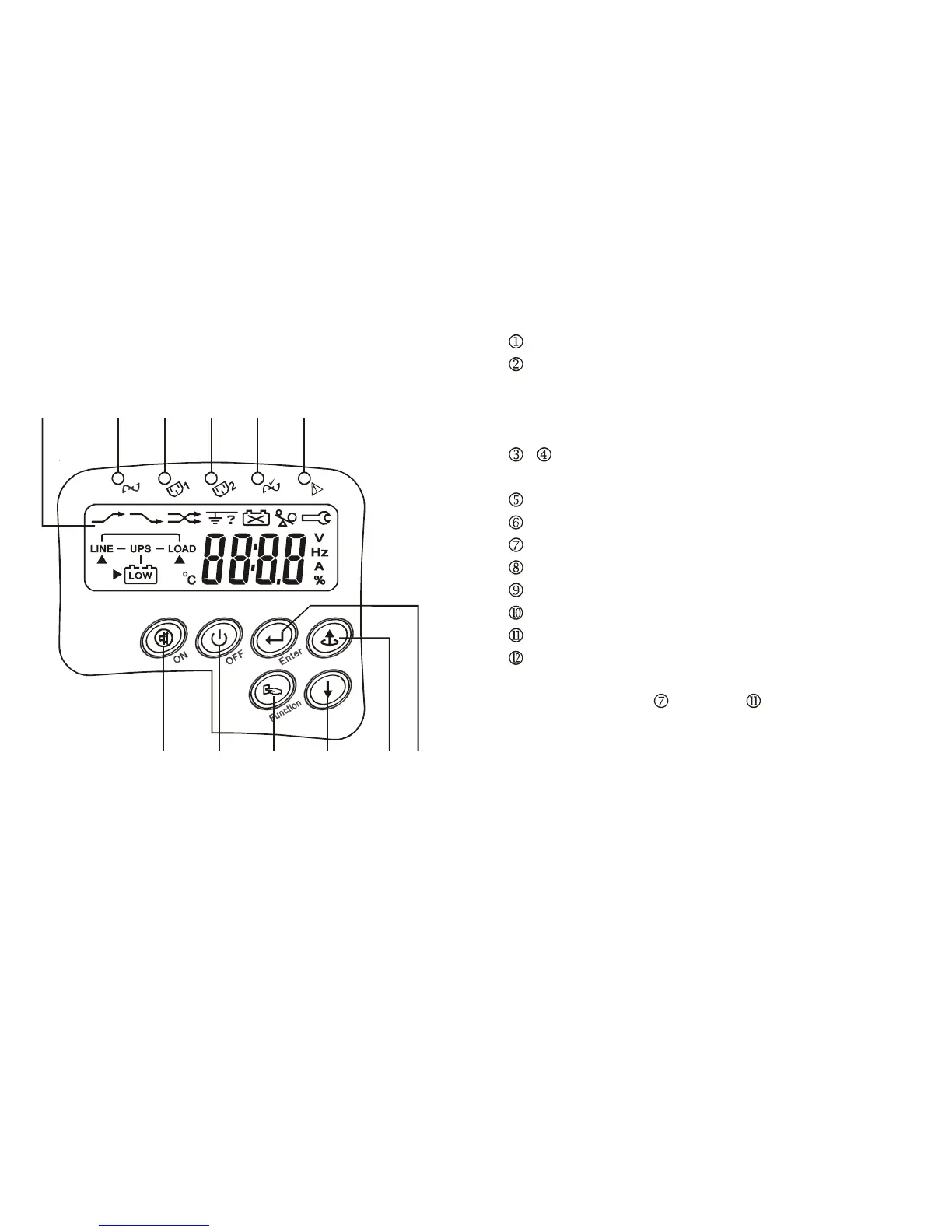
3.1. UPS Front Panel Display Descriptions
3.1.1. LCD panel (Optional)
2 3 4 5 6
121110987
1
7
LCD Display
Green LED steadily lights up to indicate that the Utility input voltage is within
the window (80Vac~144Vac, or 160Vac~288Vac); the LED flashes flickeringly
to indicate that the Utility input voltage is within the acceptable window
(60Vac~79Vac, or 120Vac~159Vac).
、 Green LED lights up to indicate there is an output available at the
Programmable Outlet 1 & Programmable Outlet 2.
Amber LED lights up to indicate the Bypass Input is normal.
UPS Fault LED
UPS On/Alarm Silence
UPS OFF Switch
Special functions log in/out
Go to next page
Go to previous page or change the setting of the UPS.
To re-confirm the change of UPS Setting
◎ Manual Bypass: Press "
ON-KEY” and " Up-KEY" key simultaneously
for approx. 3 seconds to transfer from "Inverter to Bypass" ( the bypass led
continuously “blink“ and the buzzer will beep intermediately ) or "Bypass to
Inverter", when the UPS is on Line Mode and the Bypass Voltage Window is
Normal.







 To Next Page