4. Control Panel Operation and Function Description
Each UPS is equipped with a LCD touch panel to provide the user with a simple and
intuitive user interface that is easy to learn. The touch panel offers a combination of
graphics and numbers that make it easy to determine the input/output voltage, frequency,
load and battery level at a glance. The current status of the UPS is displayed at the main
screen. User also can have the real time input/output voltage, frequency, current and battery
information from the touch panel.
Please refer to below section for learn more detail information and functions of the LCD
touch panel.
4.1 Screen Introduction
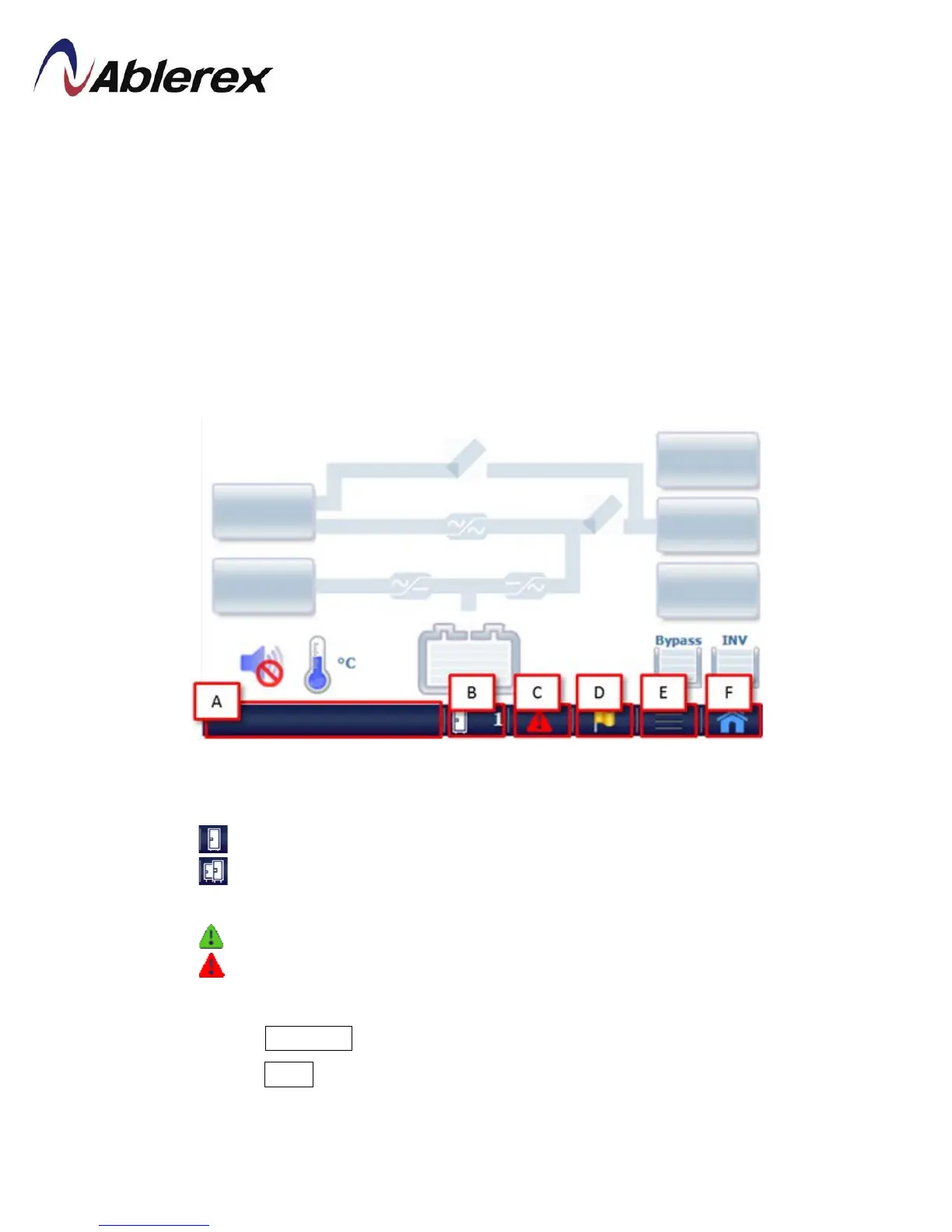
【A】Display current time, status and information of UPS.
【B】Indicate Single or Parallel system, and select the desire UPS unit to check the
information.
: Single Unit
: Parallel System
【C】Click here to see the alarm message.
: The green pattern indicates that UPS is normal.
: The red pattern indicates that UPS abnormal conditionsoccurred.
【D】Click here to see the status.
【E】
Enter to Sub-Menu, please refer to section 4-2 for more detail.
【F】Enter to Menu, please refer to section 4-2 for more detail.
47
192321262008007





 To Next Page