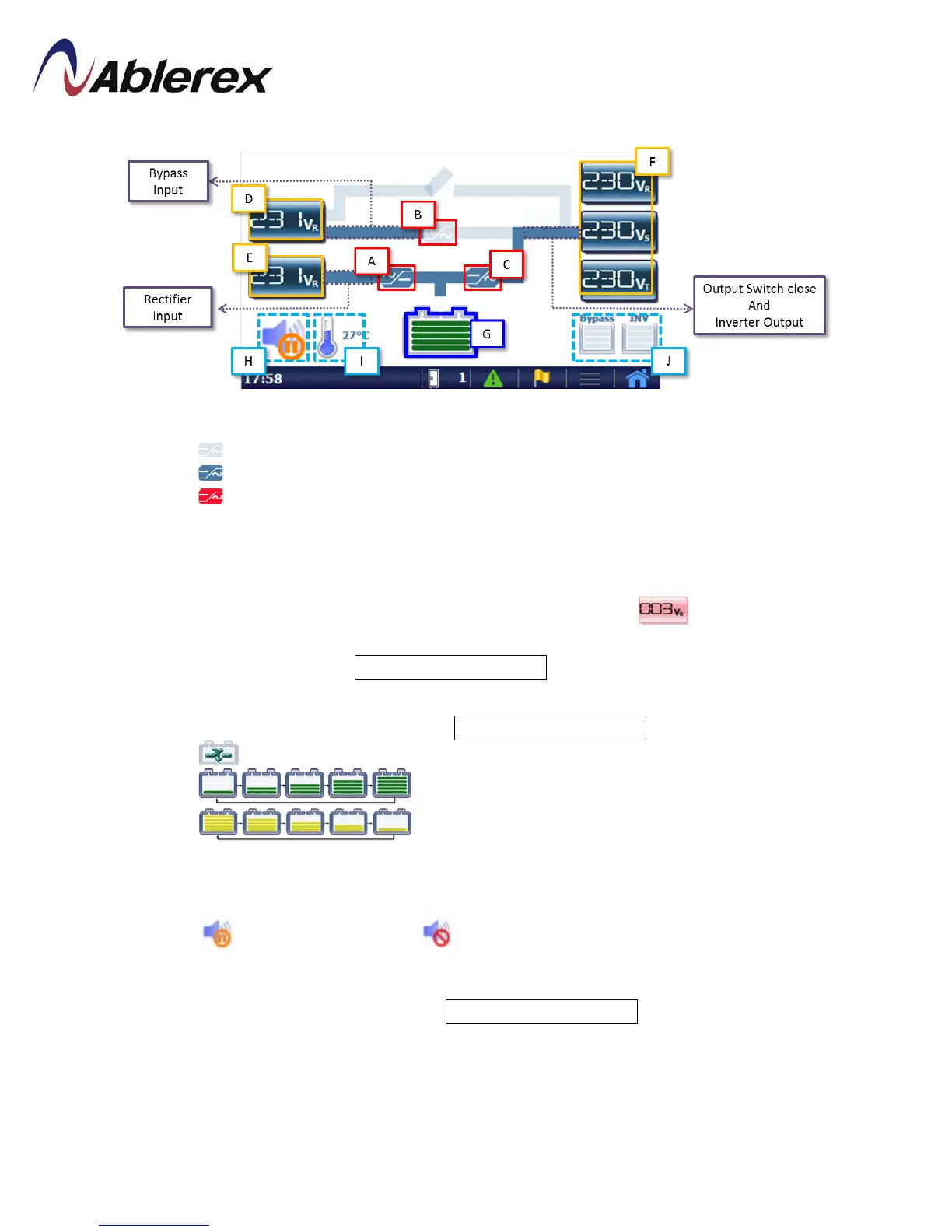
4.3 Mimic Display
【A】is Rectifier、【B】is Static Switch and 【C】is Inverter.
Thefade pattern indicatesthispart isn’t activated.
The blue pattern indicates this part is activated.
The red pattern indicates this part is occurred abnormal condition.
【D】Display the bypass input measurements.
【E】Display the mains input measurements.
【F】Display the output measurements.
The abnormal measurements will have redbackground .
Click【D】【 E】【 F】
to change the measure parameter and press for 3
seconds to enter to Real Time Information .
【G】Display the status of battery.
Press it for 3 second to enter to Real Time Information .
The battery isn’t connected.
The green pattern indicates the battery is charging.
The yellow pattern indicates the battery is discharging.
【H】Alarm silence button. Click it to silence the alarm and press for 3 seconds to
enable/disable the buzzer.
Buzzer is enabled and Buzzer is disabled.
【I】
Display UPS internal temperature.
Press for 3 seconds to enter to Real Time Information .
【J】Overload counter
53
192321262008007





 To Next Page