Home
Abus
Security System
Secvest 2WAY
Page 38 (Activating and Deactivating Data Records)
Abus Secvest 2WAY - Activating and Deactivating Data Records
48 pages
Manual
Save Page as PDF
To Next Page
To Next Page
To Previous Page
To Previous Page
Loading...
38
18.9.6. A
ctivating and deact
ivating data r
ecords
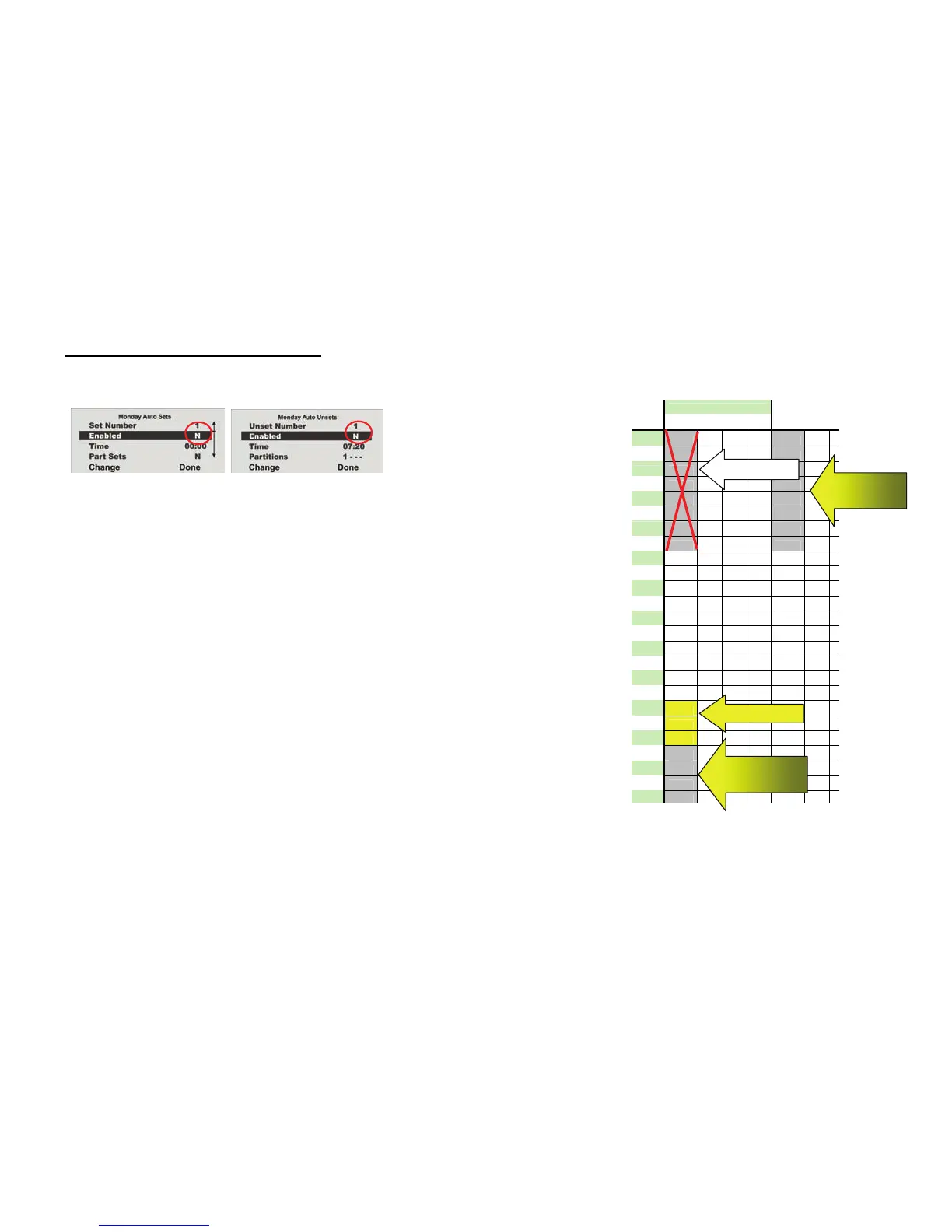
To deactivate a data record (time period), make changes in the
AU
TO
S
ET
menu.
In
AUTO UNSET
, change
Se
t
to
N
.
Data reco
rd:
Data reco
rd:
Start deactivated
End deactivated
Monday Tuesda
y
Time
P1
P2 P3 P4
P1
P2
P
00:00
00:00
01:00
02:00
03:00
S
04:00
05:00
06:00
07:00
07:20
07:20
08:00
09:00
10:00
11:00
12:00
13:00
14:00
15:00
16:00
17:00
18:00
18:00
19:00
P
20:00
19:59
21:00
20:00
22:00
S
23:00
00:00
Data recor
d 1
Data record 2
Monday
Data record 3
Activation
Tuesday
Data record 1
Deactivation
X
37
39
Table of Contents
Main Page
Default Chapter
2
Preface
2
Introduction
2
2 Contents
3
Table of Contents
3
3 Safety Information
4
4 System and Keypad Overview
5
5 Graphic Display
6
6 Activating the Wireless Alarm System
7
Fast Activation
7
User Code
7
Remote Control
7
Chip Key
7
Wireless Cylinder
7
7 During the Delay Time
8
8 Unsuccessful Activation
8
Delay Time was Not Started
8
Notes on System Activation with Compulsory Hidden (Omitted) Zones
9
Automatic Omission with Confirmation
9
Automatic Omission Without Confirmation
9
Delay Time Started
10
9 Following Successful Activation
11
Acknowledgement Tone on System
11
Acknowledgement Tone on Info Module
11
SMS Message
11
Acknowledgement on Siren
11
Accessory Module
11
10 Deactivating the Wireless Alarm System
12
User Code
12
Remote Control
12
Chip Key
12
Wireless Cylinder
12
11 Activating Partitions
13
On the System
13
Using the Wireless Remote Control
13
12 Internal Activation
14
On the System
14
Using the Wireless Remote Control
14
13 Alarms
15
Local / Internal Alarm
15
External Alarm
15
Silent Alarm
15
14 Resetting the Alarm
16
15 Alarm Transmission by Telephone
17
16 Remote Control by Telephone
17
17 User Menu
18
18 Settings in the User Menu
19
First Steps in the User Menu
19
Overview of Menu Items in the User Menu
19
Recording Voice Messages
20
Omitting Zones
21
Installing Users
21
Editing Users
22
Adding Users
26
Deleting Users
26
Viewing the Log
27
Additional Functions
29
Test
30
System Configuration
31
Week Planner
33
Activation / Deactivation of the Week Planner
34
Selecting the Weekday
34
Auto Set
35
Auto Unset
36
Internal and External Activation
37
Activating and Deactivating Data Records
38
Follow Me
39
Outputs On/Off
39
Telephone Call
40
19 Error Displays
40
Errors, Meanings, Causes and Suggested Solutions
41
20 Declaration of Conformity
43
21 User Menu Overview
43
Other manuals for Abus Secvest 2WAY
Installation Instructions
114 pages
Related product manuals
Abus SECVEST
82 pages
Abus CITADEL Alarm Set Micral
68 pages
Abus SG1800
40 pages
Abus Smartvest
63 pages
Abus SHSG10000
2 pages
Abus FG300A
4 pages
Abus AZWG10020
301 pages
Abus Bordo 6000
3 pages
Abus TVAC16000B
139 pages
Abus FUBE35001A
2 pages
Abus Alarmbox 2.0
4 pages
Abus Bordo 6000 Alarm
4 pages



 To Next Page