29
Picture settings
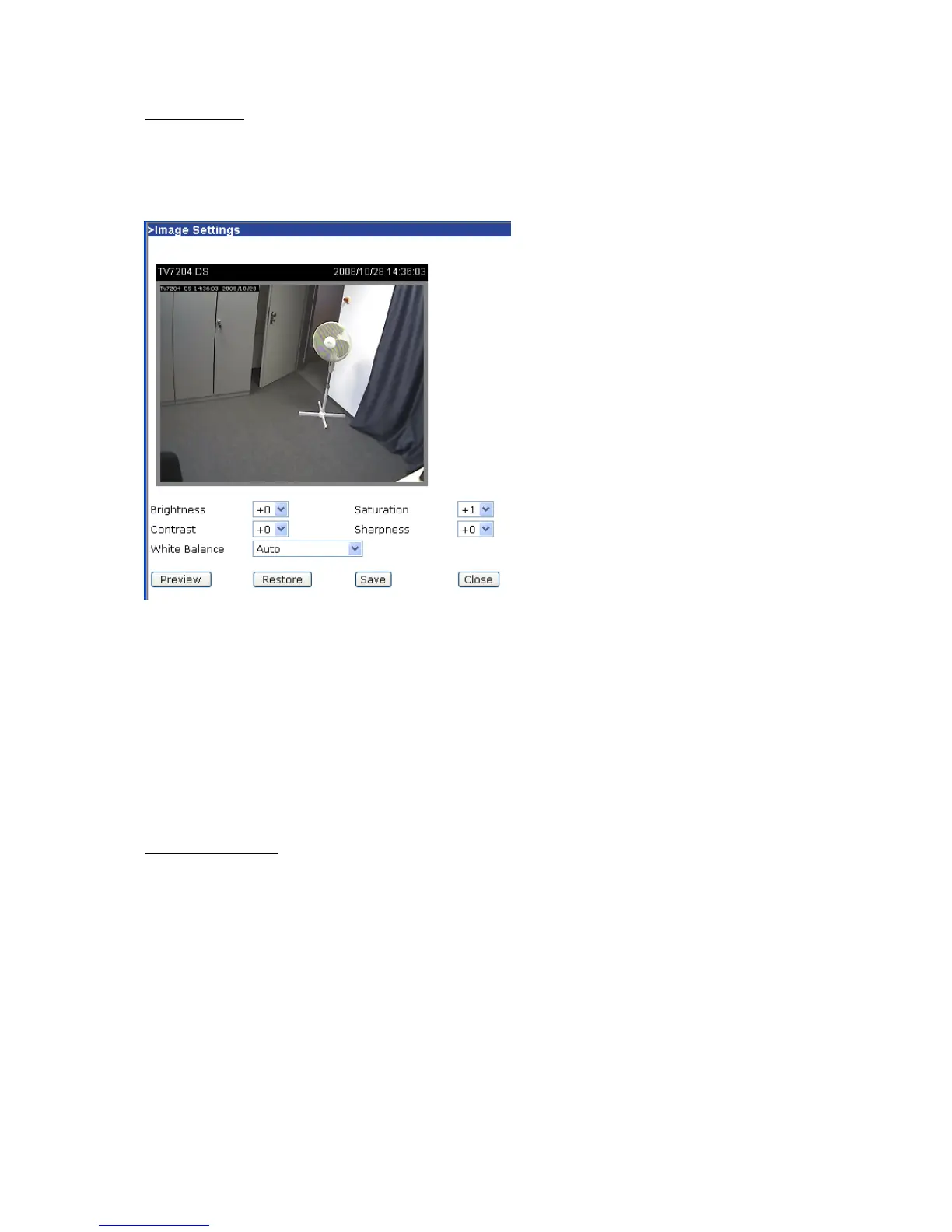
Click “Image settings” to open another window in which you can set the “Brightness”, “Contrast”,
“Saturation” and the “Sharpness” of the video picture. To check your settings, click “Preview”. To save
the picture parameters, click “Save”. To discard your changes, click “Restore”.
“White balance” Set the value for an optimal colour hue.
Audio settings
“Mute” Deactivation of the microphone inside the camera.
“Audio settings” Select the audio type and a bit rate.
“AAC” (Advanced Audio Coding) Special codec for audio data compression under MPEG4.
“GSM-AMR” (Global System for Mobile Communications – Adaptive Multi Rate) Voice codec
in GSM mobile telephone network.
Camera Control
On the camera control page, there are two main function control areas:
Camera control area
The pan and tilt functions can be controlled with these buttons. The “Left” button aims the camera to
the left; the “Right”, “Up” and “Down” buttons aim the camera accordingly. The “Home” button aims the
camera to the center.
“Pan speed” This controls the range of the horizontal movement of the camera. The greater the value,
the greater angular movement when performing the “Left” or “Right” functions would be.
“Tilt speed” This controls the range of the vertical movement of the camera. The greater the value, the
greater angular movement when performing the “Up” and “Down” functions would be.
“Auto pan/patrol speed” This defines the speed of panning and patrol, the greater the value, the
faster the speed.



 To Next Page