69
English
4. Initial start-up
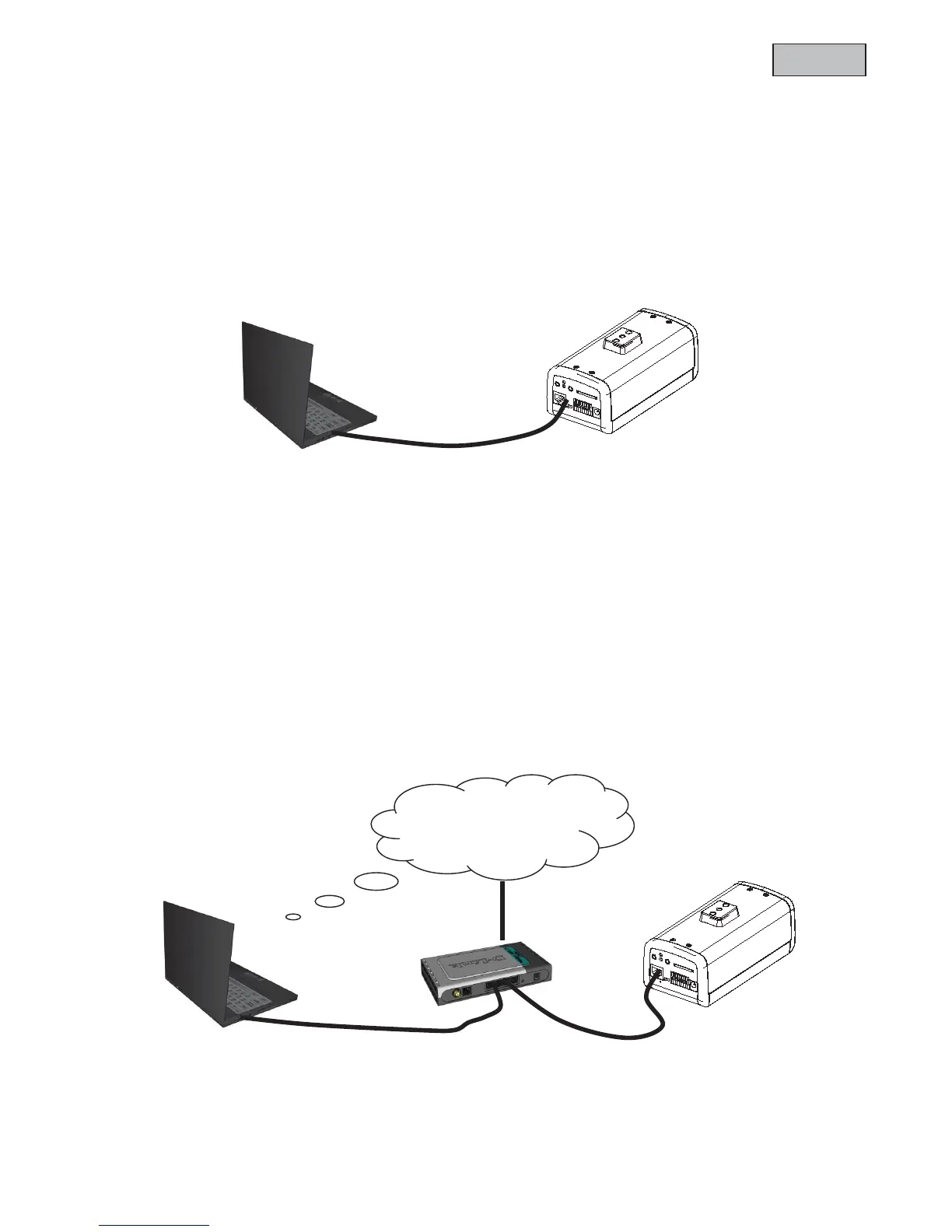
Direct connection between camera and PC / laptop
1. Make sure to use a crossover network cable
2. Connect the cable with the Ethernet port of the PC / Laptop and the camera
3. Connect the power supply to the camera
4. Configure the IP address of the PC / Laptop to 169.254.0.1
5. Continue with point 4.1 in order to finish the initial installing and build-up a connection to the
camera
Connecting the camera by using a router / switch
1. Make sure to use a pair of patch cables
2. Connect the cable with Ethernet port of the PC / laptop with the router / switch.
3. Connect the cable with the network cable and with the router / switch.
4. Connect the power supply to the camera
5. f there is a name server (DHCP) available in your network then set the IP address of your PC /
laptop to “automatically receive IP address”
6. If there is no name server (DHCP) available set the IP address of your PC / laptop to
169.254.0.1
7. Continue with point 4.1 in order to finish the initial installing and build-up a connection to the
camera
c Crossed Ethernet cable
Internet
Patch cable



 To Next Page