Accent 800 Hardware Manual Page 22
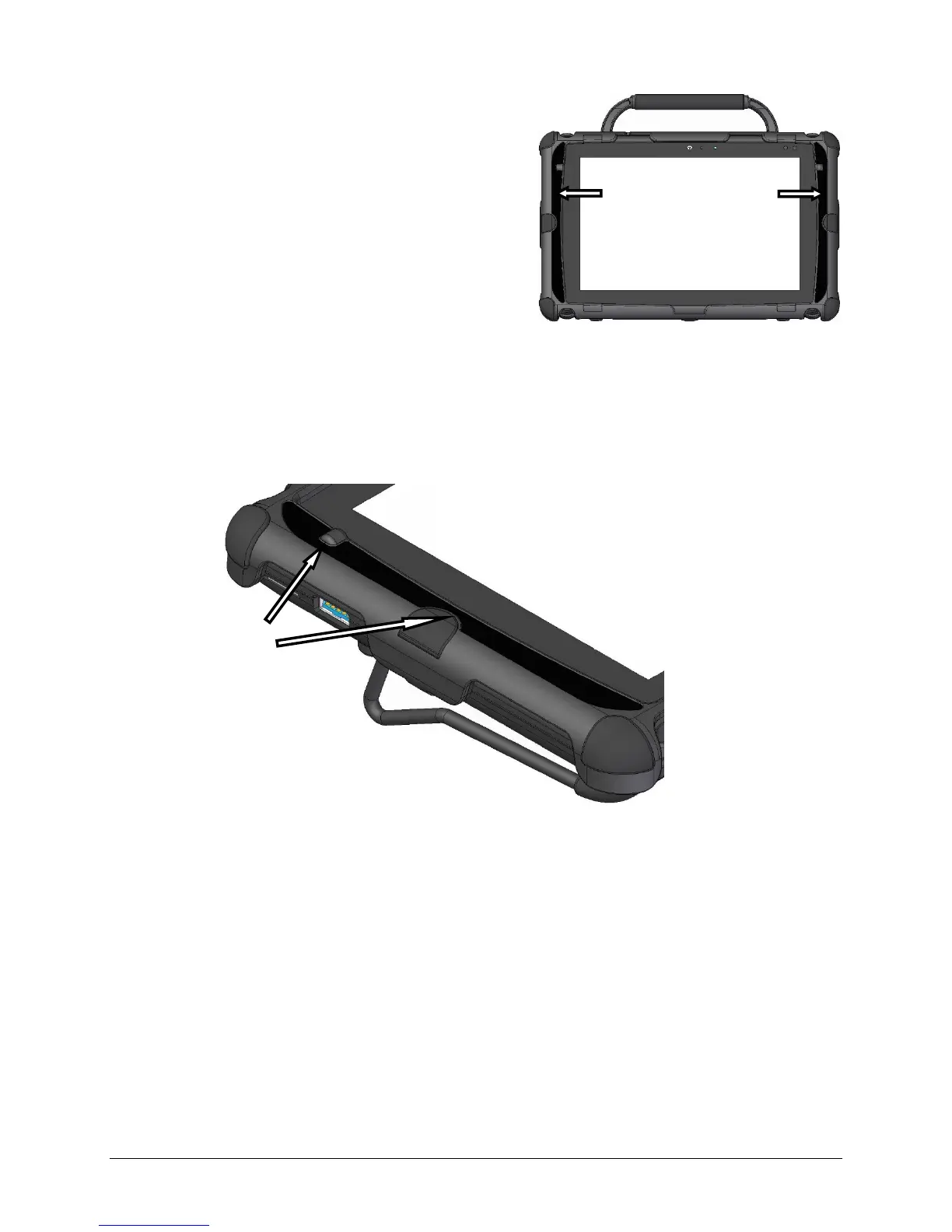
Applying Colored Labels to the Frame
Your replacement frame came with a variety
of colored labels. These labels are designed to
fit on each side of the frame.
Choose the color you want and apply the labels
to the frame, following the procedure below.
1. With the frame attached to the device, clean the label area of the frame with rubbing alcohol.
2. Peel either the right or left label from its backing. Try not to touch the back of the label.
3. Hold both ends of the label, stretching it tight so it does not fold back on itself.
4. Align the label with the corresponding features on the frame.
Hint: An outline impression on the frame indicates where the label fits.
5. Place the top end of the label onto the top of the frame’s label area and lightly smooth it down to
the other end until the label is in place.
Hint: You can pull the label loose from the frame and reposition it if necessary.
6. When the label is in place, rub your fingers over the entire label to make sure it sticks evenly.
7. Repeat steps 2 through 6 to apply the remaining label to the other side of the frame.
8. To secure the frame to the device with screws, proceed to the next section, “Attaching the Frame
More Securely”.
Notches in the label
fit around features
on the frame.



 To Next Page