Controller Programming (advanced)
Page 16
Flow Management aligns the total zone water consumption to be as high as possible
without exceeding the capacity of the water source. Up to four zones will run
simultaneously to achieve this flow rate. That zone limit can be modified under the
Advanced Options
knob position. Setting up Flow Management requires providing the
controller with zone flow rates and the water source flow capacity. If you have installed a
flow meter the controller will 'learn' the flow rates of the zones automatically. If you do not
have a flow meter on the system you must enter those rates using the
Zone Water
Management
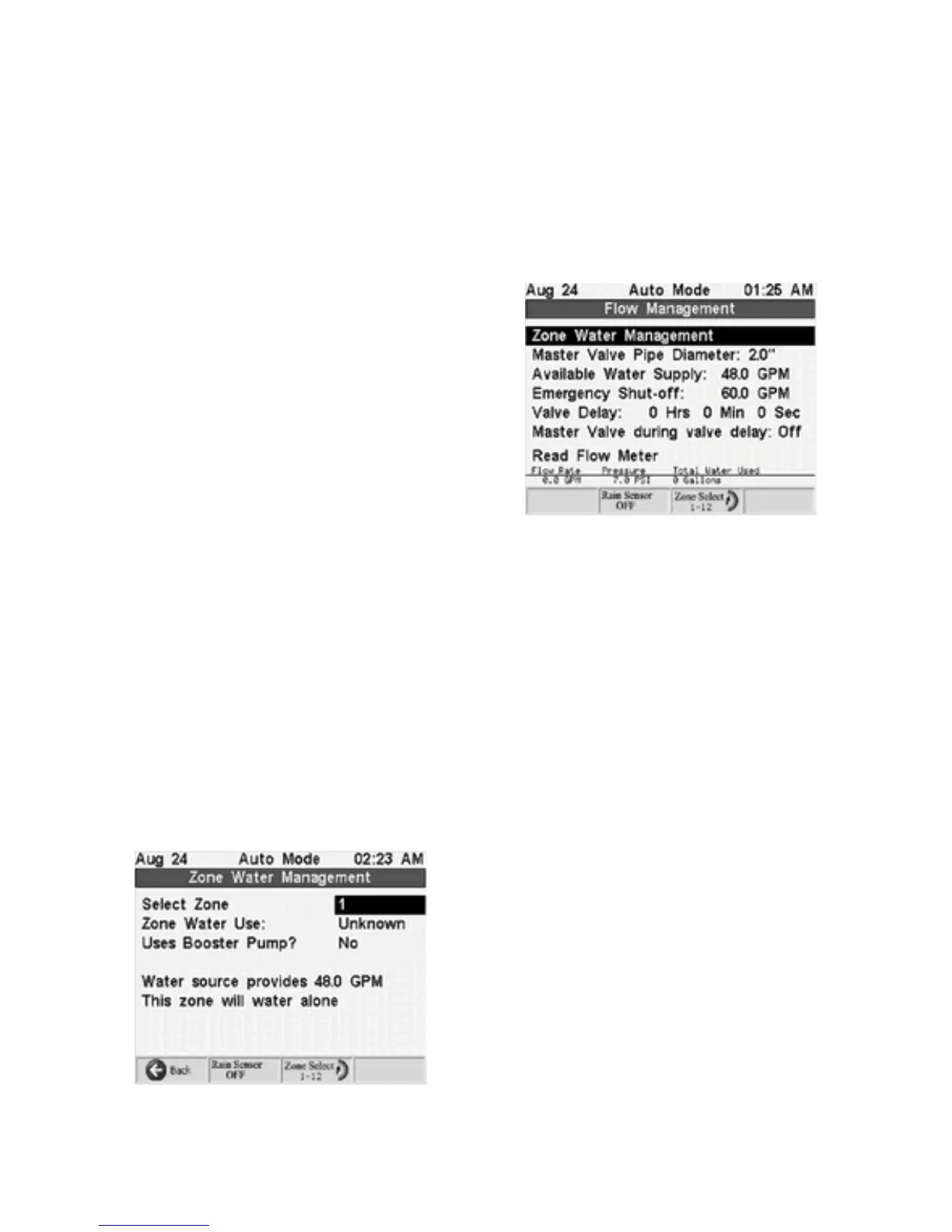
screen. The source flow capacity is entered in the main
Flow
Management
screen as follows:
1. Enter the
Master Valve Pipe Diameter
(main
line pipe diameter)
using the
Next
button and
the
+
or
-
Adjust Value
buttons. The controller
automatically calculates the
Available Water
Supply
in gallons per minute (GPM). This
calculation is based on the standard
recommended flow velocity of 5 feet per second.
You can override this calculation and enter your
own GPM rate if you wish by selecting the
Available Water Supply
field and adjusting the
value.
2. Some valves have difficulty turning off if another valve immediately turns on and drops
the water pressure. Set the lapsed time you need between valve turn-off and the next
valve turn-on in the
Valve Delay
field. This field is also useful for setting long valve
delays needed for recharging a pond or a poor well.
3. Normally you will want to have the Master Valve remain on during a valve delay period
but if you are using the Master Valve wiring to activate a pond pump and need recharge
time set the Master Valve to Off during valve delay. Do this in the
Master Valve During
Valve Delay
field.
4. The emergency shutoff field will only be available if there is a flow meter installed. It
will shutoff the system if the flow rate is exceeds the set rate.
The
Zone Water Management
screen can be accessed from the
Flow Management
screen using the
Select Item
buttons and
+
button.
Press the
Prev
button to switch to the
Zone Water Management
field and press
+
Adjust Value
.
This
Zone Water Management
screen displays a
report of each zone and its water usage. The
default value for each zone's water usage is
"unknown." If you install a flow meter, after you run
the system for the first time the controller will
automatically measure flow rates for each zone
and the "unknown" value displayed will be replaced
by the actual flow rate determined by the
controller. If you know the flow rates for each zone
you can manually enter the values into the system.
Once the system knows the rate the water source provides and the rate each zone uses,
it will automatically maximize the use of your water source based on these settings.



 To Next Page