Controller Installation
Page 4
WARNING
: Insure that all wire connections in your valve boxes are protected with
waterproof connectors such as the 3M DBY connectors.
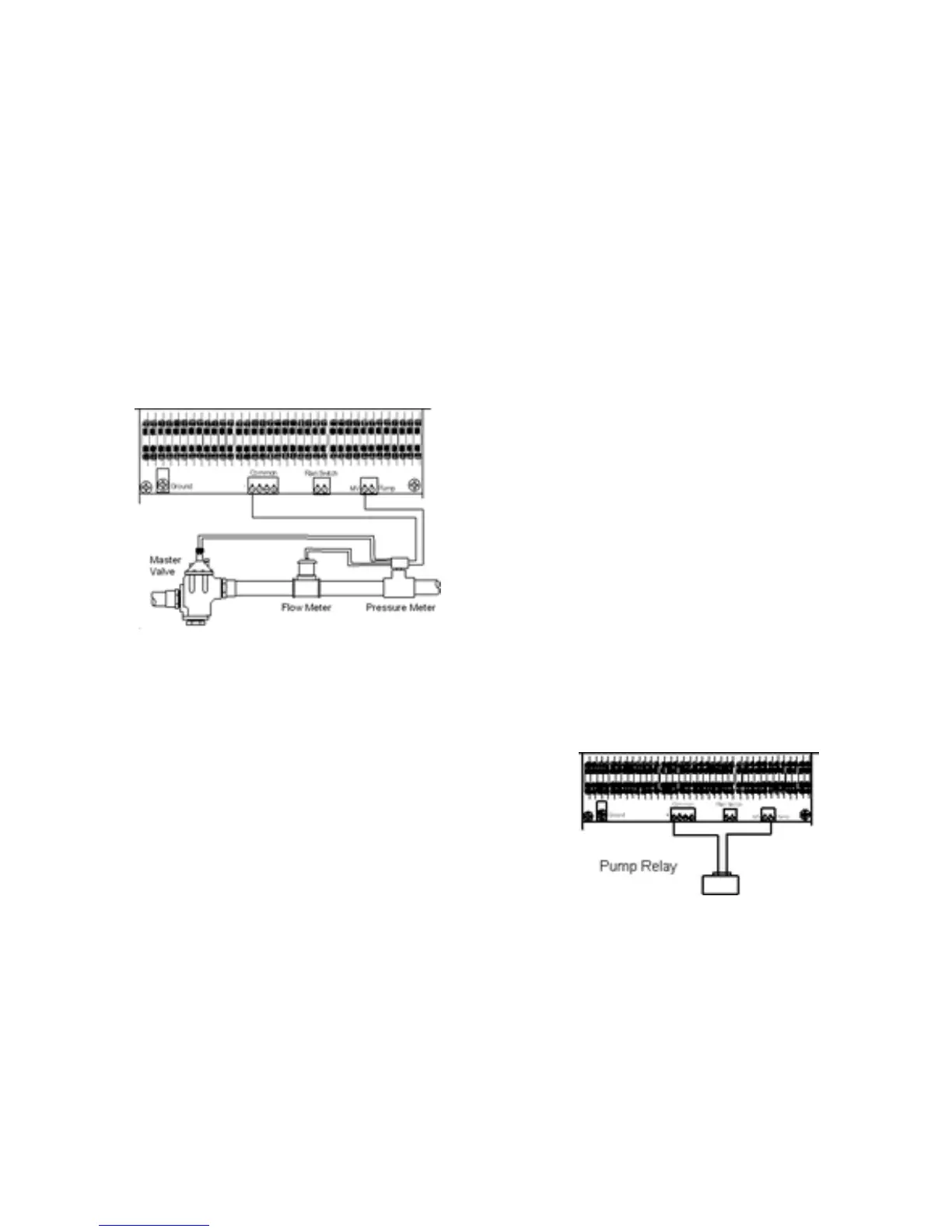
Connecting a Master Valve, Flow & Pressure Meter
The Acclima SC 36 enables sophisticated flow control for simultaneous multiple zone
watering. Knowing the available flow rate from your water source, it can then water
multiple zones simultaneously without causing a pressure drop in your system. If you
know the flow rates of your zones and your water source you can enter this information
into the controller and activate this feature even though you do not have a flow meter
installed. If you install an Acclima Flow and Pressure Module the controller will determine
this information automatically.
1. Install the Flow and Pressure Meter (FPM) module in accordance with the provided
instructions.
2. Connect the black wire pair from the FPM module to the Master Valve.
3. Connect the Red and Black wire pair from the
FPM module to the Data Industrial Flow
Transducer- red to red and black to black.
4. Connect the white wire from the FPM to the
common wire in the underground wiring system.
5. Route the remaining red wire from the FPM
back through the zone wire conduit to the MV
terminal in the SC 36 controller.
NOTE
: Connecting the master valve is optional and may not be required for your
irrigation system.
Connecting a Pump
Connect one of the pump relay wires to the common
wire at any convenient access to the common. Run
the remaining wire back through the zone wire conduit
and connect it to the 'Pump' terminal as shown below.



 To Next Page