17
Check Weighing
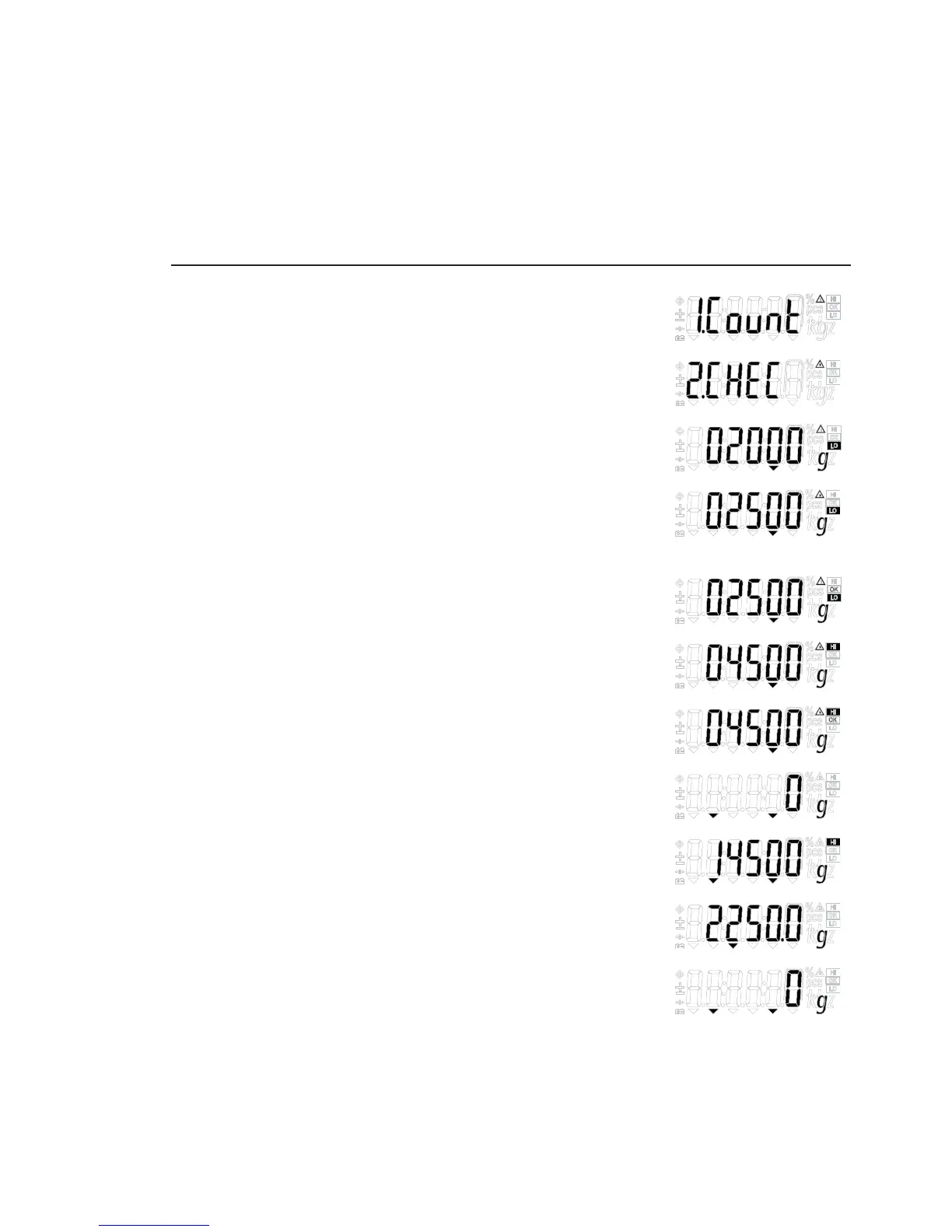
Step Key (or instruction) Display
a. Select application program (Fn/UP) > 2 sec
b. Select “Checkweighing” (Fn/UP) or (G/N/DOWN) Repeatedly
c. Press PRINT/ENTER to confirm. (PRINT/ENTER)
d. Set lower limit; “LO” flashes. (Fn/UP) or (G/N/DOWN) and/or
(ZERO/LEFT) or (TARE/RIGHT)
e. Press PRINT/ENTER to confirm and save. (PRINT/ENTER)
f. Set upper limit, “HI” flashes, (Fn/UP) or (G/N/DOWN) and/or
and then press PRINT/ENTER. (ZERO/LEFT) or (TARE/RIGHT)
g. Press PRINT/ENTER to confirm and save. (PRINT/ENTER)
h. Place the sample on the scale.
Display shows the difference and HI/LO symbol
i. Unload the scale
j. Checkweighing application: Clear (ZERO/LEFT) > 2 sec


 To Next Page