Linearize the Scale
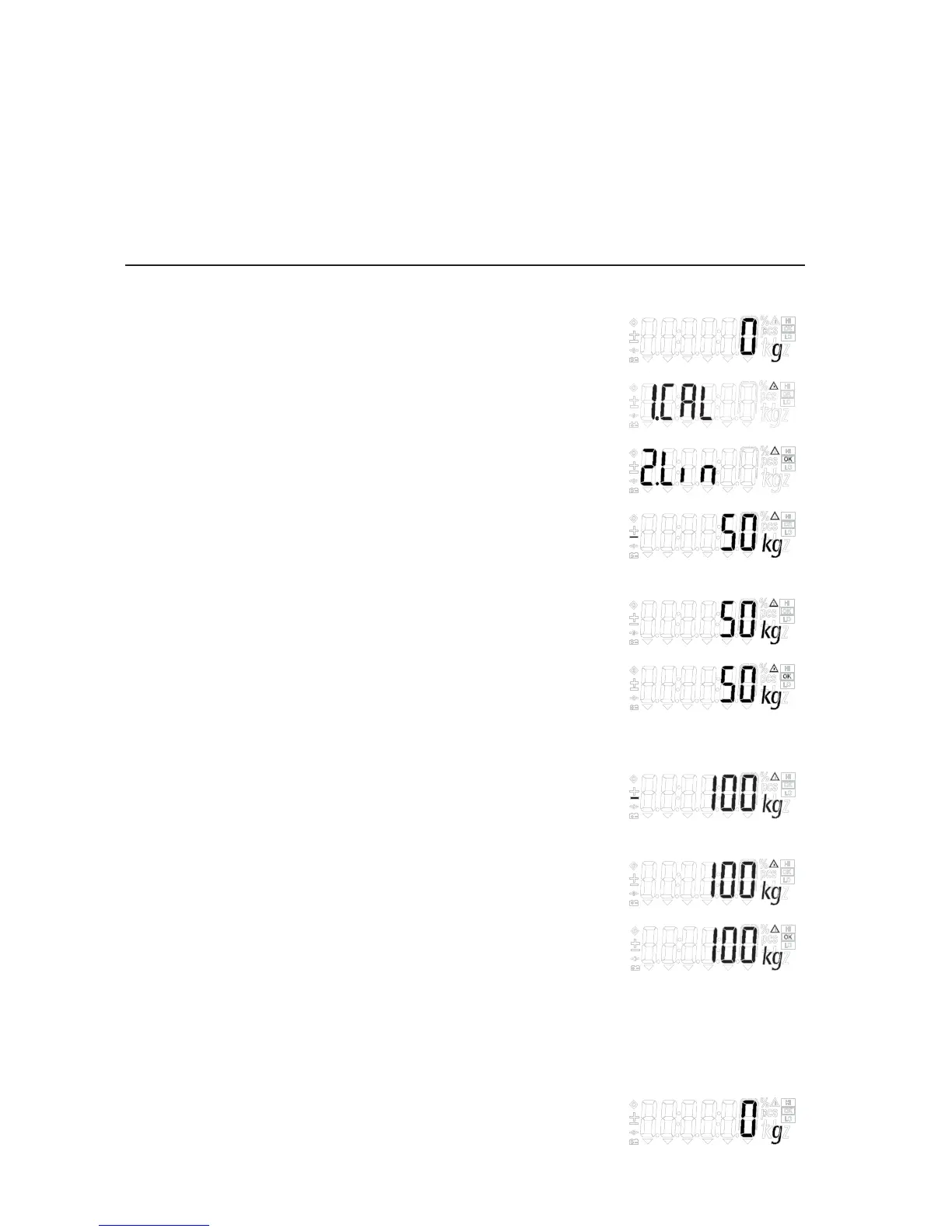
Step Key (or instruction) Display
a. Switch on the scale (ON/OFF)
b. Zero the scale (ZERO/LEFT)
c. Select calibration/linearization mode (TARE/RIGHT) > 2 sec
d. Select linearization (Fn/UP) or (G/N/DOWN) repeatedly
e. Confirm/start linearization (PRINT/ENTER)
After the zero point is stored, the required
linearization weight is displayed.
f. Place the required weight on the scale
g. If the weight is applied within the defined time (PRINT/ENTER)
limit and tolerance, the “OK” symbol is displayed.
Press “(PRINT/ENTER)” to confirm and save
calibration. (To exit linearization, press
(ZERO/LEFT) > 2 sec)
h. The next linearization weight will be shown
on the display after confirmation
of the previous linearization weight.
i. Place the required weight on the scale.
j. If the weight is applied within the defined time (PRINT/ENTER)
limit and tolerance, the “OK” symbol is displayed.
Press “(PRINT/ENTER)” to confirm and save
calibration. (To exit linearization, press
(ZERO/LEFT) > 2 sec)
k. Remove the linearization weight
l. Linearization complete
20


 To Next Page