This document serves as a user manual for the ACE Vision Series X3H410TS desktop computer, providing detailed instructions for system disassembly, product take-back, and service. It is primarily intended for professional system integrators and PC technicians, offering guidance on EPEAT-registered desktops.
Function Description:
The ACE Vision Series X3H410TS is a desktop computer designed for general computing tasks. The manual outlines procedures for accessing and replacing various internal components, facilitating maintenance, upgrades, and end-of-life processing. It emphasizes compliance with environmental directives for responsible disposal and recycling.
Important Technical Specifications (Derived from Disassembly Instructions):
- Storage: The system supports both Hard Disk Drives (HDDs) and Solid State Drives (SSDs). HDDs are typically 3.5" and secured by one latch and four Phillips screws. SSDs are 2.5" and found on the motherboard, secured by one Phillips screw.
- Memory: Memory modules are located on the motherboard, generally in pairs of two. Each module is secured by two latches.
- Processor: The desktop features a single processor located under a heatsink on the motherboard. The manual specifically mentions push-pin based Intel heatsinks.
- Motherboard: The motherboard is centrally located and secured by eight Phillips screws. It also houses a lithium battery.
- Expansion Cards/Graphics Cards: The system may include expansion and/or graphics cards, found in the lower right-hand corner of the motherboard and physically connected to the case. These are secured by two Phillips screws.
- Power Supply Module: The power supply is located in the back left-hand corner and secured by three Phillips screws.
- Chassis Cover: The chassis cover is on the top of the unit and is held in place by two Phillips screws.
- Batteries: A lithium battery is present on the motherboard, secured by one latch.
- Fans: The chassis fan is located underneath the hard drive/optical drive mounting bracket, in the top right-hand corner, and is secured by four Phillips screws.
- External Power Cable: Connects directly to the power supply via a direct pressure connection method.
Usage Features:
The manual primarily focuses on the physical manipulation of the computer's internal components rather than its operational use. It provides step-by-step instructions for:
- Disassembly: Detailed procedures for removing data storage devices, memory, processor, motherboard, expansion/graphics cards, power supply module, chassis cover, batteries, and fans. Each section specifies the location of the component, the type and number of fastenings, and the tools required.
- Component Identification: Clear illustrations and descriptions help users identify the various internal parts of the desktop.
- Safety Precautions: A crucial caution advises users to always power off and unplug the system before disassembly.
- Environmental Compliance: The manual highlights "Selective Treatment/Special Handling Per Annex VII, Directive 2012/19/EU" for various components, indicating specific disposal or recovery requirements in compliance with Directive 2008/98/EC. This includes printed circuit boards within data storage devices, memory, processor, motherboard, expansion/graphics cards, power supply module, lithium batteries, and plastic components within fans.
Maintenance Features:
- Component Replacement: The detailed disassembly instructions serve as a guide for replacing faulty or upgrading components.
- Battery Handling: Specific instructions are provided for the careful handling and proper disposal of the lithium battery, emphasizing environmental responsibility and compliance with local hazardous waste management regulations.
- Product Take-Back and E-Waste Program: Ace Computers offers a nationwide take-back service for both EPEAT-registered and Non-EPEAT registered products, in cooperation with an R2-certified recycling facility. Information on this program is available on their website.
- Product Services and Support:
- Replacement Components/Product Services: Users can obtain replacement parts and product service by visiting the Ace Computers support page and filling out a Support Request form, or by calling their Support Line.
- Availability of Parts: Most parts/product services are available for at least 5 years after the date of sale, covering power supply, fans, hard drives, memory, CPU, PCB assemblies, and all hardware.
- Returning Merchandise for Service: After completing a Support Request Form, an Ace Computers Team Member will assist with technical questions and facilitate the return process for in-house repairs if necessary.
- Manual Updates: Users are advised to check the Ace Computers website for the most up-to-date version of the manual and possible updates to the manual revision level.

 Need help?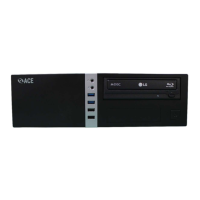

 To Next Page
 General