ACE095 Page 11 of 17 Rev Date: 12.7.2021
5. Expansion Card/Graphics Card
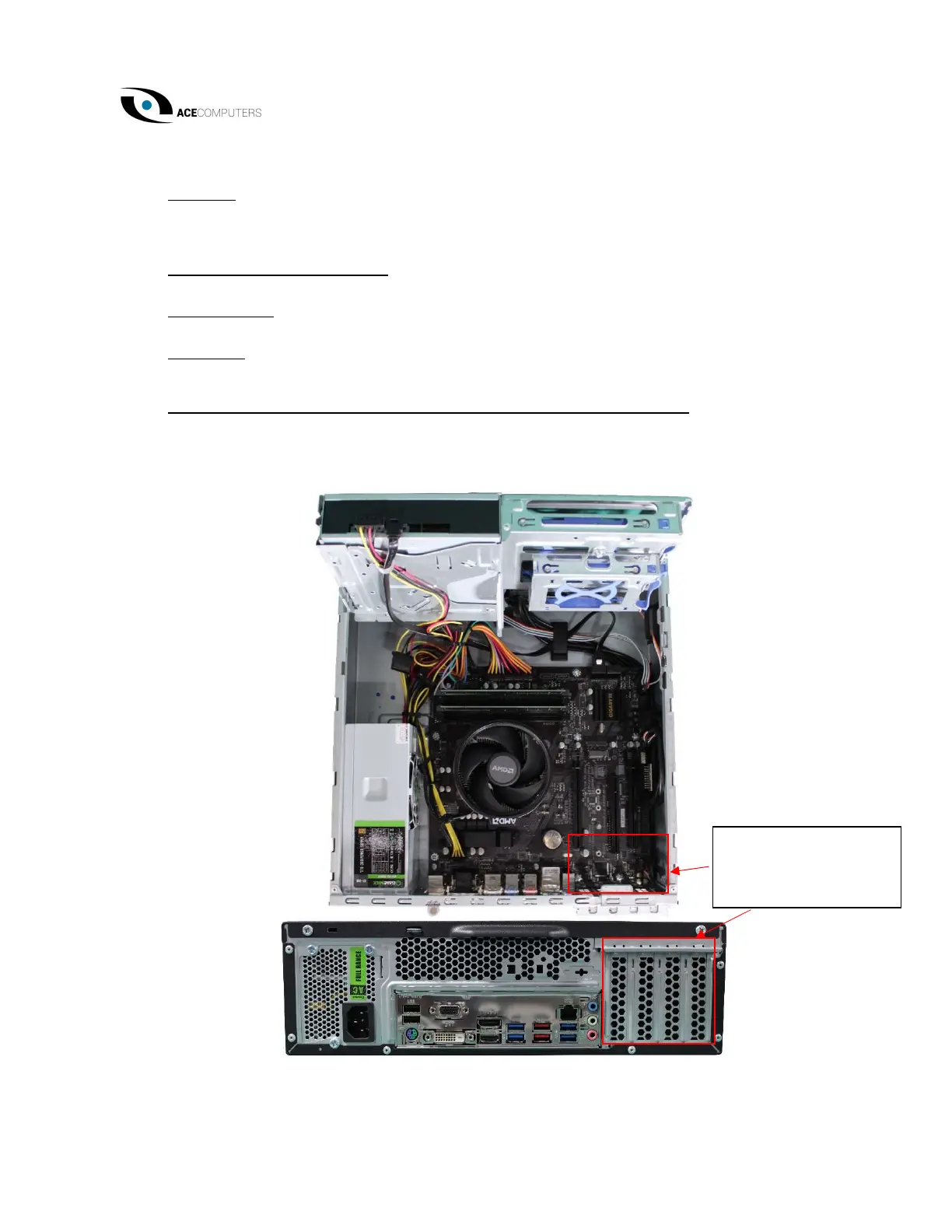
Location: Certain configurations of desktops may include expansion and/or graphics cards.
These will be found in the lower right-hand corner of the motherboard. They’re electrically
connected to the motherboard and physically connected to the case.
Type and number of fastenings: Two (2) Phillips screws.
Tools required: Screwdriver with PH2 bit.
Procedure: Remove the Phillips screws from the rear of the case. Ensure the case cover is
removed. Then you can disconnect the components from the motherboard.
Selective Treatment/Special Handling Per Annex VII, Directive 2012/19/EU: Any printed circuit
boards within the expansion card/graphics card must be removed separately from the
expansion card/graphics card and shall be disposed or recovered in compliance with Directive
2008/98/EC.
additional Expansion
Cards/Graphics Cards


 To Next Page