4.6 Wi-Fi Setting
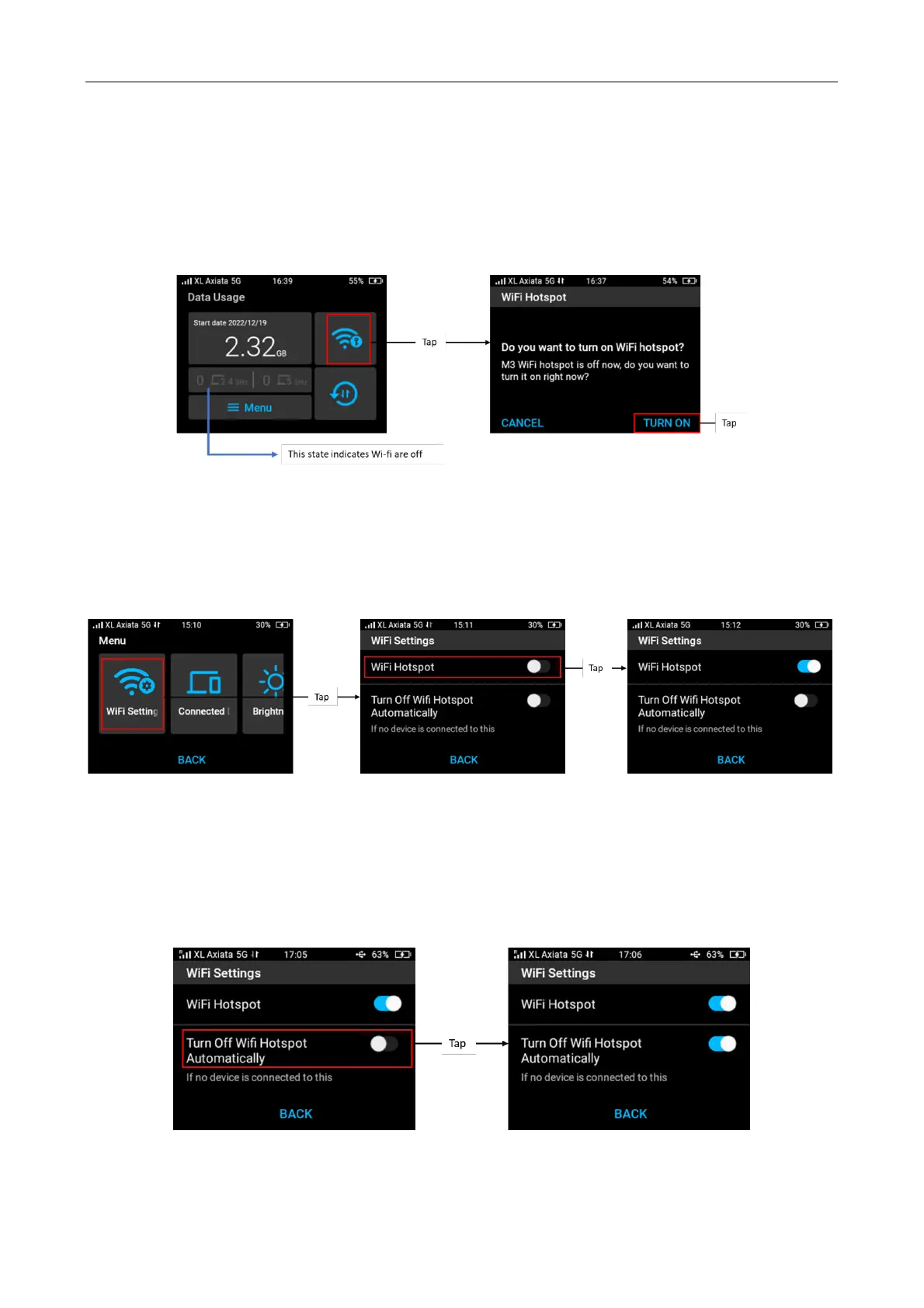
Turn On Wi-Fi hotspot from Home screen
If Wi-fi hotspot are off, you can turn it on from Home screen > tap Wi-Fi info icon. Confirm by
tapping “Turn On”. Once hotspot is activated, you can view information on each hotspot.
Turn On and Off Wi-Fi hotspot from Menu
If Wi-Fi hotspots are off and you want to turn on the Wi-Fi hotspot function, tap Menu from
home screen > tap Wi-Fi Settings and then slide on the Wi-Fi Hotspot slider. You can also turn
off Wi-Fi from this slider.
Enable automatic Wi-Fi hotspot turn off
To save battery life, you have an option to turn off Wi-Fi hotspot automatically when there are
no users connected. The default state of this function is OFF.
To activate the automatic Wi-Fi turn off, Menu > select Wi-Fi Settings > slide on Turn off Wi-Fi
Hotspot automatically.
Change Wi-Fi Name and Password



 To Next Page