EasyManua.ls Logo

Acer H6800 - User Manual

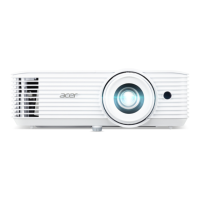
Acer H6800
53 pages
Print Icon
To Next Page IconTo Next Page
Loading...
Copyright © 2020. Acer Incorporated.
All Rights Reserved.
Acer Projector User's Guide
Original Issue: 04/2020
Acer Projector
H6800/E8600/HE-4K10/GM820/
VH-720/H6800BD+/H6800ABD/
H6800BD/H6800a/X6800/X6800a/
H6801BDa/H6800BDa/D4K2002
User's Guide

Questions and Answers

  • H
    hamiltoncraigSep 10, 2025
    How do I fix a partial or incorrectly displayed image on my Acer Projector (PC)?
    • K
      Kimberly VegaSep 10, 2025
      To fix an incorrectly displayed image, open "My Computer", open the "Control Panel", and then double-click the "Display" icon. Select the "Settings" tab. Verify that your display resolution setting is lower than or equal to WUXGA-RB (1920 x 1200). Click the "Advanced Properties" button. If the problem still appears, change the monitor display you are using and follow the steps below: Verify that the resolution setting is lower than or equal to WUXGA-RB (1920 x 1200). Click the "Change" button under the "Monitor" tab. Click "Show all devices". Next, select "Standard monitor types" under the SP box, and choose the resolution mode you need under the "Models" box. Verify that the resolution setting of the monitor display is lower than or equal to WUXGA-RB (1920 x 1200).
  • R
    Rachel HowardSep 9, 2025
    How to remove vertical flickering bar on Acer H6800 Projector?
    • J
      Jacob Young PhDSep 9, 2025
      To remove a vertical flickering bar, use "Frequency" to make an adjustment. Also, check and reconfigure the display mode of your graphics card to make it compatible with the projector.
  • I
    Isabella BlairSep 8, 2025
    How to stop Acer H6800 Projector image from flickering?
    • S
      Sara RhodesSep 8, 2025
      To correct an unstable or flickering image, adjust the "Tracking". Also, try changing the display color depth settings on your computer.
  • D
    Denise Brown DDSAug 23, 2025
    How to adjust the screen size on Acer Projector?
    • B
      burkedavidAug 23, 2025
      To adjust the image size, try the following: adjust the zoom ring on the projector; move the projector closer to or further from the screen; or press "MENU" on the remote control, go to "Image - -> Aspect Ratio" and try different settings or press "RATIO" on the remote control to adjust directly.
  • J
    Jeffery DodsonSep 5, 2025
    How to correct slanted image sides on Acer H6800?
    • C
      Christopher WilkinsSep 5, 2025
      To fix slanted sides, try repositioning the projector so that it is centered on the screen, if possible. Alternatively, press the "Keystone / " button on the remote control until the sides are vertical.
  • R
    Ryan GrantSep 4, 2025
    What to do if Acer H6800 Projector is not responding?
    • E
      Ernest RamirezSep 4, 2025
      If the projector stops responding, turn it off if possible, then unplug the power cord and wait at least 30 seconds before reconnecting the power.
  • K
    kathryn42Sep 3, 2025
    Why is my Acer H6800 Projector image blurry?
    • A
      Abigail Hays DVMSep 3, 2025
      The image may be out of focus because the lens cap is still on. Remove it. You may also need to adjust the focus ring on the projector lens. Check that the projection screen is within the required distance from the projector.
  • S
    Steven ButlerSep 2, 2025
    How to fix no image on Acer H6800?
    • B
      Brenda HolmesSep 2, 2025
      First, ensure the projector is connected as described in the "Getting Started" section and that none of the connector pins are bent or broken. Also, check if the projector lamp has been securely installed. Make sure you have removed the lens cap and the projector is switched on.
  • W
    williamsrobertSep 1, 2025
    Why does my Acer Projector LAN/WiFi, USB Display source show no signal?
    • C
      Christian ParsonsSep 1, 2025
      If your Acer Projector's LAN/WiFi, USB Display source shows no signal, power off the projector and power it on again.
  • P
    phelpstanyaAug 30, 2025
    How to fix image with vertical flickering bar on Acer H6800 Projector?
    • H
      howardalexAug 31, 2025
      To fix an image with a vertical flickering bar on your Acer Projector, use "Frequency" to make an adjustment. Also, check and reconfigure the display mode of your graphics card to make it compatible with the projector.

Summary

Information for your safety and comfort

Power Connection Safety

Guidelines for connecting and disconnecting the power supply unit to the projector safely.

Accessibility for Disconnection

Ensuring the power outlet is accessible for easy disconnection of the projector.

Critical Safety Warnings

Critical safety warnings regarding water, unstable surfaces, and ventilation.

Electrical Power Usage

Product Servicing and Safety

Instructions and warnings against self-servicing the projector and referring to qualified personnel.

Additional Safety Precautions

Initial Setup and Use

Essential Operating Precautions

Essential precautions to maximize the projector's lifespan and ensure safe operation.

Control Panel Functions

Remote Control Operation

Powering the Projector On and Off

Operational Warning Indicators

Image Adjustment Guide

Image Size and Projection Distance

User Interface Navigation

Color Settings Adjustment

Image Settings Adjustment

System Settings Configuration

Management Settings

Audio Settings

Troubleshooting and Appendices

Image Problem Solutions

A guide to common image problems and their solutions for troubleshooting.

Projector Troubleshooting Guide

Lamp Replacement Procedure (Service Personnel)

Ceiling Mount Installation Guide

Technical Specifications

Signal Compatibility Modes

Regulatory and Safety Notices

FCC Compliance and Notices

Details on FCC compliance for Class B digital devices, including operation conditions and interference.

EU Declaration of Conformity

FCC Declaration of Conformity

Acer H6800 Specifications

General IconGeneral
BrandAcer
ModelH6800
CategoryProjector
LanguageEnglish

Related product manuals