40
34
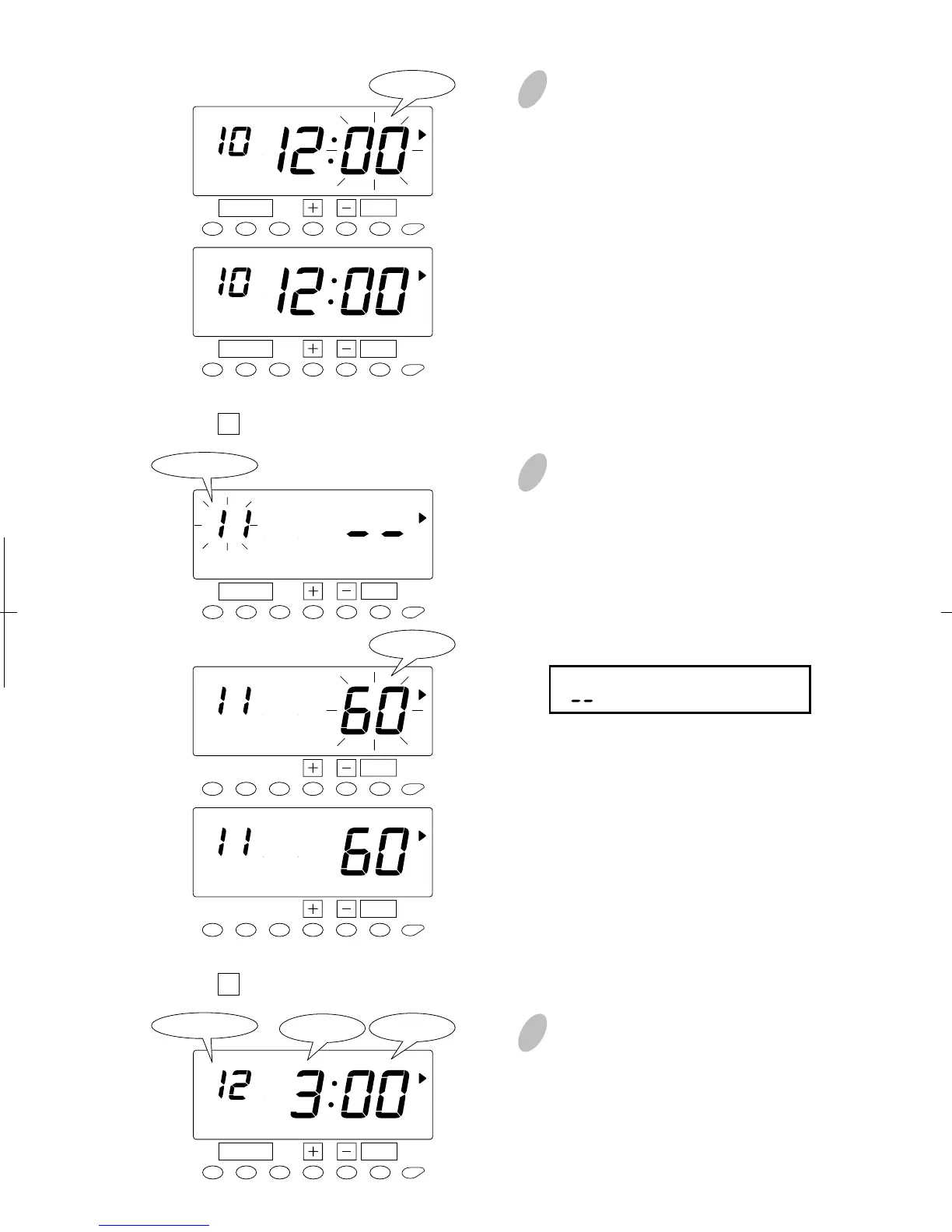
In this case, push the [+] or [-]
button to set at "00". And then,
push the [SET] button. At that
moment, the display will change
from flashing to steady.
SET
PM
FUNCTION
SCHEDULE
SET
PM
FUNCTION
SCHEDULE
Minute
13
Set the "
11 Duration in minutes, Break #1".
Push the [SET] button again and
select "11" by pressing the [+] or [-]
button. Once you push the [SET]
button, flashing of the display will
change to "Minute". In case of the
example, push the [+] or [-] button
to set at "60" and push the [SET]
button. At that moment, the display
will change from flashing to steady.
Range of values: 1-99 min.
(" " makes the function disabled.)
SET
SCHEDULE
SET
SCHEDULE
SET
FUNCTION
Program No.
SCHEDULE
14
Set the "
12 Start time of Break #2".
Make settings for the "Start time of
break #2" in the same manner as for
the "Start time of break #1", as
illustrated in the figure on the left.
SET
PM
FUNCTION
Program No.
SCHEDULE
15
Minute
Minute
Hour


 To Next Page