41
35
Push the [SET] button again. Then,
the left-side number starts flashing.
A flashing number can be changed.
FUNCTION
SCHEDULE
SCHEDULE
FUNCTION
SCHEDULE
FUNCTION
SCHEDULE
17
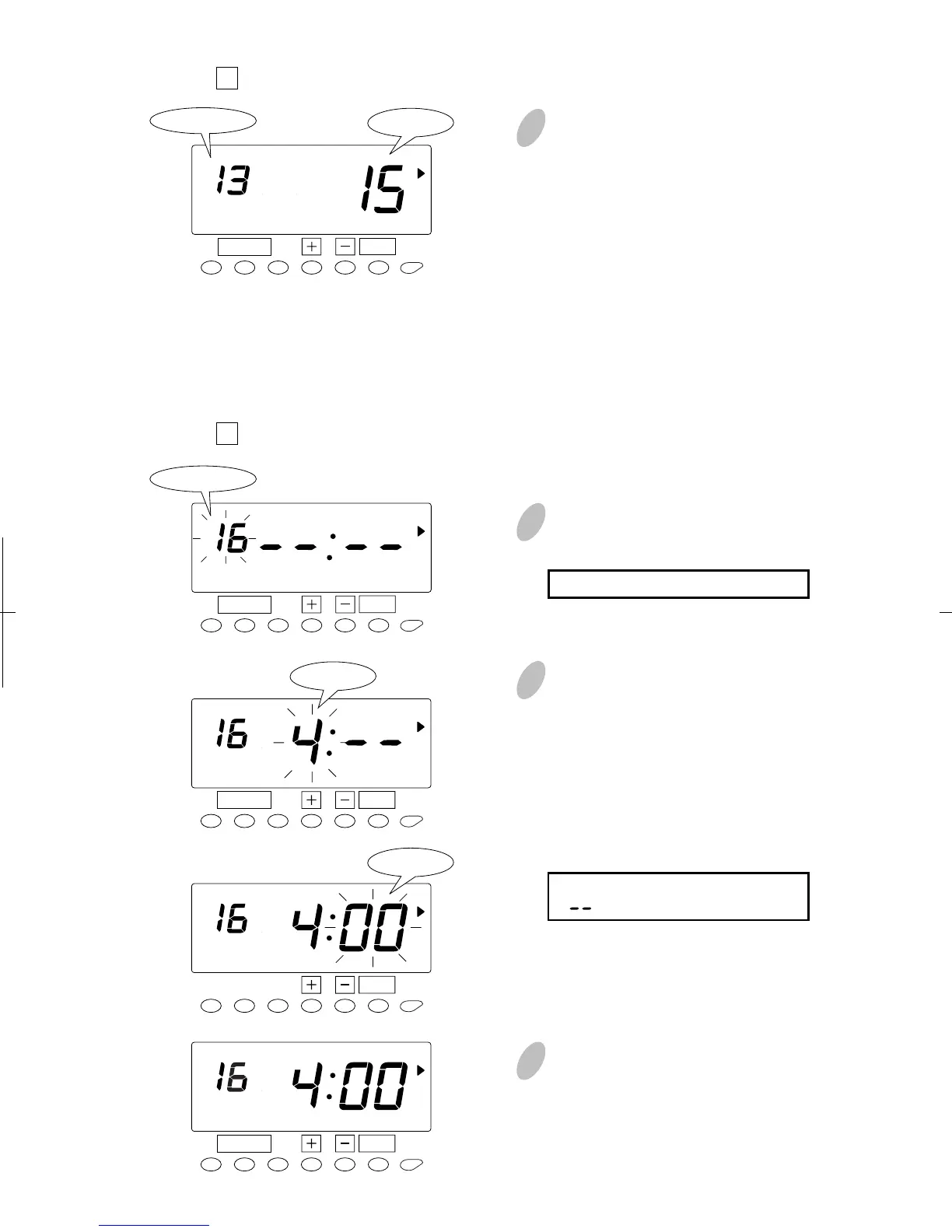
In this case, push the [+] or [-]
button to set at "00". And then,
push the [SET] button. At that
moment, the display will change
from flashing to steady.
19
Push the [+] or [-] button to select
"16" and push the [SET] button. At
that moment, flashing of the display
will change to "Hour". In case of the
example, push the [+] or [-] button
to set at "4" and push the [SET]
button. At that moment, flashing of
the display will change from "Hour"
to "Minute".
Range of values: 1-24 hour(s)
(" " makes the function disabled.)
18
Set the "
13 Duration in minutes, Break #2".
Program #14 and #15 (not shown) are for Break #3.
[For non-selected days of the week (which the above schedules aren't applied
to.)]
Set the "
16 Threshold hours for auto break deduction".
Make settings for the "Duration in
minutes, Break #2" in the same
manner as for the "Duration in
minutes, Break #1", as illustrated in
the figure on the left.
SET
FUNCTION
Program No.
Program No.
SCHEDULE
16
Minute
Hour
Minute
SET
SET
SET
SET


 To Next Page