ASCON Service Guide Book
20
12. Sleep mode setting
•
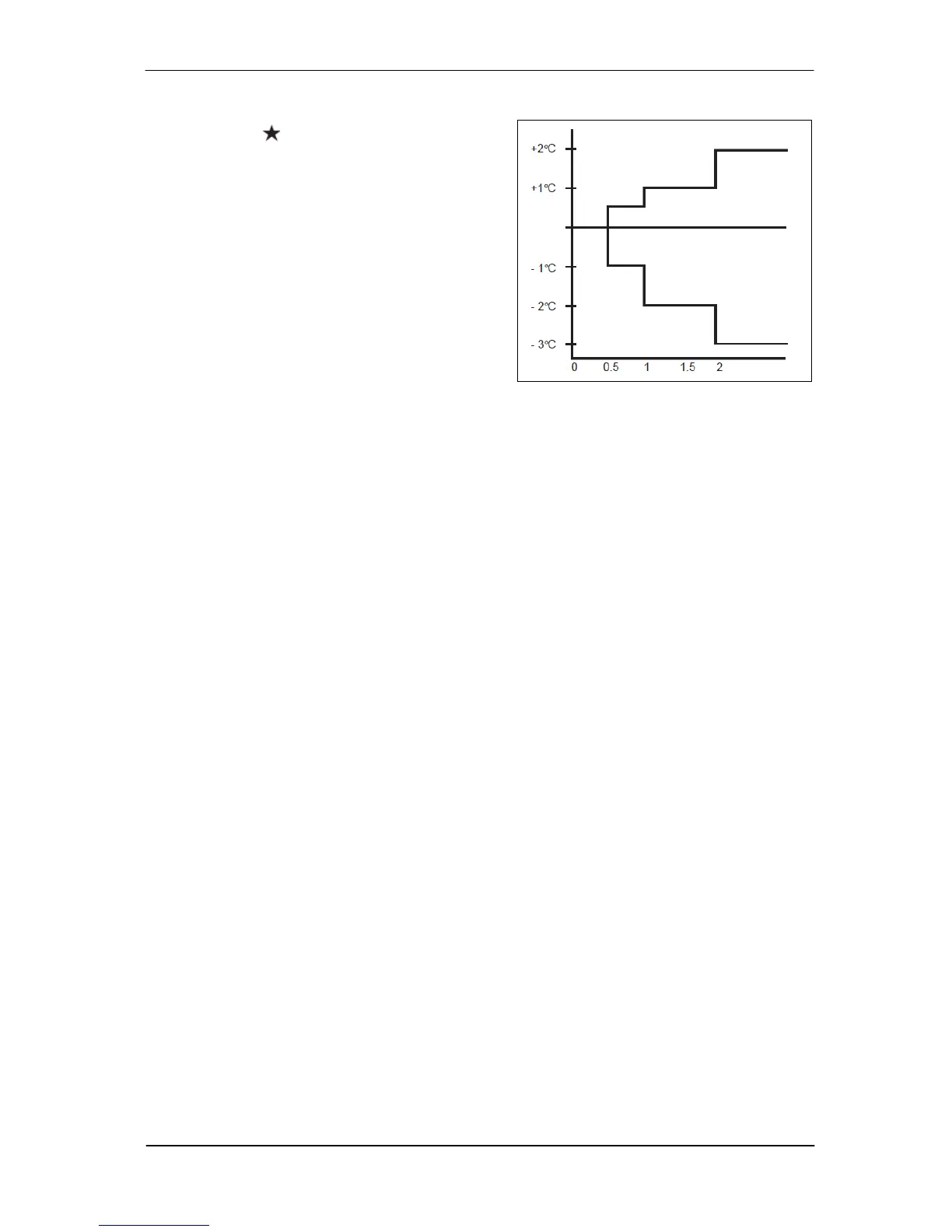
Press the button will activate the sleep
mode function.
•
This is an energy saving option. When the unit
is operating under cooling mode, the set
temperature is increased by 0.5°C after the
first half an hour, another 0.5°C after the
second half an hour and 1°C after the
following 1 hour.
•
When the unit is operating under heating
mode, the set temperature is decreased by
1°C after the first half an hour, another 1°C
after the second half an hour and 1°C after the
following 1 hour.
•
This function is available under COOL, HEAT
and AUTO mode.
13. Temperature setting
•
To set the desired room temperature, press the
▲
or
▼
button to increase or decrease the
set temperature.
•
The temperature setting range is from 16°C to 30°C (Optional setting 20°Cto 30°C).
•
Press both buttons
▲
and
▼
simultaneously to toggle from °C to °F setting.



 To Next Page