E33 Hardware User’s Manual
9
How to Do the Waterproof with Conduit Installation
Beside the bundled network cable, you also can use conduit and follow the installation
procedure to make the camera be water-resistant even for the situations where the camera can
easily be flooded by pouring rain.
The important part to focus on during the installation:
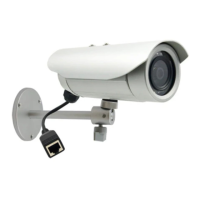
The protection of the cabling has to be done by a proper flex
conduit. The size of the flex conduit that matches with the
conduit gland is 1/2”. Please note that the conduit gland is
included to the package of the bullet camera.
The following images show the step-by-step procedure of completing the water-proof
installation.
Disassemble the conduit gland as shown on the
photo.
1. Pull the network cable through the flex conduit.
Please note that the size of the conduit and the
gland is big enough to let the RJ-45 connector pass
through all the way.
2. Two pieces from the conduit gland set will be
attached to flex conduit first.
3. Remove the bundled network cable and
connector from back side cover of the camera.



 To Next Page