KCM-7111 Hardware User’s Manual
8
Physical description
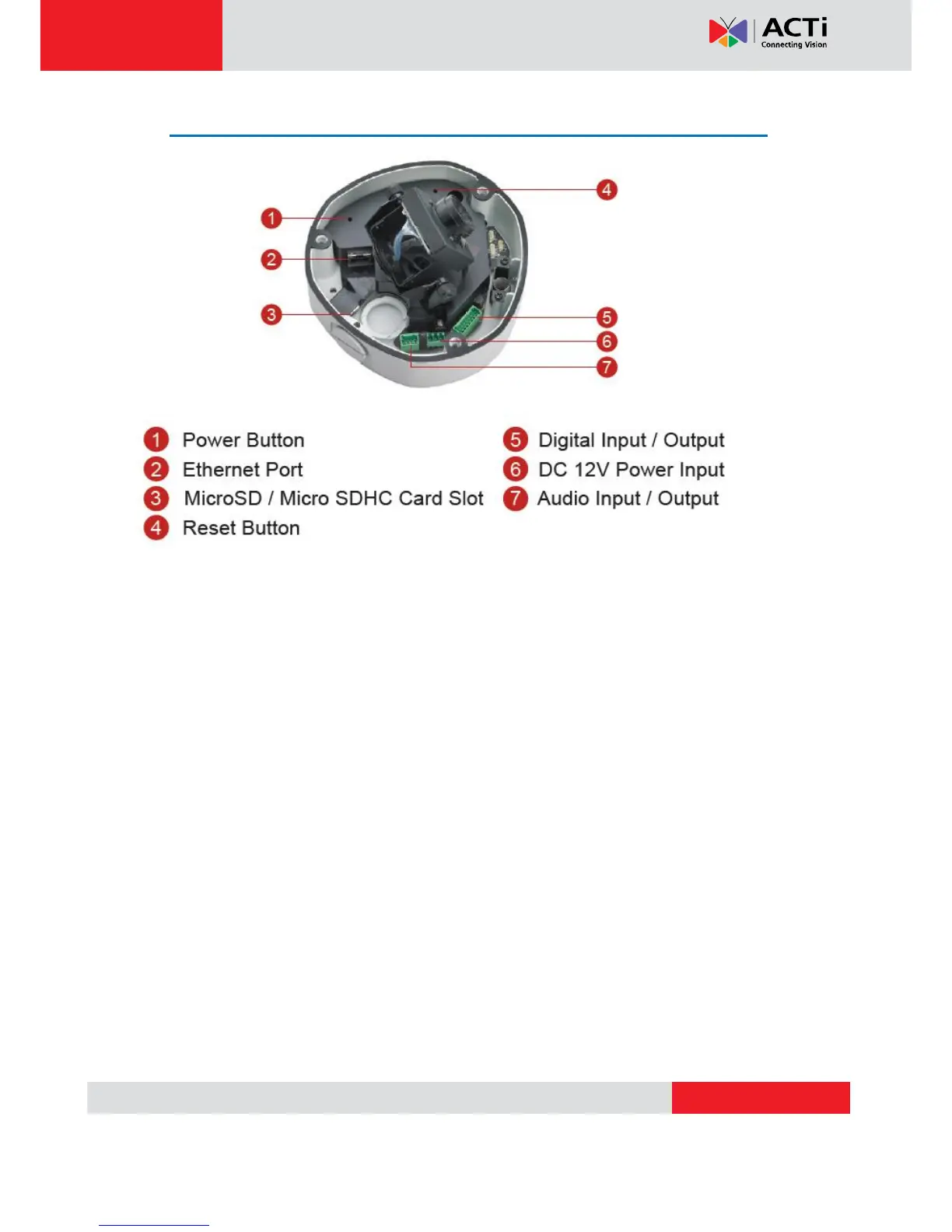
1) Power Button
Press the Power Button and then camera will reboot automatically.
2) Ethernet Port
The IP device connects to the Ethernet via a standard RJ45 connector. Supporting NWAY, this
IP device can auto detect the speed of local network segment (10Base-T/100Base-TX
Ethernet).
3) Micro SD / Micro SDHC Card Slot*
Insert your Micro SD card here for local recording on camera
4) Reset Button
Step 1: Switch off IP device by disconnecting the power cable
Step 2: Press and continue to hold the Reset Button (with a sharp tipped object, like a pen.)
Step 3: Reconnect the power cable while continuing to hold the reset button. The red
Power LED light will flash on for 3 second first, turn off for about 15 seconds, flash on for
another second and turn off again. By this time the reset to default operation is already
completed. This will take around 20 seconds from power up. You may then release the


 To Next Page