USER MANUAL - DUAL ZONE AUDIO MEDIA PLAYER EQUIPMENT ACT553 - ACT553/DAB+
480305-3.0 11/12/2019 Page 6 / 33
© ACTIA “Any reproduction of this document, even partial, is strictly forbidden without written authorisation”.
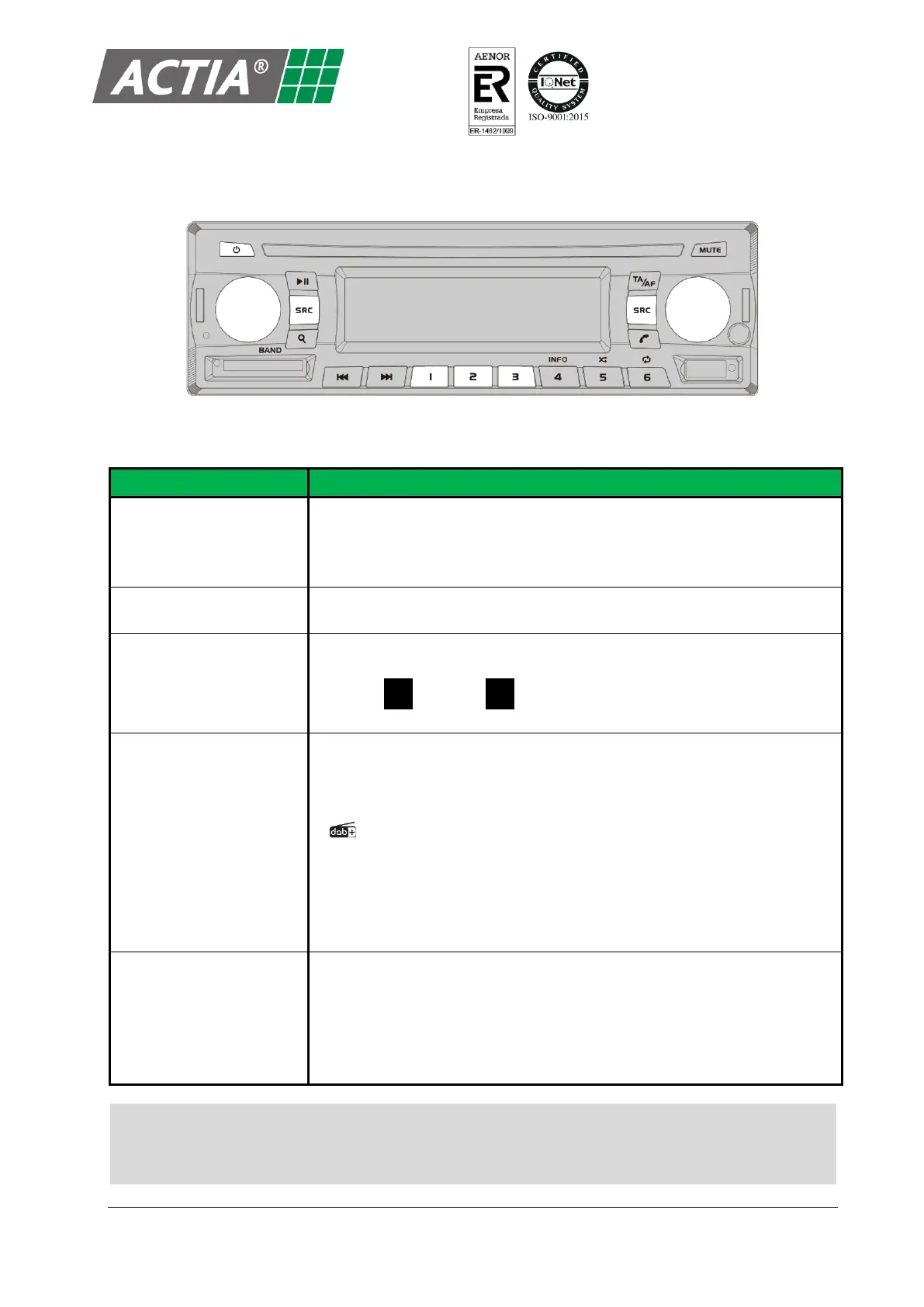
Figure 4 – Basic Controls
Table 1 – Basic Controls
Turn on/off the equipment
1. Put the vehicle ignition to ACC.
2. Press [
a
] to turn on the equipment.
3. Press and hold [
a
] to turn off the equipment.
Turn the [VOLUME] knob or press the [VOLUME] keys on the remote
control.
Press the [VOLUME] knob or the [SEL] key on the remote control, for the
concerned zone (driver or passenger).
The icons D (Driver) o P (Passenger) on the LCD screen indicate the
active zone at all times.
Press [SRC] repeatedly for the concerned zone until select the desired
source:
▪ Radio AM/FM/DAB+ (AM/FM/DAB+ radio tuner). The LCD screen
displays the name of the currently selected band: Radio(FM), Radio(AM),
Radio(DAB).
▪ Media (USB) (USB media player).
▪ Media (SD) (SD card media player).
▪ Audio AUX (Auxiliary Input).
▪ Remote Audio (only available in the driver zone).
Press [MUTE].
To release:
▪ Press [MUTE] again to return to previous volume.
▪ Turn the [VOLUME] knob or press the [VOLUME] keys on the remote
control.
Note!
For the remote control works with the ACT553 – ACT553/DAB+ equipment, link the remote
control with the equipment by pressing [550].


 To Next Page