Installation and Commissioning Guide
Split Ducted ESP Digital
Installation and Commissioning Guide - Split Ducted ESP Digital Units
Doc. No.0525-077 Ver. 2 200129
7
05. Operation Manual Access
05.01. Download from website
Operation manuals can be downloaded through our website shown below.
https://www.actronair.com.au/brochures-manuals/#operating-manuals
05.02. Near Filed Communication (NFC) Tag
LC7-2 is NFC capable that allows the users to view and download the operation manual. There are a wide variety of
NFC reader Apps, below is an example of one App that can be used.
05.02.01. iOS Users
NOTE
Images may vary from those shown below.
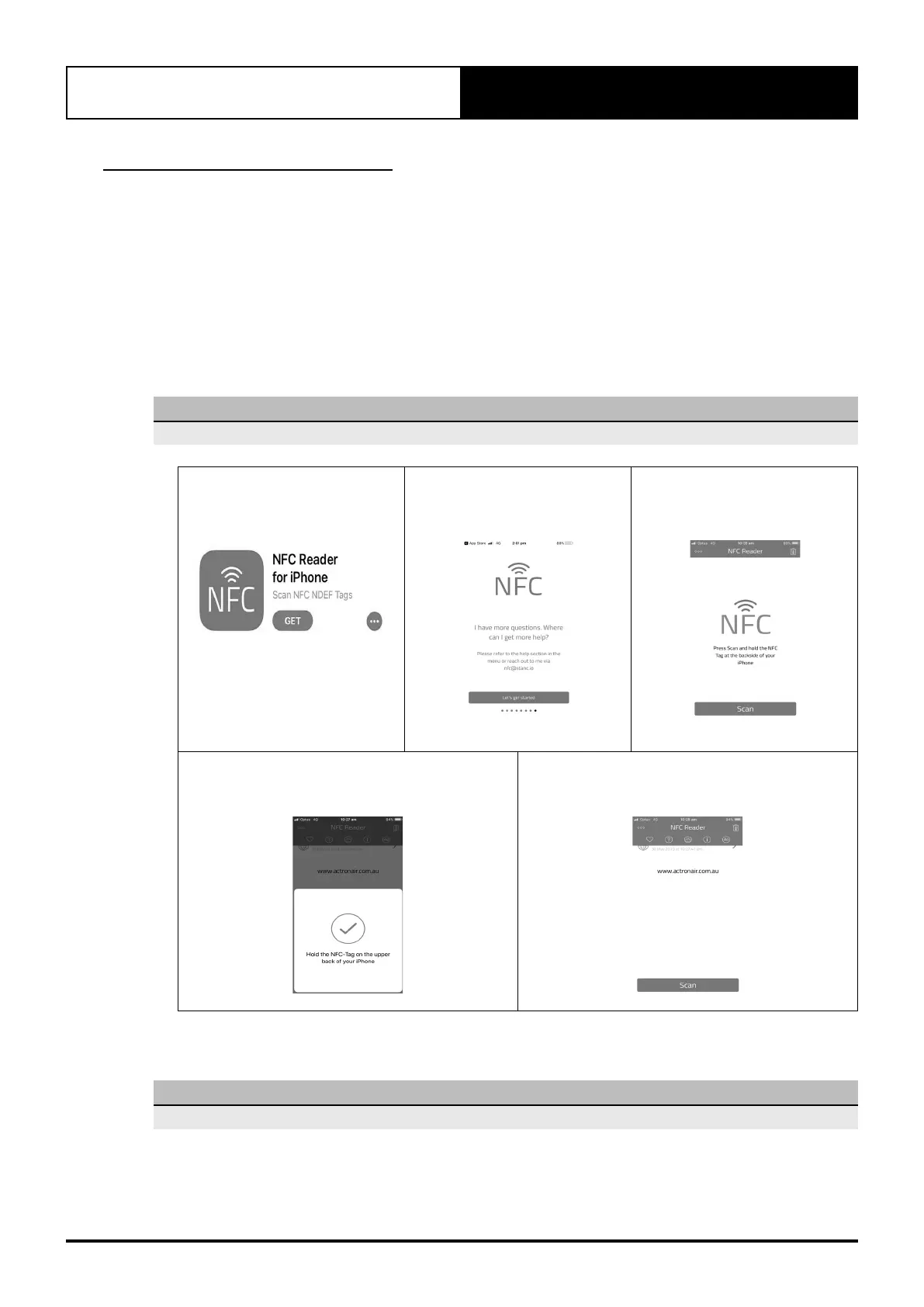
1. Go to App Store and download
NFC Reader for iPhone.
2. Open NFC App. Read through
NFC App Information and Click
on Let’s get started.
3. Place the mobile device close
to NFC Tag on the controller.
Follow the instructions on App.
4. Once the tag has successfully scanned the image
below will appear.
5. A pop-up window will appear to redirect you to
https://www.actronair.com.au/nfc
6. List of Controller Models will appear on the screen of your mobile device.
Select the model number of your controller to view the operation manual.
NOTE
The Model number of your controller can be found underneath the Power On/Off button of the controller.



 To Next Page