6
•
•
ALKALINE
BATTERIES
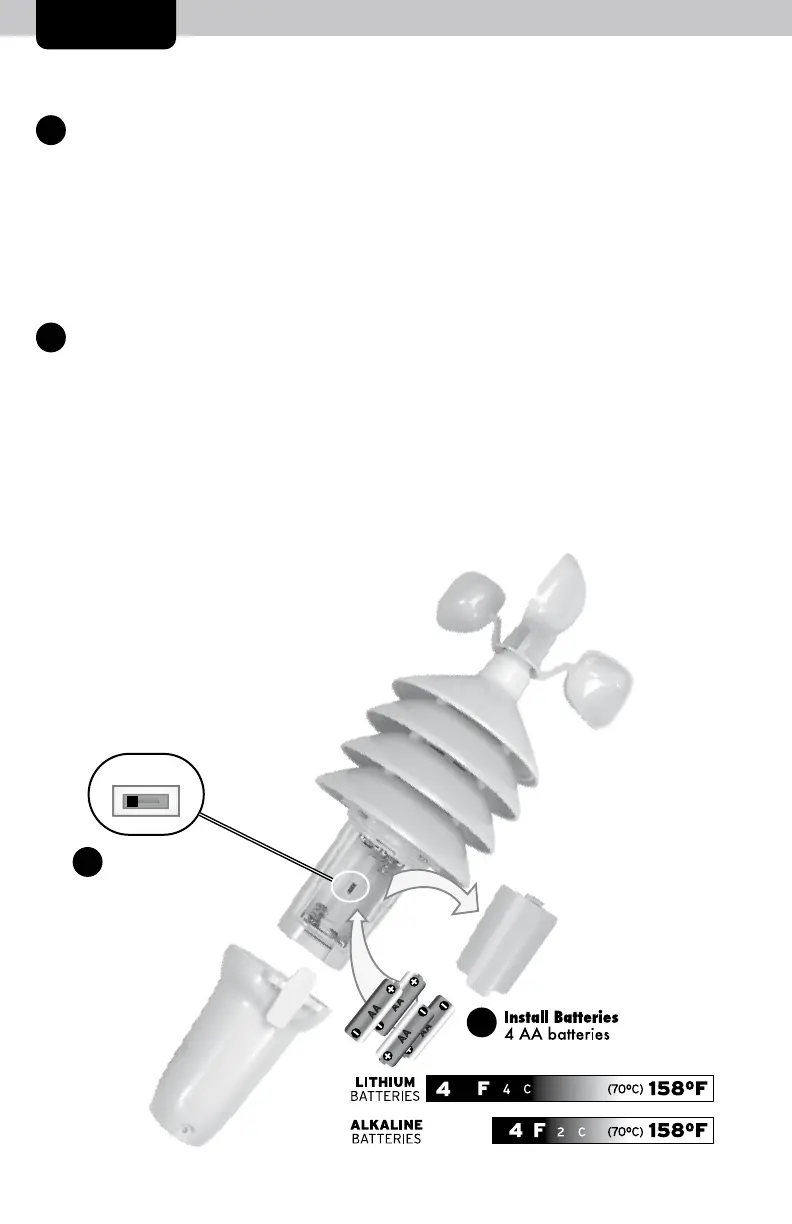
Install Batteries
4 AA batteries
(700C) 158°F I
SETUP
3-IN-1 Sensor Setup
1
Set the A-B-C Switch
The A-B-C switch is located inside
the battery compartment. It can
be set to A, B or C. However,
you must select the same letter
choices for both the sensor and
the display in order for the units
to synchronize.
2
Install or Replace Batteries
AcuRite recommends high quality
alkaline or lithium batteries for
the best product performance.
Heavy duty or rechargeable
batteries are not recommended.
The 3-in-1 sensor requires lithium
batteries in low temperature
conditions. Cold temperatures
1. Press the release lever and pull
off the lower housing of the
sensor.
2. Remove the battery
compartment cover. Take
note of the A-B-C switch
setting inside the battery
compartment.
3. Insert 4 x AA batteries into
the battery compartment, as
shown. Follow the polarity
(+/-) diagram in the battery
compartment.
4. Replace the battery cover and
lower housing of the sensor.
can cause alkaline batteries to
function improperly. Use lithium
batteries in the 3-in-1 sensor for
temperatures below -4ºF / -20ºC.
2
A-B-C Switch
Set to match
display
A B C
1


 To Next Page